Interview Coder alternative - hands-on claim audit
Interview Coder Review 2026: We Tested the Undetectability Claims
Interview Coder says it is the No. 1 undetectable AI for interviews,
with 20+ undetectability features, screen-share invisibility, no focus
shifts, Activity Monitor invisibility, and real-time audio support. We
tested those claims on the macOS desktop app, then reran the important
failure cases in CTRLpotato.
Last tested: July 2026Platform: macOS desktop appFree / limited desktop flowEvidence: screenshots and videos from real runsPublic claims checked on interviewcoder.co
Should you use Interview Coder for interviews or online assessments?
Our read
Interview Coder is coding-first, but the desktop control layer did
not hold up in our interview and assessment workflow tests.
It produced a reasonable answer on a clean Two Sum screen. But the
important failures were not model failures. In our tests, the app
was visible during screen share, caused focus loss, changed the
cursor, appeared locally in Activity Monitor, struggled with audio,
and missed the current task on a cluttered coding screen.
Interview Coder may fit
Clean LeetCode-style screenshots
Solo practice or low-monitoring setups
Users who only need manual screenshot-and-solve
Pick CTRLpotato if
You care about screen-share, focus, cursor, and shortcut safety
You need reliable audio capture, automatic Live Coach, and
follow-ups
You want area screenshots, selected text, and top-tier model
choice
You want Mobile Mirror as a remote control and second screen
You want to test real AI answers before paying
Test summary
The short version
Best fit
Interview Coder for clean coding prompts; CTRLpotato for interviews and assessments
Interview Coder can help on clean LeetCode-style screenshots. CTRLpotato is stronger when the screen is messy, follow-ups matter, audio matters, online assessments matter, and stealth interaction details matter.
Biggest gap
The undetectability claims did not match our desktop test
The biggest failures were product-layer issues: screen-share visibility, focus loss, Activity Monitor exposure, cursor tells, shortcut key leakage, and unreliable audio capture.
Price context
$299/mo public AI tier vs CTRLpotato's no-card trial
Interview Coder's public site shows a free download, but says AI features require a subscription. CTRLpotato starts with 10 free AI answers and has lower paid entry points.
The biggest failure was the stealth and control layer.
Interview Coder can answer a clean coding prompt. The bigger problem in
our tests was that its undetectability claims did not hold up: controls
appeared in a receiver-side screen share, the active window lost focus,
a fixed systemcontainer process with a recognizable icon was visible in
Activity Monitor, the cursor changed over hidden UI, and shortcut keys
reached the active page. Audio capture and messy coding context were
additional workflow failures, not the only issue.
Undetectability checks
Small leaks that can become fatal in interviews and assessments
These are not abstract stealth concerns. They are normal ways candidates
get checked: shared screens, active-window monitoring, Activity Monitor,
cursor behavior, and keyboard input. The shortcut test is shown in the
side-by-side rerun below because we recorded both products on the same
active page.
Visible on receiver screen
Screen-share visibility
Interview Coder says its overlay remains hidden when sharing your screen. In our Google Meet / Zoom test, Interview Coder controls were visible on the shared screen.
Active window changed
Focus stealing
Using Interview Coder changed the active window in our test. Interview and assessment platforms can monitor focus loss even if they cannot see which app received focus.
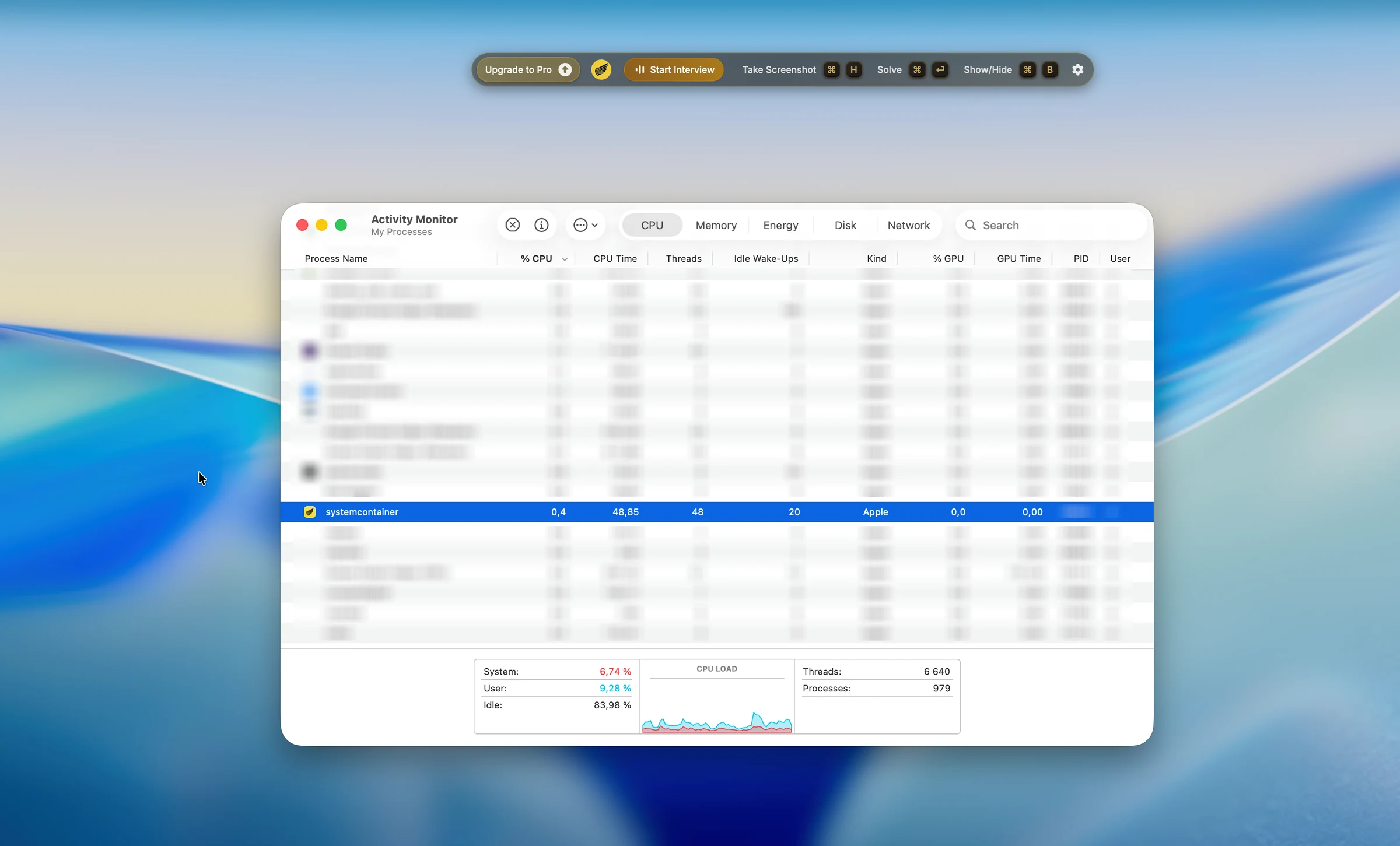
Interview Coder claims Activity Monitor invisibility. In our test, a fixed systemcontainer process was visible with a recognizable Interview Coder-style icon. A fixed generic process name is not enough if a proctor asks to open Activity Monitor and the icon still gives it away.
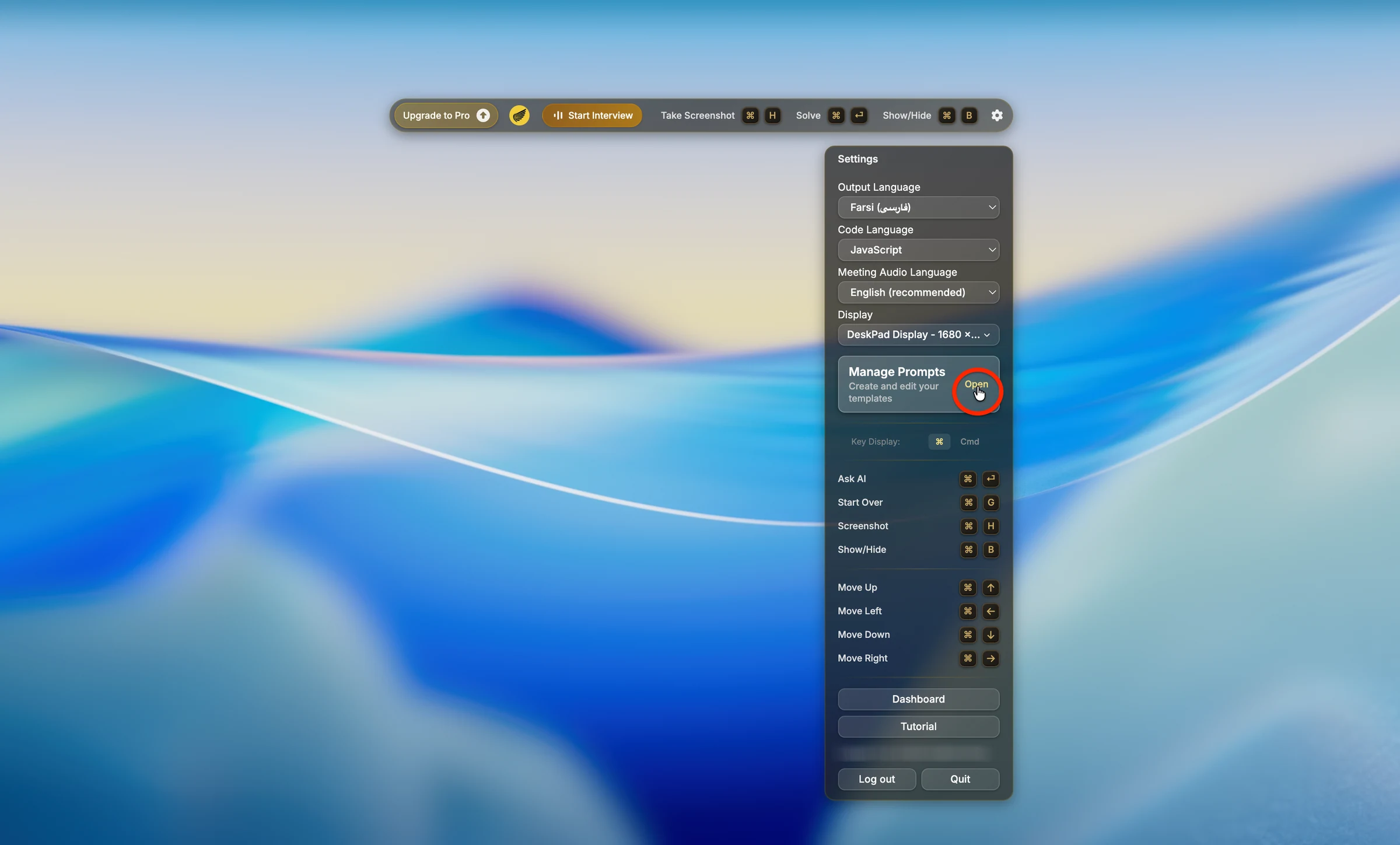
The cursor changed over Interview Coder surfaces. During screen share, that can reveal interaction with an invisible assistant because the pointer changes where nothing visible should exist.
Same scenario rerun
We reran the important failures in CTRLpotato
Same prompt, same screen, same failure condition, side by side.
Same shortcut trigger: Interview Coder leaked keys, CTRLpotato blocked them
We triggered the assistant shortcut while a browser test page was active. In monitored assessments, the key question is whether shortcut key presses still reach the active page.
Interview Coder result
Interview Coder shortcut interaction still reached the active page in our test, creating observable key events.
CTRLpotato result
CTRLpotato's shortcut handling kept the bound assistant shortcut from reaching the active page.
Blocking assistant shortcuts matters because assessments can monitor key events even when they cannot see the assistant.
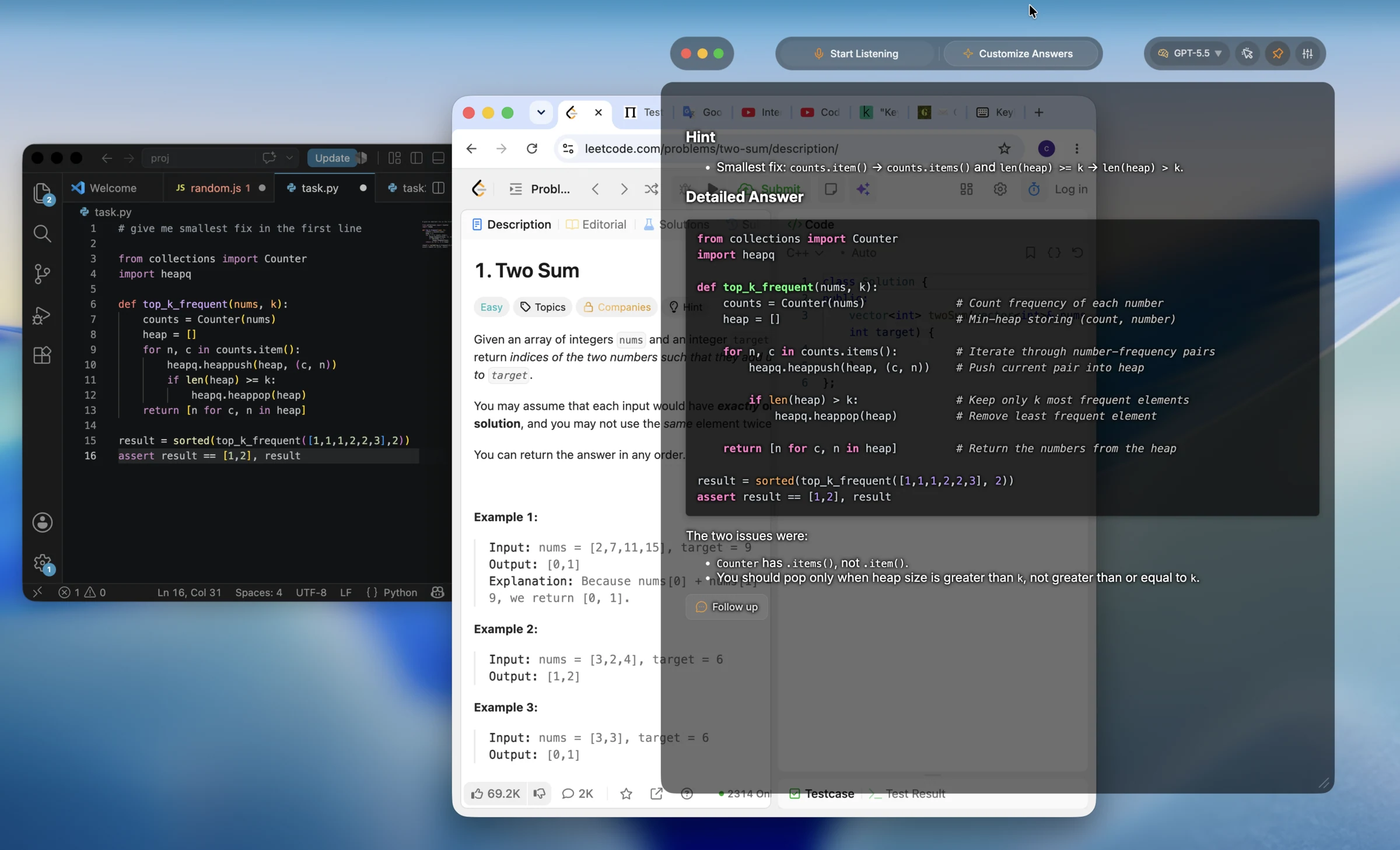
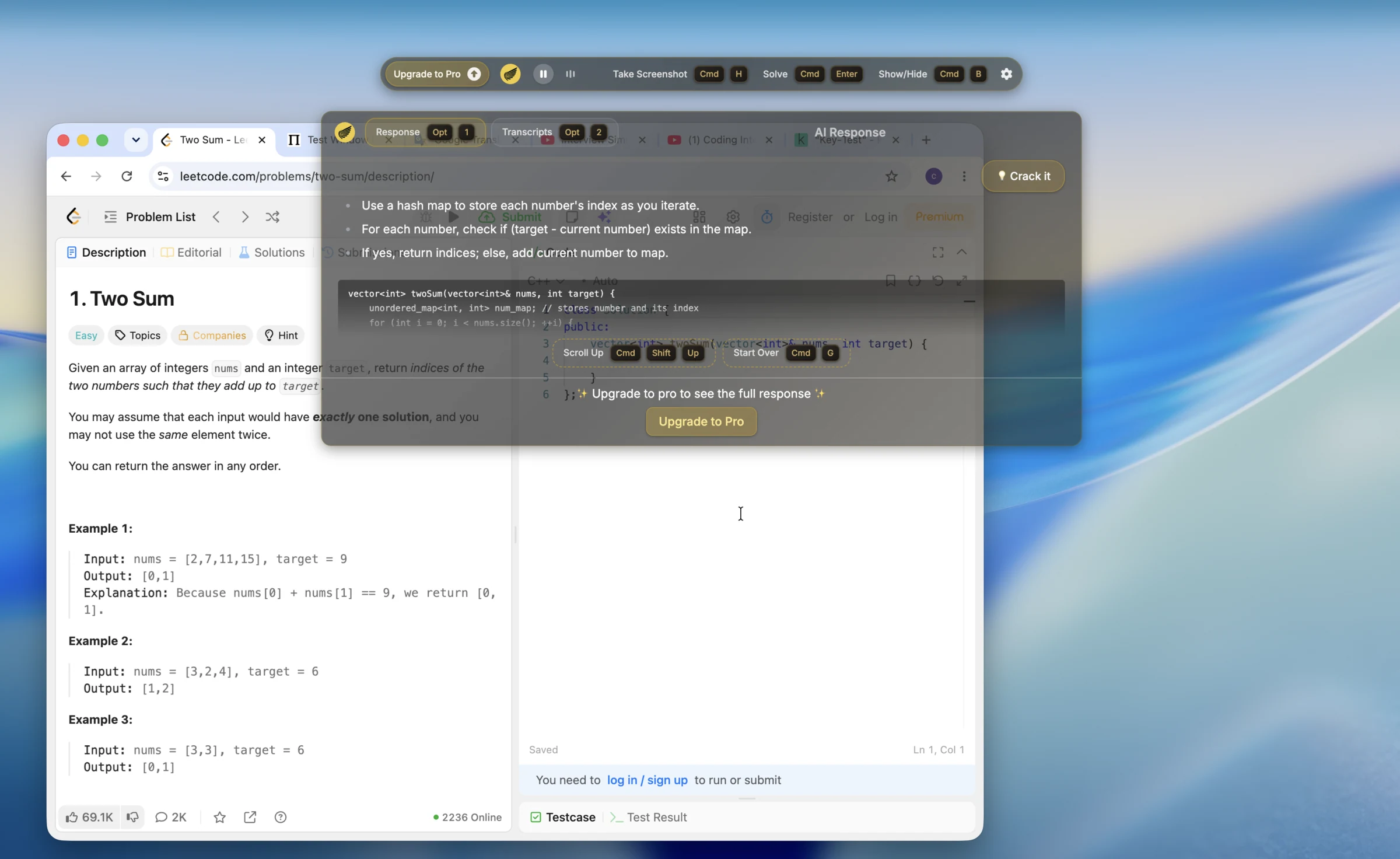
Same cluttered coding screen: Interview Coder lacked context targeting
This was a deliberately messy desktop: an old Two Sum page and a current top_k_frequent debugging task were visible at the same time. The point is not that a model should read our mind; the point is that the app needs region capture, selected text, or another way to target only the relevant context.
The hard part was not solving Two Sum. It was controlling which screen context reached the AI.
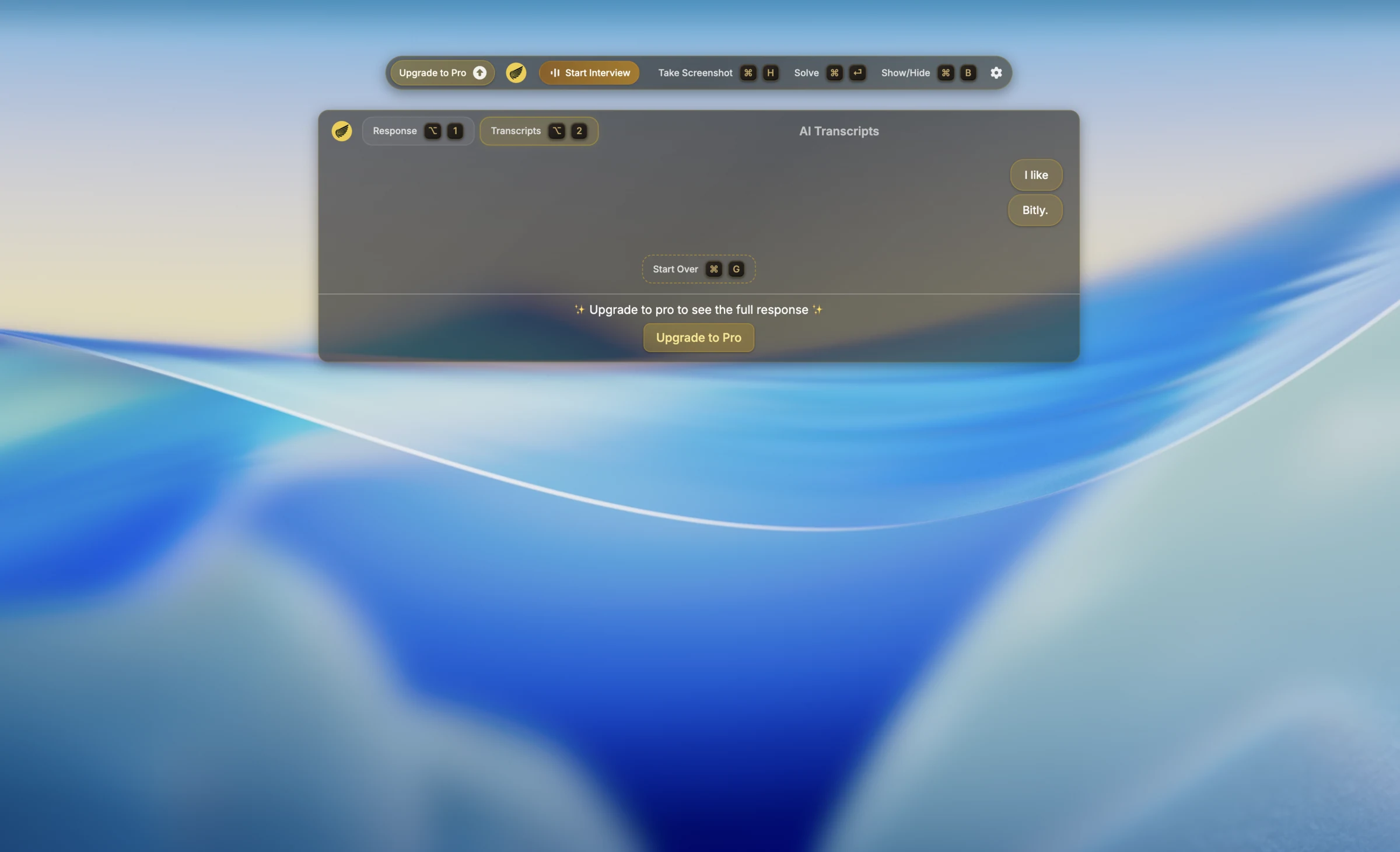
Same audio prompt: Interview Coder struggled, CTRLpotato answered
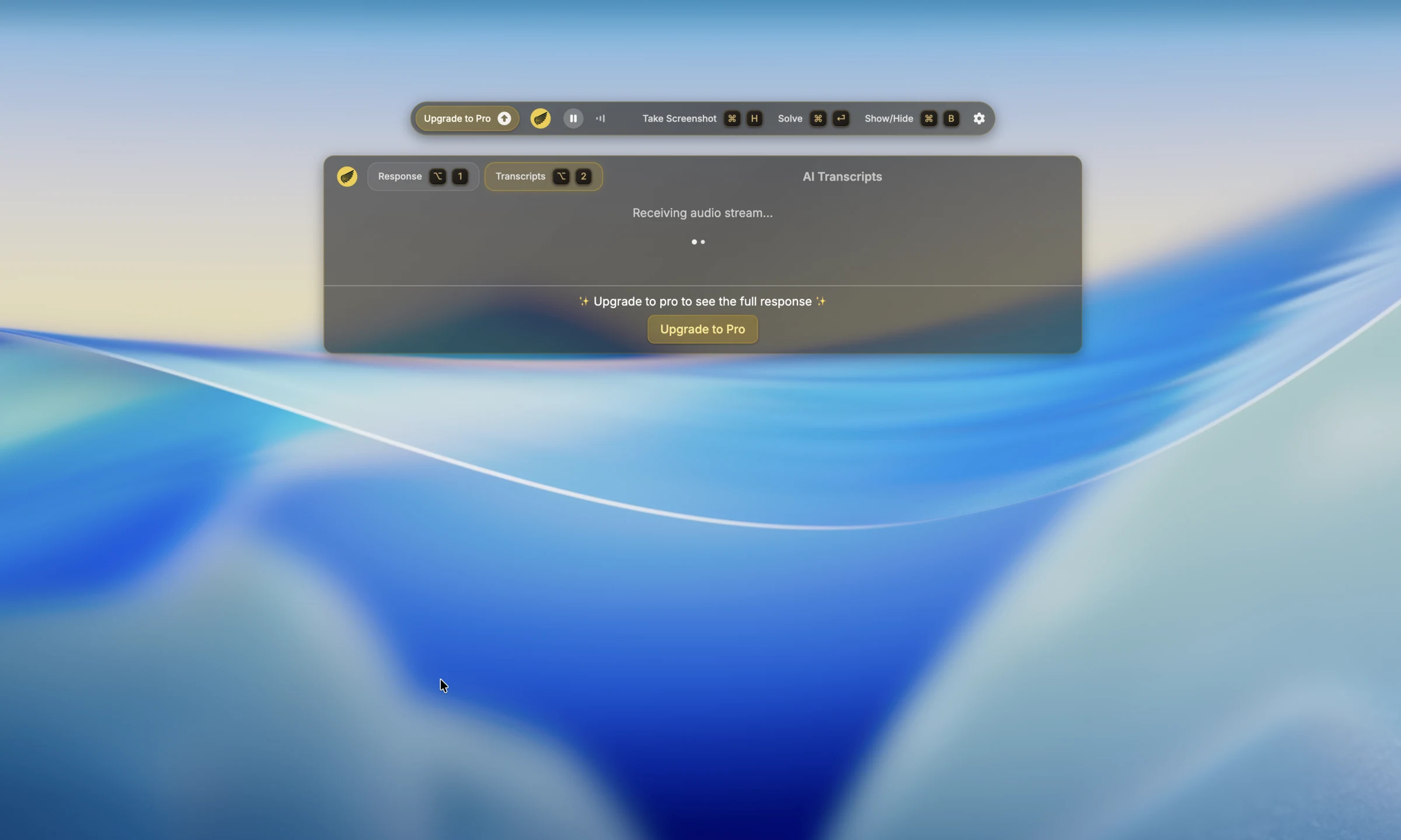
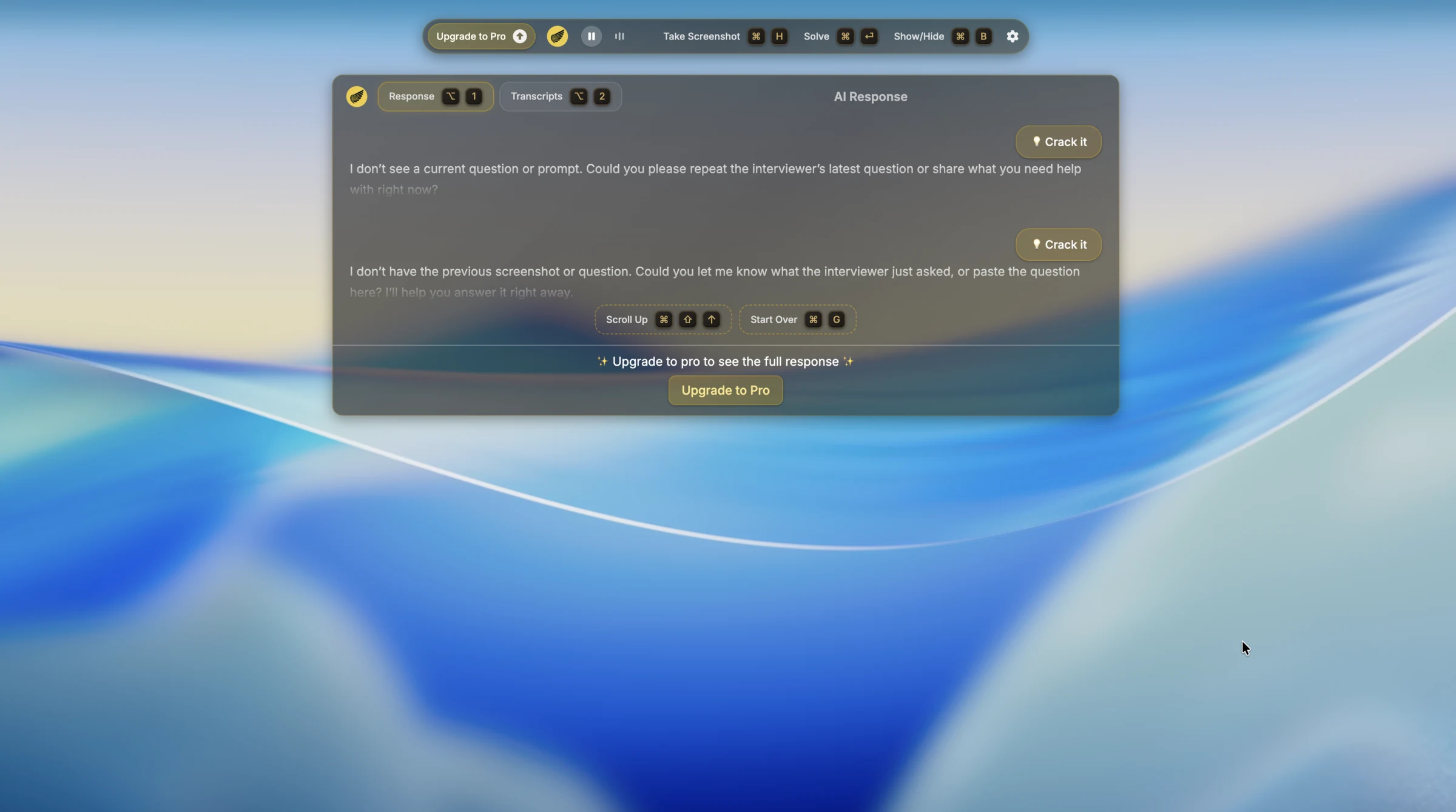
We used the system-design prompt 'implement a URL shortener like bit.ly.' Across our Interview Coder audio runs, capture was the consistent failure point: transcripts stalled, contained fragments, or the answer said it did not see a current prompt.
CTRLpotato captured the same spoken task and produced a system-design answer.
When the task is spoken aloud, audio reliability matters more than whether the underlying model can answer after a clean paste.
Pricing
The pricing gap is unusually large
Interview Coder asks for a bigger commitment earlier
Interview Coder's public site shows a free download, but its FAQ
says AI features require a subscription. The public paid offers we
found were Monthly Pro at $299 and Lifetime Pro at $799.
CTRLpotato is easier to test before paying
CTRLpotato starts with 10 free AI answers, then lower-commitment
options: Lite at $29/mo, Sprint Pass at $39 once, and Pro at $59/mo
quarterly or $69/mo monthly.
Pricing point
CTRLpotato
Interview Coder public site
Try before paying
Pass 10 AI answers, no card
Mixed Free download only
Monthly AI plan
Pass Lite at $29/mo
Fail Monthly Pro at $299/mo
Short interview crunch option
Pass Sprint Pass $39 once
Fail No equivalent found
Lifetime option
Mixed Subscription / pass
Pass $799 lifetime
Try the same scenarios yourself - 10 free AI answers, no card.
We tested the product layer, not just the AI model
Scenarios
Receiver-side Google Meet screen share, focus logging, Activity
Monitor visibility, cursor behavior checks, shortcut event checks, a
spoken Bitly system-design prompt, a clean Two Sum coding prompt,
and a cluttered current-task coding screen.
What counted
Whether Interview Coder stayed hidden during screen share, preserved
focus, avoided cursor tells, avoided obvious local system exposure,
blocked shortcut keys from reaching the active page, captured audio,
selected the current coding task, and gave a usable first visible
answer.
Limitations
This was a macOS desktop test using the free / limited desktop flow.
Paid tiers and future versions may behave differently. Every claim
on this page is tied to the screenshots and videos shown here.
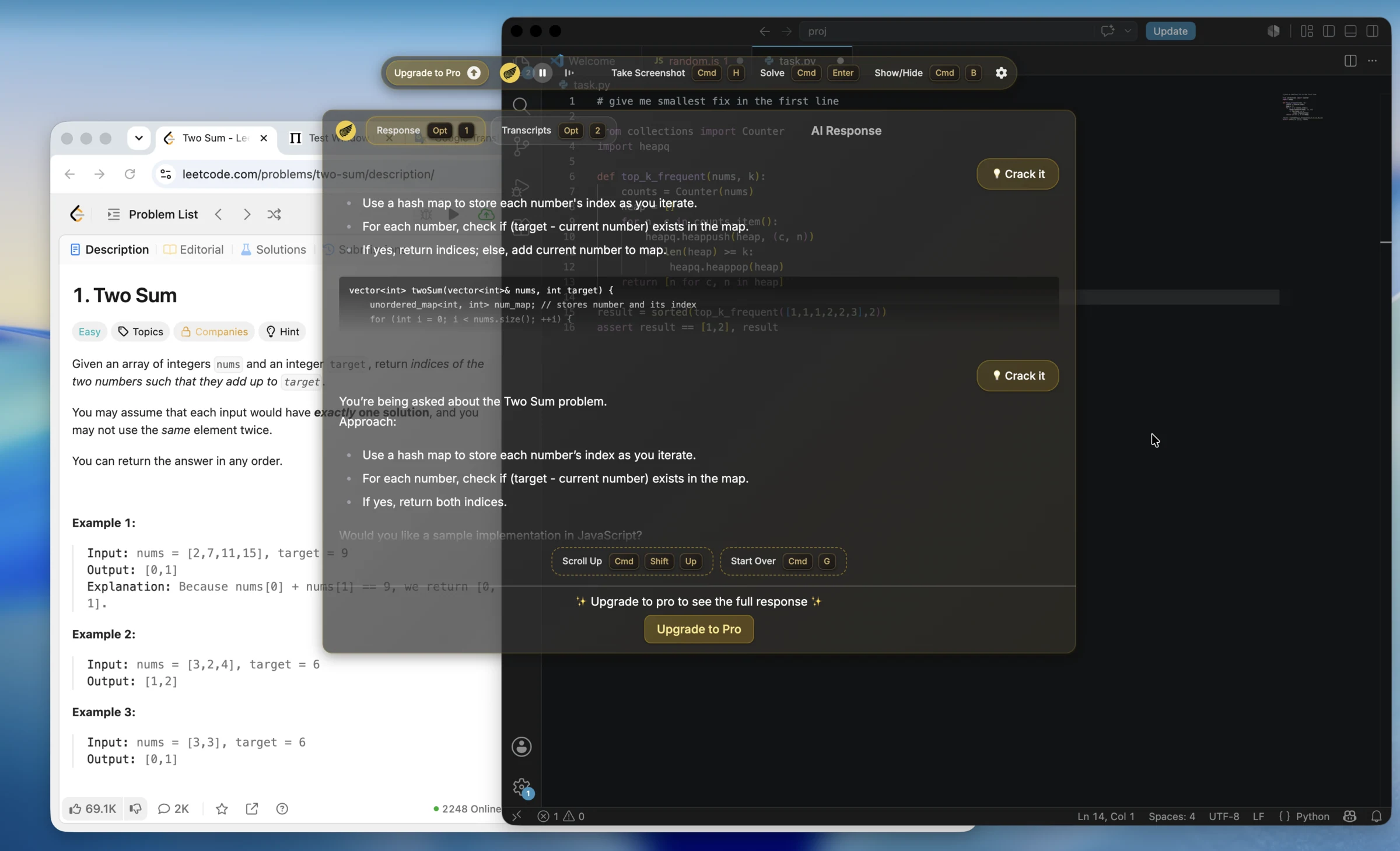
On a clean Two Sum prompt, Interview Coder produced a reasonable hash-map style answer. We do not claim it cannot solve coding prompts; the issue is reliability once the workflow becomes a real interview or assessment desktop.
Where it fits
Compact overlay: useful for a narrow coding-only flow
Interview Coder's compact hotkey overlay can feel lighter if your only goal is manual screenshot -> coding answer. That simplicity is less helpful once you need audio, follow-ups, area targeting, assistant shortcuts that do not reach the active page, or Mobile Mirror as a remote control and second screen.
Pricing balance
Lifetime plan: a real option if you want one upfront purchase
Interview Coder publicly offers a lifetime option. CTRLpotato focuses on lower monthly entry, a short Sprint Pass, and a no-card trial instead of a large upfront lifetime purchase.
CTRLpotato vs Interview Coder
The practical difference
Interview Coder is screenshot-first
Interview Coder's tested workflow centered on screenshots, hotkeys,
and a compact overlay. That can work for clean coding prompts, but
it was brittle when audio, follow-ups, current-task control, and
stealth interaction details mattered.
CTRLpotato is built for interviews and assessments
CTRLpotato separates Ask AI, Follow Up, Live Coach, area
screenshots, selected text, top-tier model choice, answer
customization, controls that do not steal focus, dynamic local
identity, Mobile Mirror, and Session Debriefs so you can control
context, answer shape, how the app is controlled, and where the
answer appears.
Interview Coder gets credit for clean coding prompts. The workflow and
stealth-interaction gap is still the practical difference.
Want the workflow built for interviews and assessments?
AI answers are only half the product. The workflow decides whether you
can actually use them during an interview or assessment: what context
goes in, what answer comes out, whether focus stays put, whether the
cursor gives you away, and whether you have Mobile Mirror when the
desktop is crowded.
What is the best Interview Coder alternative for interviews and online assessments?
CTRLpotato is a strong Interview Coder alternative if your priority is interview and assessment workflow control: staying hidden from screen share, keeping the interview or test page focused, keeping the cursor normal, blocking assistant shortcut keys from reaching the active page, dynamic local app/process identity, area screenshots, selected text, follow-ups, Live Coach, top-tier model choice, answer customization, Mobile Mirror as remote control and a second screen, and a lower-friction trial.
Is Interview Coder actually undetectable?
Interview Coder makes strong undetectability claims. In our macOS desktop tests, we observed receiver-side screen-share visibility, focus loss, cursor changes, and a visible local process in Activity Monitor. Paid tiers and future versions may differ, so test your exact setup before relying on any stealth claim.
Is Interview Coder visible during screen share?
In our Google Meet / Zoom test, Interview Coder controls were visible on the shared screen. That is the highest-risk finding on this page because screen-share invisibility is one of the core claims users care about.
Do Interview Coder shortcuts leak into the active assessment page?
In our shortcut event test, Interview Coder key presses reached the active browser page. That matters because online assessments can monitor keyboard events. CTRLpotato's bound assistant shortcut did not reach the same active page in our rerun.
Does Interview Coder show up in Activity Monitor?
In our test, Interview Coder appeared as a fixed systemcontainer process in Activity Monitor with a recognizable icon. That matters because candidates are sometimes asked to open Activity Monitor, Task Manager, installed apps, or similar system surfaces. A fixed generic process name is much less convincing when the icon still looks like the assistant.
Does Interview Coder support audio?
Interview Coder publicly claims real-time audio support. Across our trial runs, audio capture was unreliable: the transcript stalled, captured fragments, or the answer said it did not see a current prompt. CTRLpotato captured the same Bitly URL shortener prompt and produced an answer.
How much does Interview Coder cost?
Interview Coder's public site shows a free download and says AI features require a subscription. The public paid offers we found were Monthly Pro at $299 and Lifetime Pro at $799. CTRLpotato starts with 10 free AI answers, then Lite at $29/mo, Sprint Pass at $39 once, and Pro at $59-$69/mo.
Is Interview Coder good for coding interviews?
It can help on clean coding prompts. In our test it gave a reasonable answer for a clean Two Sum screen, but the cluttered-screen test exposed the workflow gap: Interview Coder analyzed the wrong visible context, while CTRLpotato can target a specific area or selected text.