LockedIn AI alternative - hands-on desktop claim audit
LockedIn AI Review 2026: We Tested the Hidden Desktop Claims
LockedIn AI markets itself as a fully hidden, undetectable interview
copilot with system audio, focus protection, Activity Monitor aliasing,
and hotkeys that never reach websites. We tested the macOS desktop app,
then reran the important failure classes in CTRLpotato.
Last tested: July 2026Platform: macOS desktop appDesktop app + stealth settings testedEvidence: screenshots and videos from real runsPublic claims checked on lockedinai.com
Should you use LockedIn AI for real interviews or online assessments?
Our read
LockedIn AI was the least interview-ready app we have tested so far.
We would not recommend relying on it during a real live interview.
The problem was not only raw AI output. In our tests, LockedIn leaked
shortcut keys to the active page, stole focus, changed the cursor,
exposed LockedIn helper processes, failed to capture system audio, and
wrapped everything in a chaotic UI that felt unusable under interview
pressure.
LockedIn AI may fit
Solo experimentation with many AI controls
Users who specifically want to try Duo / human assist
Low-risk practice where clunky UI is acceptable
Pick CTRLpotato if
You care about focus, cursor, shortcut, and process-name safety
You need reliable audio capture, Live Coach, and follow-ups
You want area screenshots, selected text, and top-tier model choice
You want Mobile Mirror as a remote control and second screen
You want to test real AI answers before paying
Test summary
The short version
Best fit
LockedIn for experimentation; CTRLpotato for real interviews and assessments
LockedIn can generate AI content, but our macOS desktop test did not feel safe or practical for a real interview. CTRLpotato is stronger when focus, shortcut isolation, audio, answer shape, and fast control matter.
Biggest gap
Hidden pixels were not enough
LockedIn's strongest desktop claims are about invisibility, but our test found leaks in the interaction layer: hotkeys reached the page, focus changed, the cursor changed, and helper processes remained visible.
Price context
$54.99/mo Unlimited listing vs CTRLpotato's no-card trial
LockedIn's public pricing showed an Unlimited plan listed at $54.99/mo, and its support docs say Desktop App access requires Unlimited Professional or eligible Credit plans. CTRLpotato starts with 10 free AI answers and a $39 Sprint Pass.
The cursor changed over hidden UI and resize surfaces. During screen share, pointer changes can expose interaction with something that should not be there.
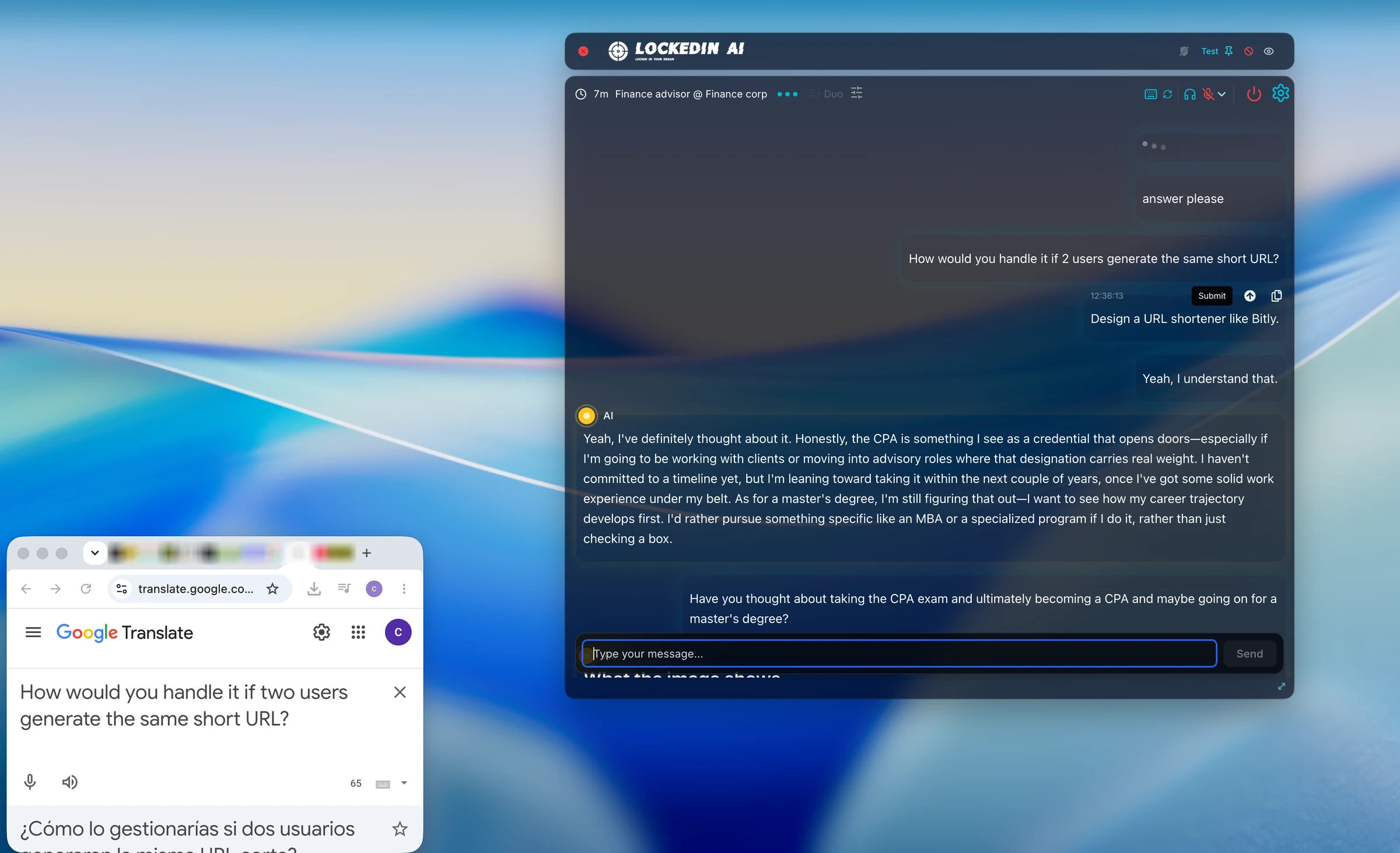
LockedIn markets crystal-clear system audio capture. In our test clip, system audio was not captured, which breaks spoken interview and system-design workflows.
LockedIn hid pixels, then leaked the interaction layer.
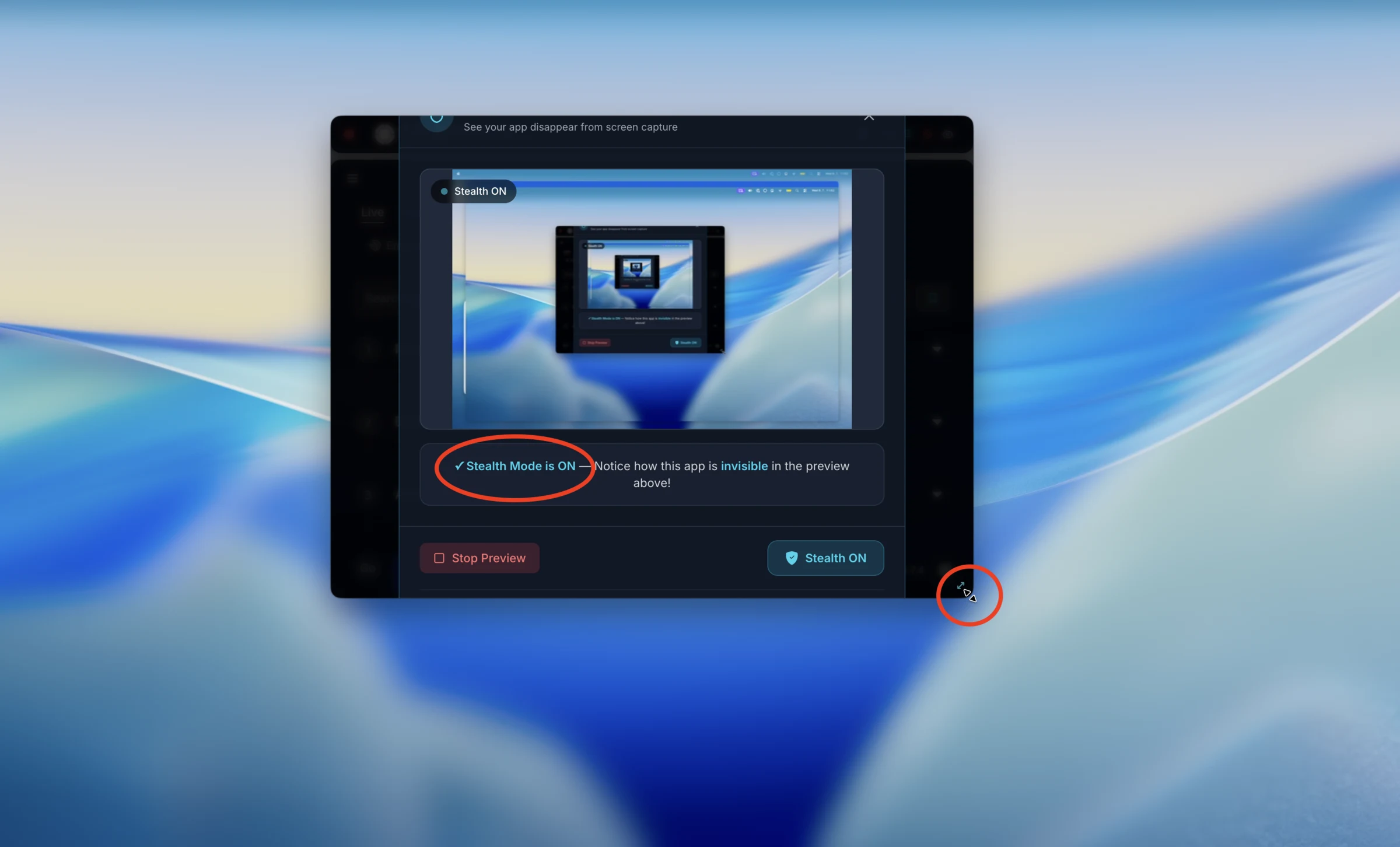
LockedIn's screen-capture hiding appeared to work in its own preview, so
we are not claiming a screen-share pixel failure. The bigger problem is
more practical: the active page saw shortcut keys, the page lost focus,
the cursor changed over hidden UI, Activity Monitor still exposed LockedIn
helpers, and system audio failed in our test.
Undetectability checks
Small leaks that can become fatal in interviews and assessments
These are not abstract stealth concerns. They are normal ways candidates
get checked: keyboard events, active-window monitoring, cursor behavior,
Activity Monitor, installed apps, and system audio. Hidden pixels alone do
not make a tool safe to use.
Shortcut keys reached the page
Hotkeys were not isolated
LockedIn says global hotkeys never propagate to websites or web apps. In our keyboard event test, the active page still registered the shortcut combo while LockedIn was used.
Active window changed
Focus stealing
Using LockedIn changed the active window in our test. That matters because interview and assessment platforms can monitor blur/focus events.
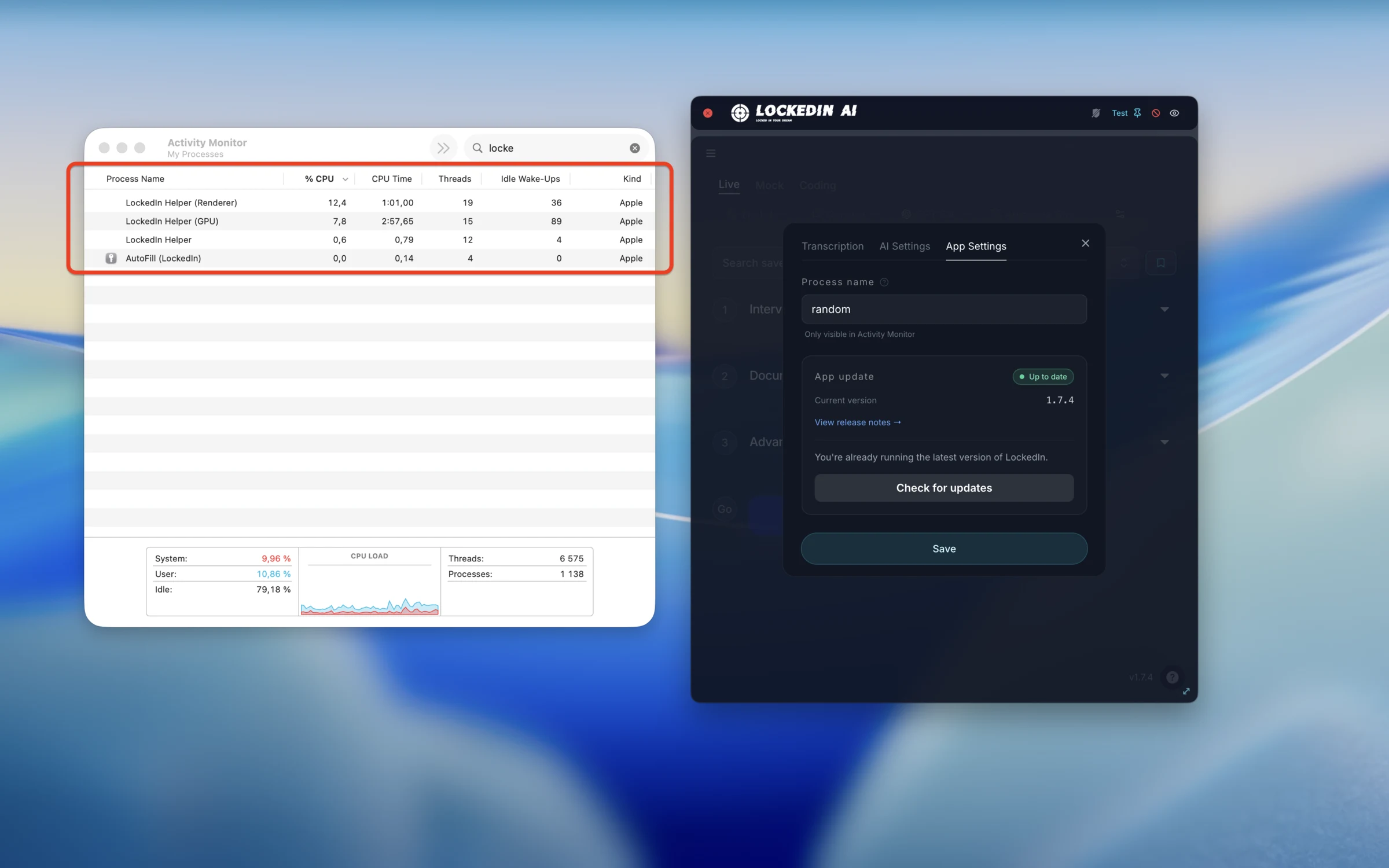
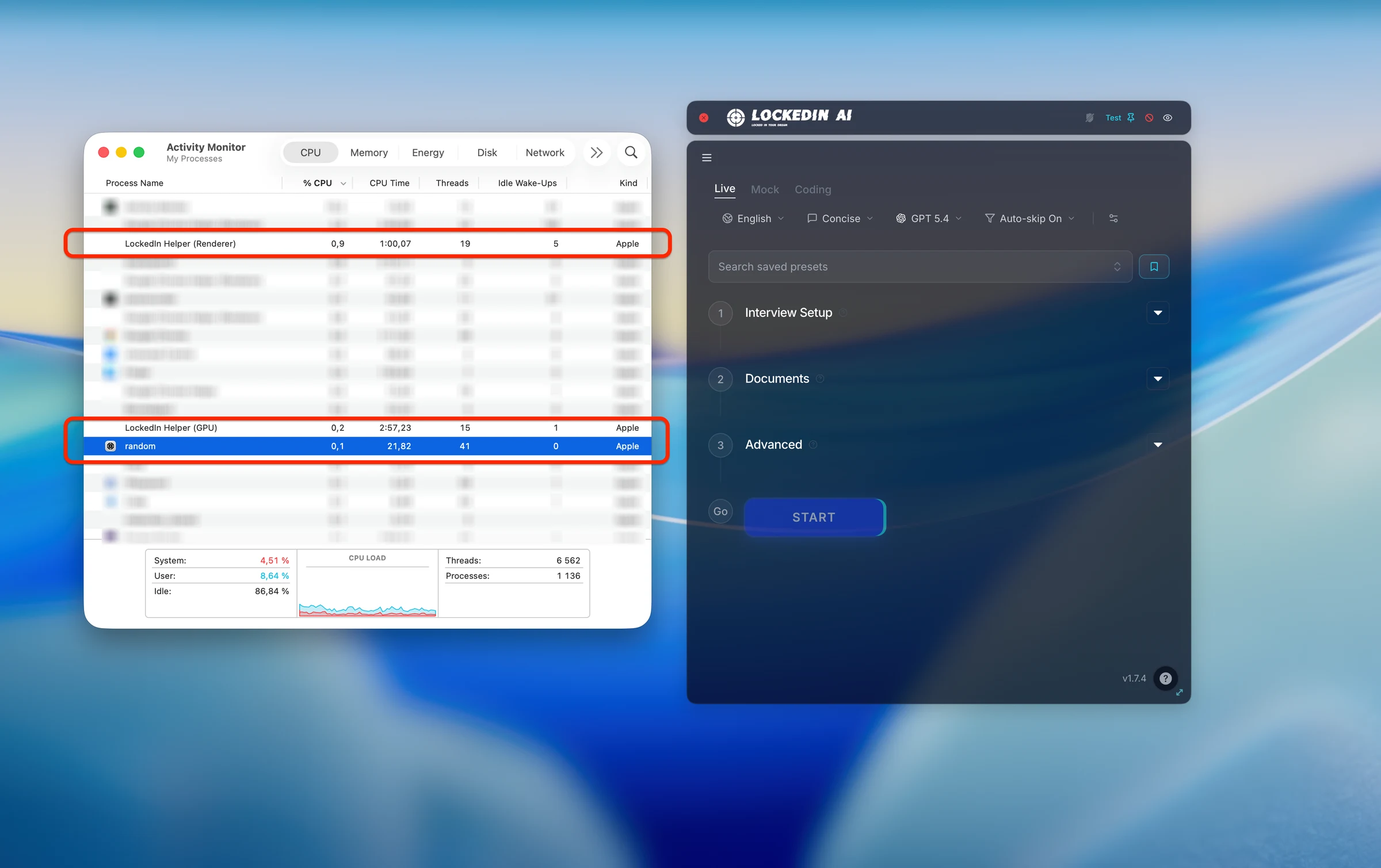
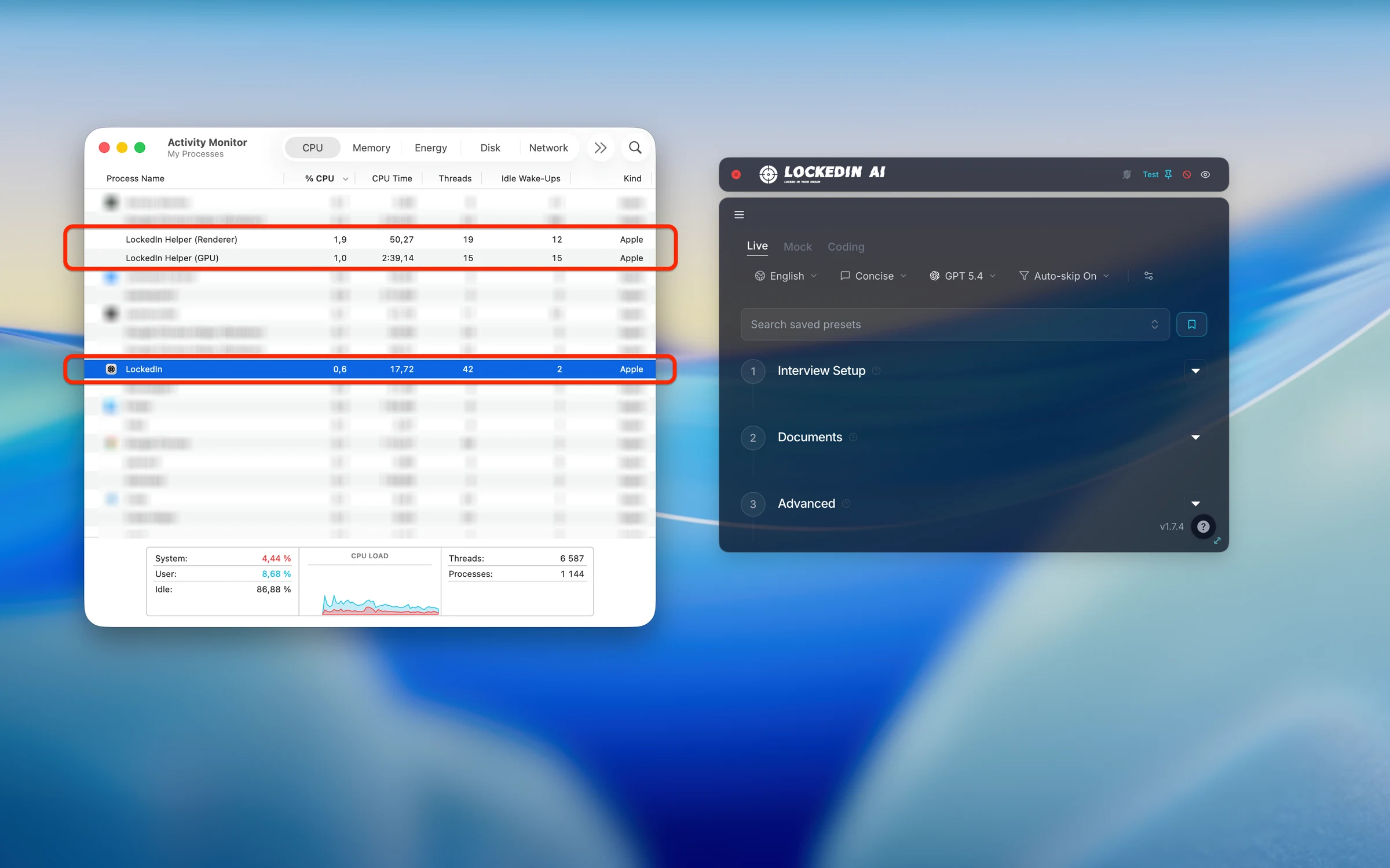
Out of the box, the app appeared locally as LockedIn with branded helper processes. That is a serious problem when a proctor asks to open Activity Monitor.
LockedIn can rename the main process, but in our test the helper processes still contained LockedIn. A cosmetic alias is not enough if the original app name remains searchable.
A renamed main process only helps if the rest of the local identity disappears too. In our test, the app identity and helper naming still made the assistant recognizable.
The cursor changed over LockedIn surfaces. During screen share, that can reveal interaction with an invisible assistant because the pointer changes where nothing visible should exist.
Live usability
Could you actually run this during a live interview?
This is where LockedIn performed worst. It may generate some usable AI
content, but the app around that content felt overloaded, brittle, and too
hard to operate while someone is waiting for an answer.
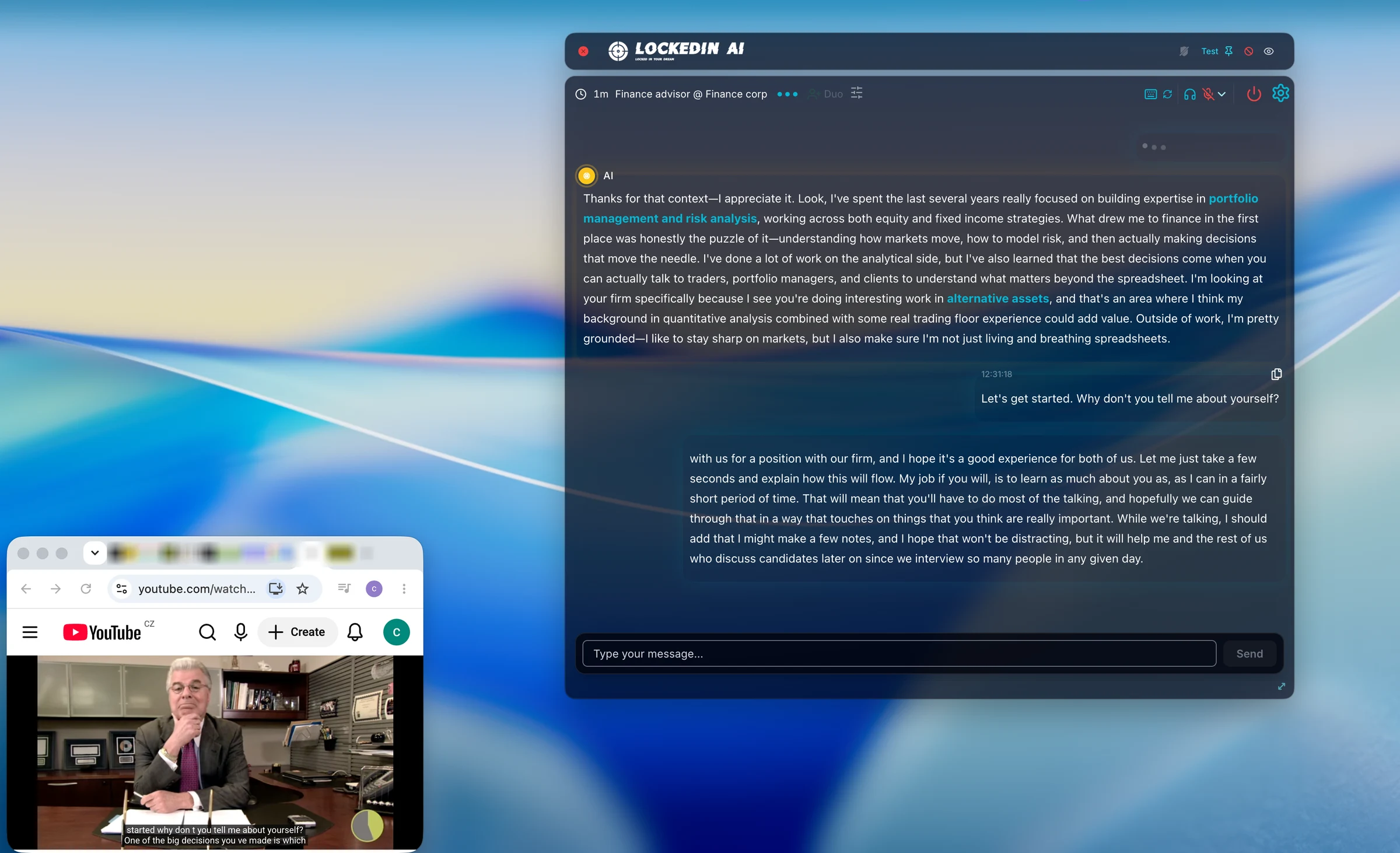
Auto mode was the live-interview promise. In our run, current questions queued up while the answer area stayed stale and the user had to type 'answer please.'
Concise ignored
Concise coding still produced a long code block
Even with concise coding answers selected, LockedIn returned a large full-code response. That can be useful as prep material, but it is hard to use while someone is waiting.
The answer sounded and looked like written AI prose
When LockedIn finally returned guidance, it started with generic AI phrasing and long paragraphs. That is not a live-answer shape we would want to read mid-interview.
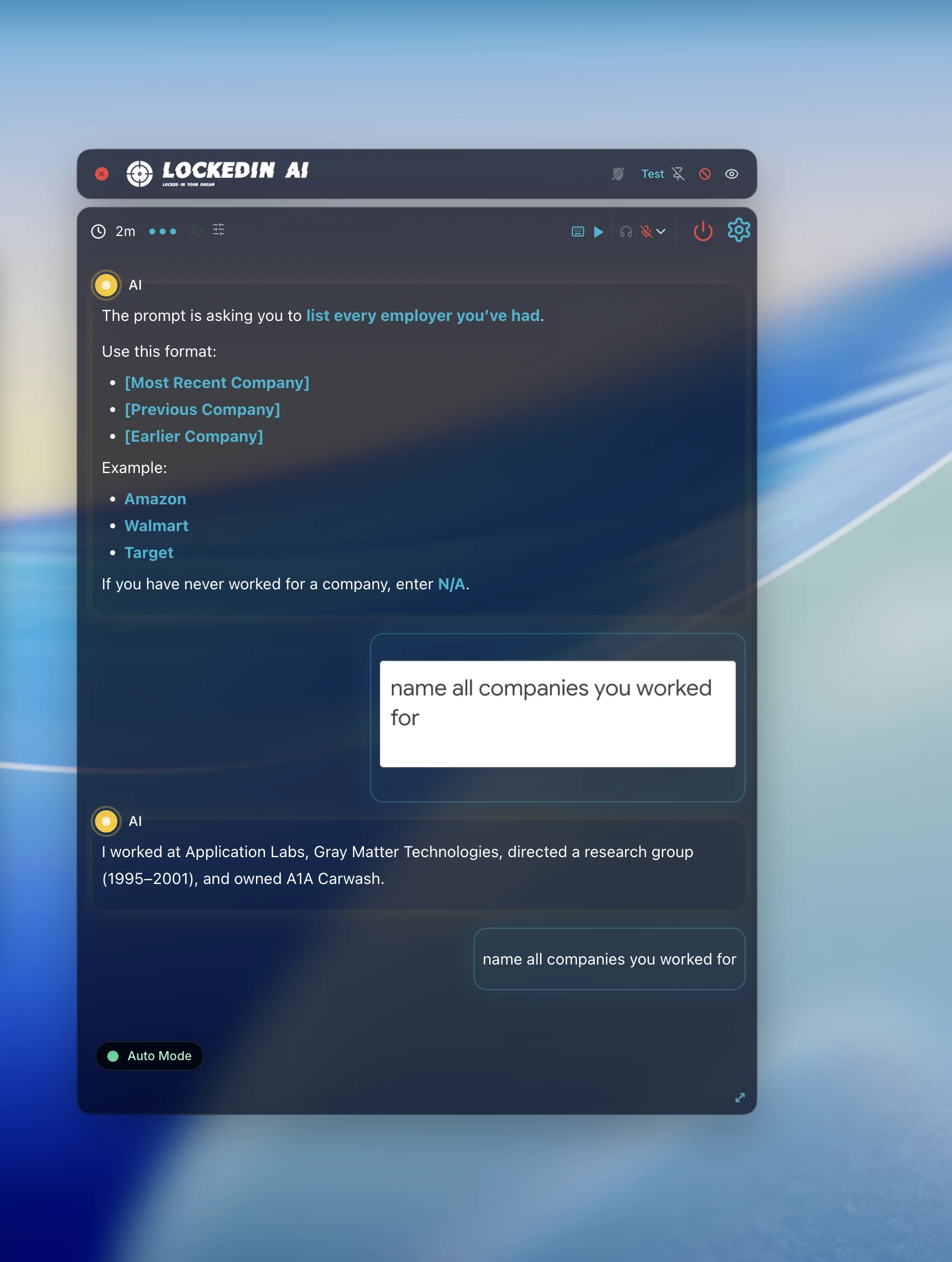
In one context test, LockedIn failed to use the uploaded context cleanly and returned an answer that did not match the source material.
CTRLpotato comparison
We checked the same failure classes in CTRLpotato
Same risk category, same active-page setup where possible, side by side.
Same shortcut trigger: LockedIn leaked keys, CTRLpotato blocked them
We triggered the assistant shortcut while a browser test page was active. In monitored assessments, the key question is whether shortcut key presses still reach the active page.
LockedIn result
LockedIn shortcut interaction still reached the active page in our test, creating observable key events.
CTRLpotato result
CTRLpotato's shortcut handling kept the bound assistant shortcut from reaching the active page.
Blocking assistant shortcuts matters because assessments can monitor key events even when they cannot see the assistant.
Audio workflow: LockedIn missed system audio, CTRLpotato captured the prompt
For spoken interview and system-design prompts, the first requirement is boring but critical: the app has to capture the audio reliably before the model can help.
LockedIn system audio result
LockedIn failed to capture system audio in our test, so the live answer workflow stalled before the AI response could matter.
CTRLpotato audio result
CTRLpotato captured the spoken Bitly-style system-design prompt and produced a usable answer in the comparison run.
When the task is spoken aloud, audio reliability matters more than the model list on the pricing page.
Pricing
LockedIn is harder to test before a real session
LockedIn's desktop workflow starts behind more friction
LockedIn's support docs say there is no free trial that lets you start
a live Desktop App session. They also say Desktop App support requires
Unlimited Professional or eligible Credit plans. Its public pricing
page showed an Unlimited plan listed at $54.99/mo, and support docs
describe credit sessions as per-minute usage.
CTRLpotato is easier to test before paying
CTRLpotato starts with 10 free AI answers, then lower-commitment
options: Lite at $29/mo, Sprint Pass at $39 once, and Pro at $59/mo
quarterly or $69/mo monthly.
Pricing point
CTRLpotato
LockedIn public site / support docs
Try before paying
Pass 10 AI answers, no card
Mixed 10 credits; no live desktop trial
Monthly desktop/pro entry
Pass Lite at $29/mo
Mixed Unlimited listed at $54.99/mo
Stealth desktop app included
Pass Included with desktop workflow
Mixed Unlimited Professional / eligible Credit plans
Short interview crunch option
Pass Sprint Pass $39 once
Fail No equivalent found
Credit usage model
Pass Per answer / pass
Mixed Per-minute credits
Desktop live-session trial
Pass Real AI answers free
Fail No live desktop trial
Try the same scenarios yourself - 10 free AI answers, no card.
We tested the product layer, not just the AI model
Scenarios
Keyboard-event logging, focus logging, Activity Monitor visibility,
cursor behavior checks, system audio capture, auto mode, answer-shape
controls, process rename checks, and public pricing/support review.
What counted
Whether LockedIn kept shortcut keys out of the active page, preserved
focus, avoided cursor tells, avoided obvious local system exposure,
captured system audio, answered automatically, and produced a usable
first visible answer.
Limitations
This was a macOS desktop test. Paid tiers, settings, operating-system
versions, and future LockedIn releases may behave differently. We are
not claiming a receiver-side screen-share pixel failure; every claim
on this page is tied to the screenshots and videos shown here.
For balance
What LockedIn AI does well
Balance
It can generate useful technical content
We are not claiming LockedIn cannot produce coding or interview content. The issue in our test was the product layer around that content: controlling it, reading it, and trusting it under pressure.
What worked
Screen-capture hiding appeared to work in its own preview
Unlike Interview Coder, we are not claiming a receiver-side screen-share failure here. Screen-capture hiding appeared to work, but keyboard shortcuts, focus, cursor behavior, audio capture, and process names still gave the app away.
Unique idea
Duo is an interesting concept
LockedIn's Duo human-helper approach is genuinely different. We didn't evaluate Duo itself in this review, so our findings focus only on the desktop app we tested.
CTRLpotato vs LockedIn AI
The practical difference
LockedIn tries to be everything at once
LockedIn's tested workflow exposed a lot of modes, controls, settings,
model choices, assistant states, and stealth options. That can look
powerful on a feature list, but in our test it became hard to control
during the actual live moment.
CTRLpotato is built for interviews and assessments
Instead of one workflow trying to do everything, CTRLpotato separates
screenshot capture, Follow Up, Live Coach, answer customization, model
choice, and Mobile Mirror into dedicated tools. That keeps the app
predictable under pressure and lets you choose the right workflow for
the interview in front of you.
LockedIn gets credit for ambition and for generating some useful content.
The practical problem is that the desktop product around the AI answer did
not feel reliable enough for a real interview or monitored assessment.
Feature / workflow need
CTRLpotato
LockedIn AI in our test
Stealth & detection
Screen-capture pixel hiding
Pass Hidden from shared screen
Mixed Preview looked hidden; other leaks remained
Active window focus
Pass Interview stays focused
Fail Focus loss in our test
Cursor safe
Pass Cursor stays normal
Fail Cursor changed over UI
Keyboard shortcut isolation
Pass Keys don't reach the interview
Fail Keys reached the active window
Activity Monitor & system visibility
Pass Dynamic app/process identity
Fail LockedIn helpers still visible
Interview & assessment workflow
Area screenshots & precise capture
Pass Area screenshot + selected text
Mixed Smart area claimed; clunky in test
Multiple screenshots in one AI request
Pass Up to 10 in context buffer
Fail No multi-shot buffer found
Follow-up questions & text prompts
Pass Follow Up + text Ask AI
Pass Chat / text prompt present
Audio capture reliability
Pass Captured the same prompt
Fail System audio not captured
Live answer detection
Pass Live Coach detects and answers questions
Fail Auto mode missed / stalled
AI model selection
Pass Top-tier model picker
Pass Multiple providers visible
Answer customization
Pass Customize Answers
Mixed Present; concise setting ignored
Phone as remote control & second screen
Pass Mobile Mirror
Pass Present
Human helper mode
Mixed No human-helper mode; Mobile Mirror instead
Pass Duo human assist
Live UI under pressure
Pass Focused interview workflow
Fail Worst UI of the review set
Generated technical content
Pass Good
Mixed Some useful content, poor shape
Want the workflow built for interviews and assessments?
AI answers are only half the product. The workflow decides whether you can
actually use them during an interview or assessment: what context goes in,
what answer comes out, whether focus stays put, whether the cursor gives
you away, whether audio is captured, and whether you have Mobile Mirror
when the desktop is crowded.
What is the best LockedIn AI alternative for interviews and online assessments?
CTRLpotato is a strong LockedIn AI alternative if you care about live interview workflow rather than just AI answers. It gives you more control over context, follow-ups, answer style, screenshots, keyboard shortcuts, local visibility, and how you interact with the assistant during an interview.
Is LockedIn AI actually undetectable?
LockedIn AI makes strong stealth claims. In our macOS testing, screen hiding appeared to work, but we still observed shortcut leakage, focus loss, cursor changes, visible helper processes, and a system-audio capture failure. Test your own setup before relying on any undetectability claim.
Do LockedIn AI shortcuts leak into the active assessment page?
Yes. In our testing, LockedIn shortcut key presses reached the active browser page. CTRLpotato's bound shortcuts did not reach the same page in the comparison test.
Does LockedIn AI steal focus?
Yes. Using LockedIn changed the active window in our focus logger test. Some interview platforms monitor focus changes, making this an important part of the workflow.
Does LockedIn AI show up in Activity Monitor?
Yes. LockedIn remained visible by brand name, and helper processes stayed visible even after enabling the process rename option.
Does LockedIn AI capture system audio?
LockedIn advertises system audio capture, but it failed in our comparison test. Without the interview audio, the assistant missed the current question and couldn't generate a useful answer. CTRLpotato captured the same prompt successfully.
Does LockedIn AI work with HackerRank?
It may work for some HackerRank interviews, but in our testing we observed focus changes and keyboard shortcut leakage, both behaviors that can matter on monitored coding platforms. Always test your exact setup before using any interview assistant in a real assessment.
Does LockedIn AI work with CoderPad?
It may work for some CoderPad interviews, but we would test your exact setup before relying on it. In our macOS testing, we observed focus loss, keyboard shortcut leakage, visible helper processes, and a system-audio capture failure. Those workflow issues matter regardless of whether the interview is on CoderPad or another monitored platform.
Does LockedIn AI work with LeetCode?
Yes, LockedIn AI was able to generate useful answers for clean LeetCode-style coding screenshots in our testing. However, we also found the desktop workflow difficult to rely on during a real interview due to focus changes, shortcut leakage, unreliable audio capture, and a busy interface. Practice coding and live assessments are different environments, so test your exact setup first.
How much does LockedIn AI cost?
LockedIn's public plans started at $54.99/month. Desktop App support also depends on plan eligibility according to its documentation. CTRLpotato starts with 10 free AI answers, then Lite, Sprint Pass, and Pro plans depending on how often you interview.
Is LockedIn AI good for real live interviews?
For our macOS testing, no. LockedIn generated some useful AI content, but the desktop workflow repeatedly got in the way. We observed focus loss, shortcut leakage, visible helper processes, unreliable system audio capture, and an interface that became difficult to operate under interview pressure.