ULTRACODE alternative - claim + architecture audit
ULTRACODE AI Review 2026: The “100% Undetectable” Claim Did Not Hold Up
ULTRACODE says it stays invisible on every platform, preserves the
interview tab's focus, and runs deeper in the operating system than
monitoring software can reach. We tested those claims on macOS and
Windows, then inspected the signed macOS build to see what was actually
inside.
Last tested: July 2026Platforms tested: macOS + WindowsmacOS bundle inspected: v8.9.0Evidence: videos, screenshots, event tests, bundle inspection
Should you use ULTRACODE AI for real interviews or online assessments?
Our read
ULTRACODE's biggest selling point is undetectability. In our tests,
that promise did not hold up.
A menu appeared in screen share, mouse interaction stole focus, a
privileged monitor still saw shortcut keys, the cursor changed over
hidden controls and disappeared while typing, and branded processes
remained visible. Combined with the full-screen overlay and missing
context targeting, ULTRACODE showed the largest gap between
marketing claims and the product we actually tested.
ULTRACODE AI may fit
Clean, single-window coding practice
Users who prefer a shortcut-first workflow
Basic screenshot-to-answer use
Practice sessions where stealth is not important
Pick CTRLpotato if
You need the app to stay hidden during screen share and desktop
use
You want area screenshots, selected text, and a visible context
buffer
You want named top-tier model selection and custom answers
You want Mobile Mirror as a remote control and second screen
You want a lower paid entry after testing the product
Test summary
The short version
Biggest gap
The absolute undetectability claims did not survive testing
A menu appeared in screen share, the active page lost focus, a privileged monitor still saw shortcut keys, and branded processes remained visible.
Architecture verdict
The "kernel-adjacent" claim is technically false
ULTRACODE is a standard Electron app with a small Swift helper using Apple's public, user-space session event-tap API. That is not kernel-adjacent, not beyond monitoring software, and not something competitors would need to rebuild their products from scratch to implement.
Buying risk
$799 lifetime marketing, 365 days in the linked terms
The current sales page and its linked terms gave conflicting access durations. The terms also said purchases were final, including unused purchases.
Claim and risk audit
The claims and high-risk checks we tested
Claim / check
Observed result
Why it matters
Proof
"100% invisible" during full-screen sharing
Fail Menu visible to receiver
The main overlay stayed hidden, but an ULTRACODE menu appeared in our receiver-side Google Meet view.
ULTRACODE markets o3, o4-mini-high, and GPT-5.2 as ‘latest.’ OpenAI now lists GPT-5.6 as its latest model, and o4-mini is already scheduled for deprecation.
They said competitors would have to rebuild from scratch to copy this.
We inspected it: it's a standard Electron app.
ULTRACODE ships a native keyboard helper. The inspected macOS app was an
Electron application, and its helper used Apple's public user-space
session event-tap API. We found no kernel extension, system extension,
DriverKit component, Endpoint Security entitlement, or privileged helper
supporting the “kernel-adjacent” claim.
Shipped macOS architecture
“Runs deeper in the OS” was a standard Electron app with a session-level
event tap
ULTRACODE's claim
“ULTRACODE RUNS DEEPER IN THE OS than any monitoring software can
reach.”
We inspected the signed and notarized ULTRACODE v8.9.0 macOS bundle.
The main app was built with Electron 36.2.1. Keyboard blocking was
delegated to a 204 KB Swift helper calling Apple's public
CGEventTapCreate API at
kCGSessionEventTap.
This is a standard user-space event-tap architecture available to
desktop applications. It can suppress configured shortcut
combinations and keep them out of the active app, but it is not a
kernel hook. A monitor running earlier in the event chain, or at the
lower HID level, can still observe the physical keypress first. Our
shortcut recording shows exactly that.
The “100% undetectable” promise failed in ordinary desktop checks
These are the normal surfaces interviews and assessments can observe:
receiver-side screen sharing, active-window focus, privileged input
monitoring, cursor behavior, Activity Monitor, and Task Manager. Hiding
the overlay isn't enough if everything around it remains visible.
Menu visible to the receiver
Screen-share hiding failed when a menu opened
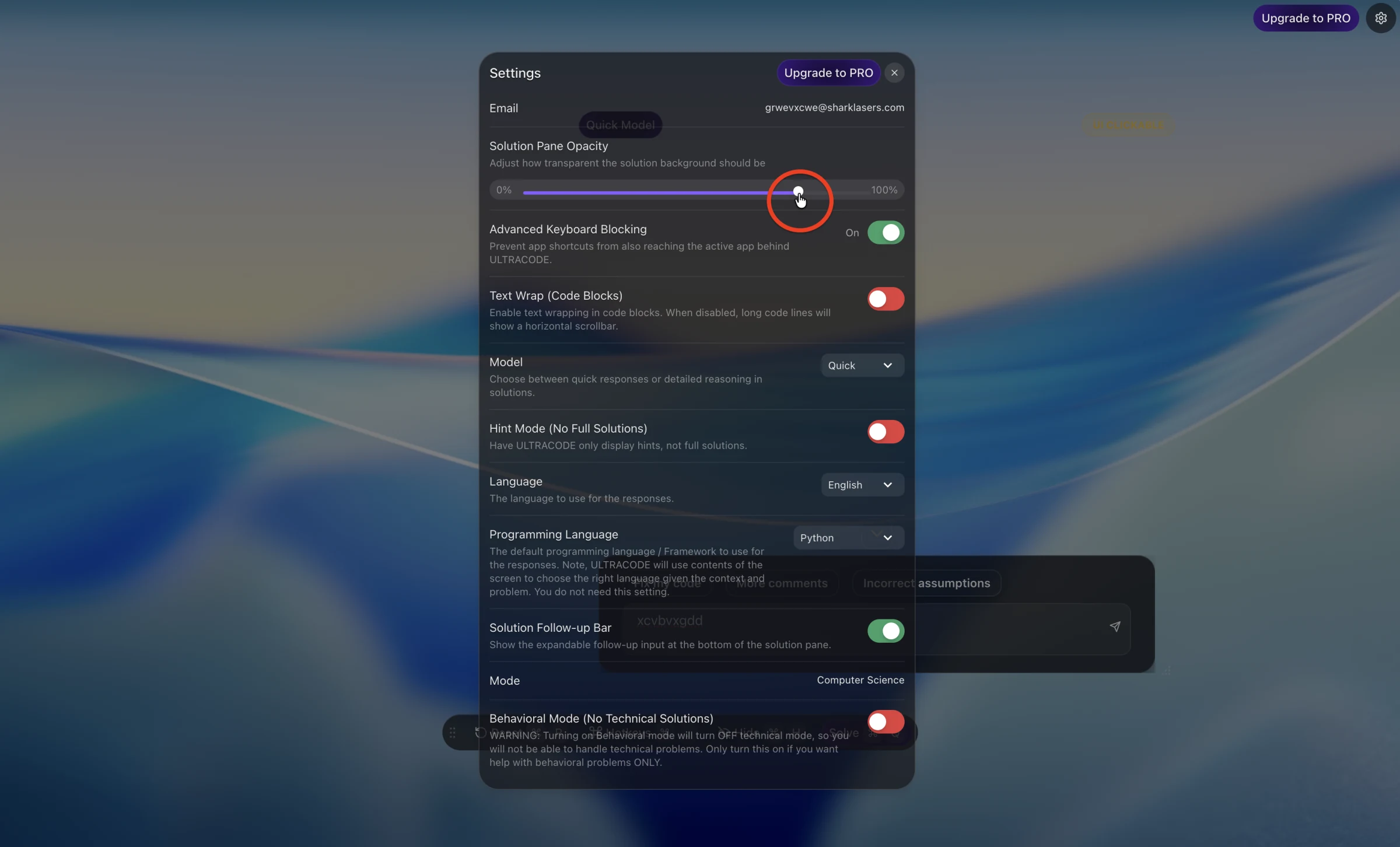
The main overlay remained hidden in the receiver-side view, but its language menu appeared on the shared screen. Screen-share safe until a menu opens is not 100% screen-share safe.
BLUR event logged
ULTRACODE stole focus from the active page
Clicking the interactive overlay changed the active window and triggered a visible BLUR event. That directly conflicts with the advertised active-tab-focus protection.
Detected before ULTRACODE blocked it
Shortcut blocking still leaked keypresses
ULTRACODE kept the configured shortcut out of the browser, but a privileged keyboard monitor still detected the physical keypresses. Proctoring software can monitor at the same event-tap level or closer to the hardware.
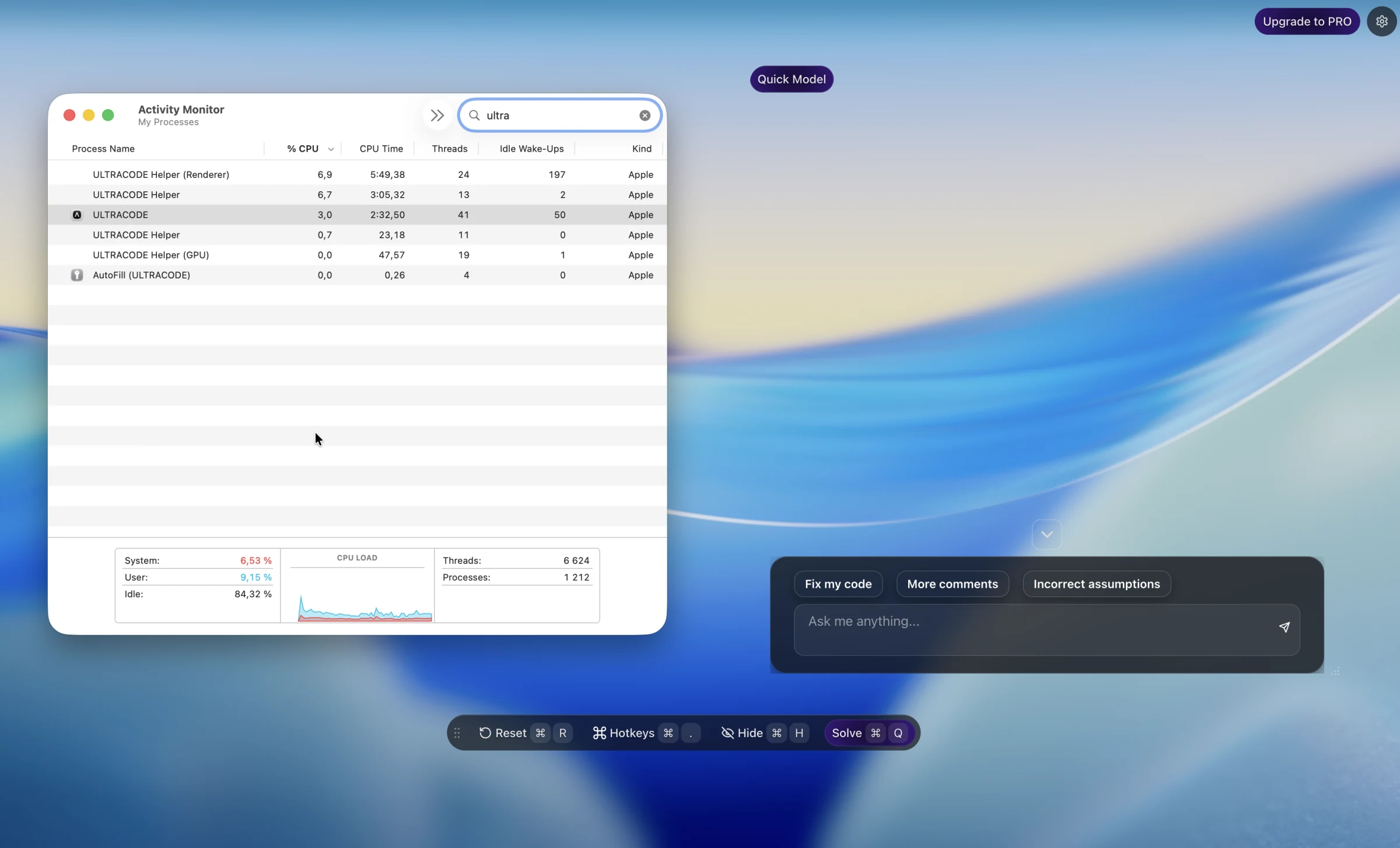
Activity Monitor showed ULTRACODE, its helpers, and AutoFill (ULTRACODE) by name. This is exactly the system surface a proctor may ask a candidate to open.
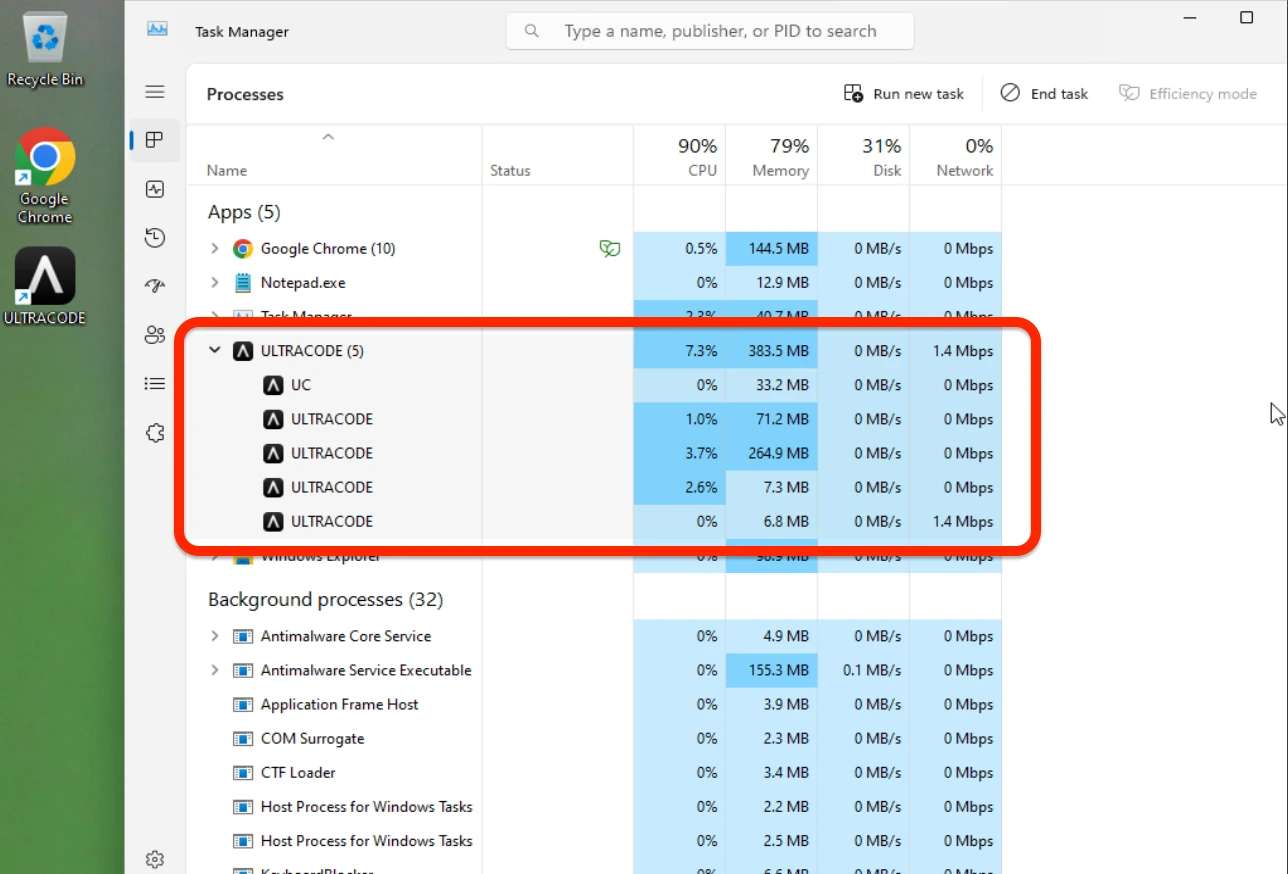
Windows Task Manager showed an ULTRACODE process group with the recognizable icon. The claimed zero trace did not survive a normal process check on either tested platform.
The cursor changed over ULTRACODE controls. During screen share, that can reveal interaction with an invisible assistant because the pointer changes where the receiver sees no visible UI.
Hidden typing changed the shared cursor
Typing into ULTRACODE made the cursor disappear
While the user typed into ULTRACODE's hidden follow-up input, the cursor disappeared on the shared screen. An interviewer can see that unexplained change and correlate it with hidden assistant use. This is a stealth failure, not merely a usability issue.
Live usability
Could you actually run this during a live interview?
ULTRACODE can generate a coding answer. The harder question is whether a
candidate can control the full-screen overlay, target the right context,
and read the result without losing focus or fighting the interface.
Full-screen overlay tradeoff
Either click-through or in the way
With click-through enabled, the overlay could not be controlled normally with the mouse. Disable it and the full-screen layer intercepted desktop interaction; clicking the assistant also changed focus. That is a poor tradeoff during a timed interview.
Context control missing
No area capture or visible context buffer
Without area capture or a visible context buffer, it was much harder to control what the AI actually received. That became obvious in the cluttered-screen example below.
MODEL CONTROL LIMITED
“Quick” and “Reasoning” aren't enough
The app reduced model selection to Quick and Reasoning, so users couldn't verify which advertised model generated an answer. That removes an important piece of control during live interviews.
CTRLpotato comparison
We checked the same failure classes in CTRLpotato
Same risk category, same active-page setup where possible, side by side.
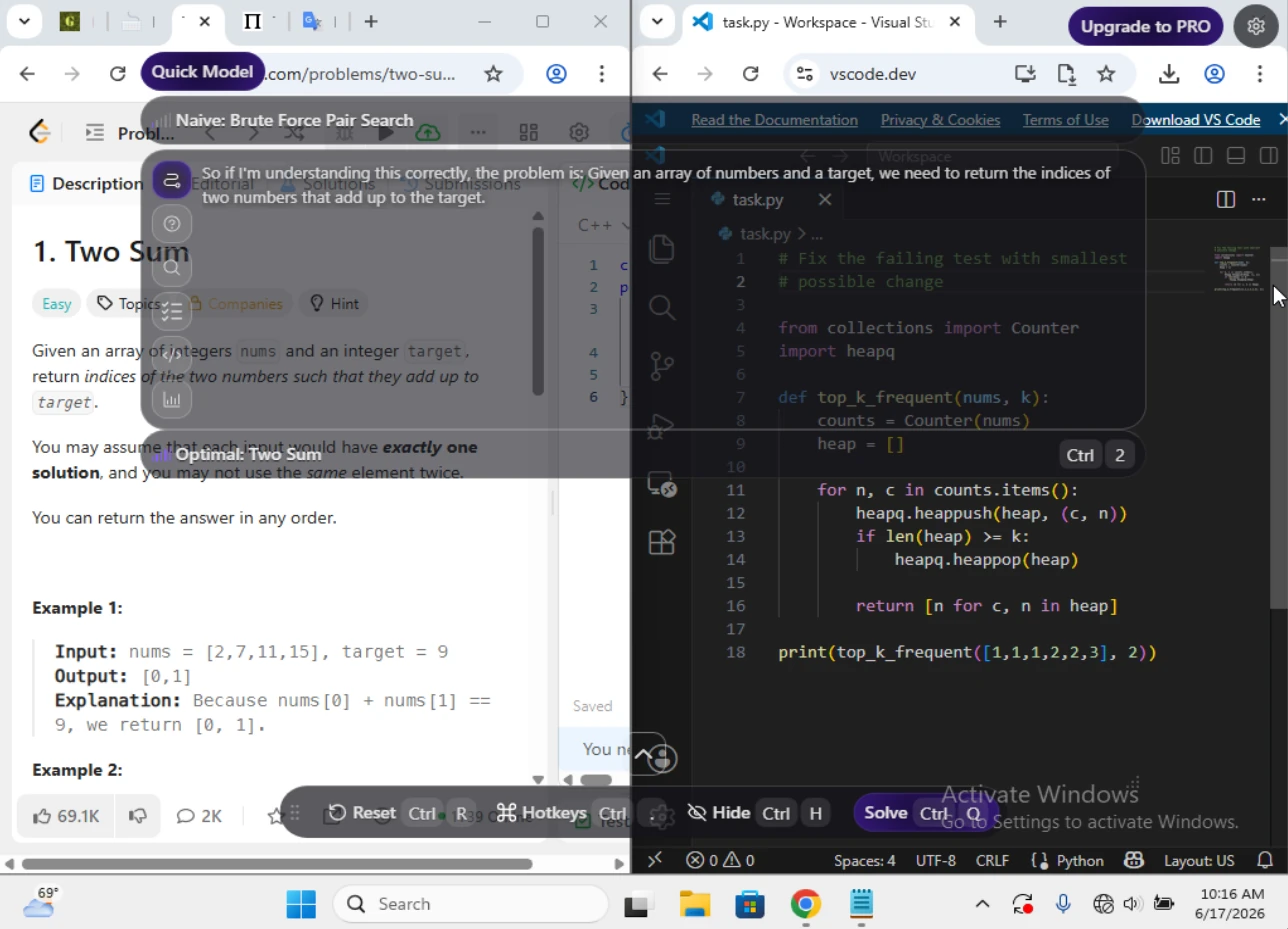
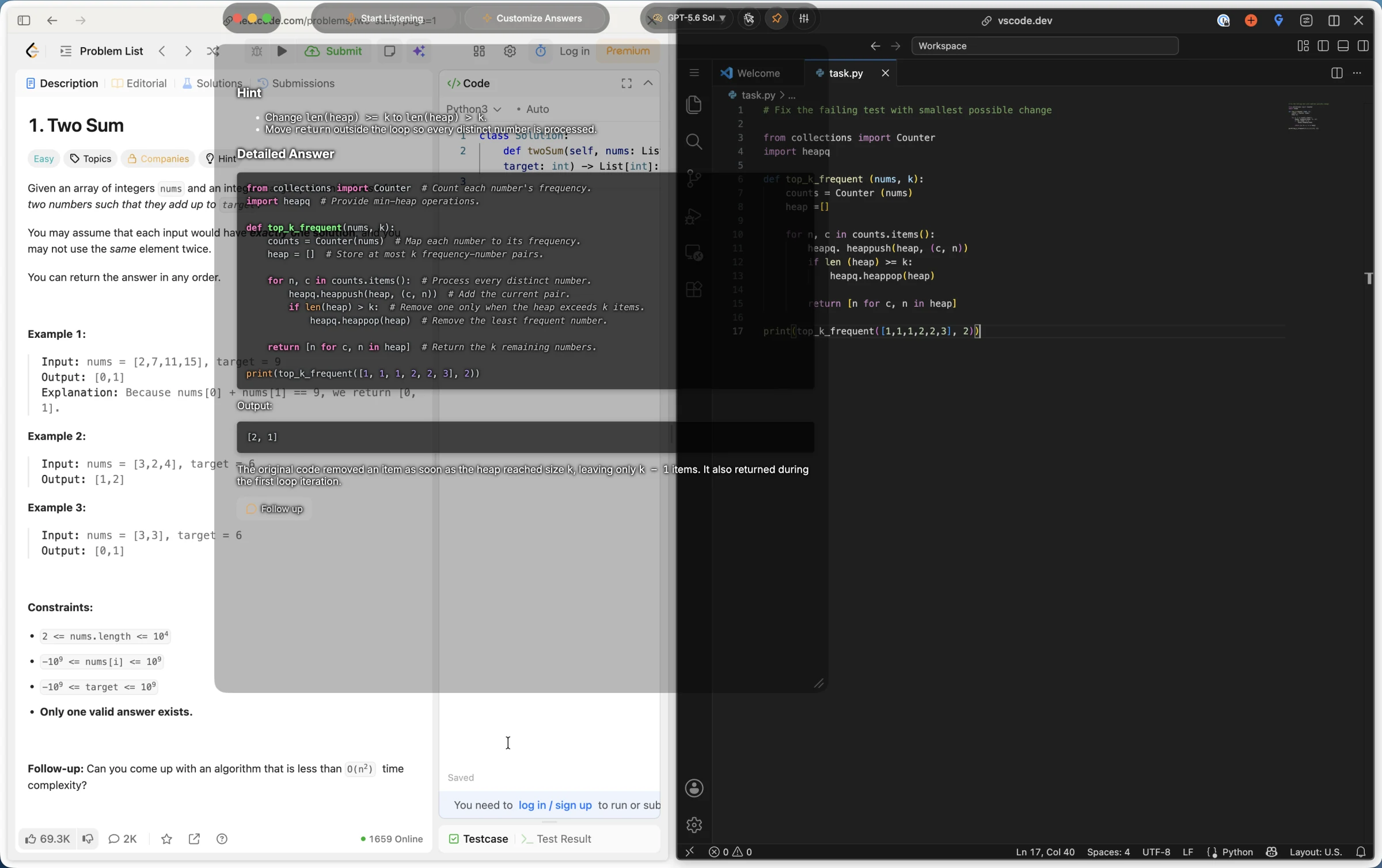
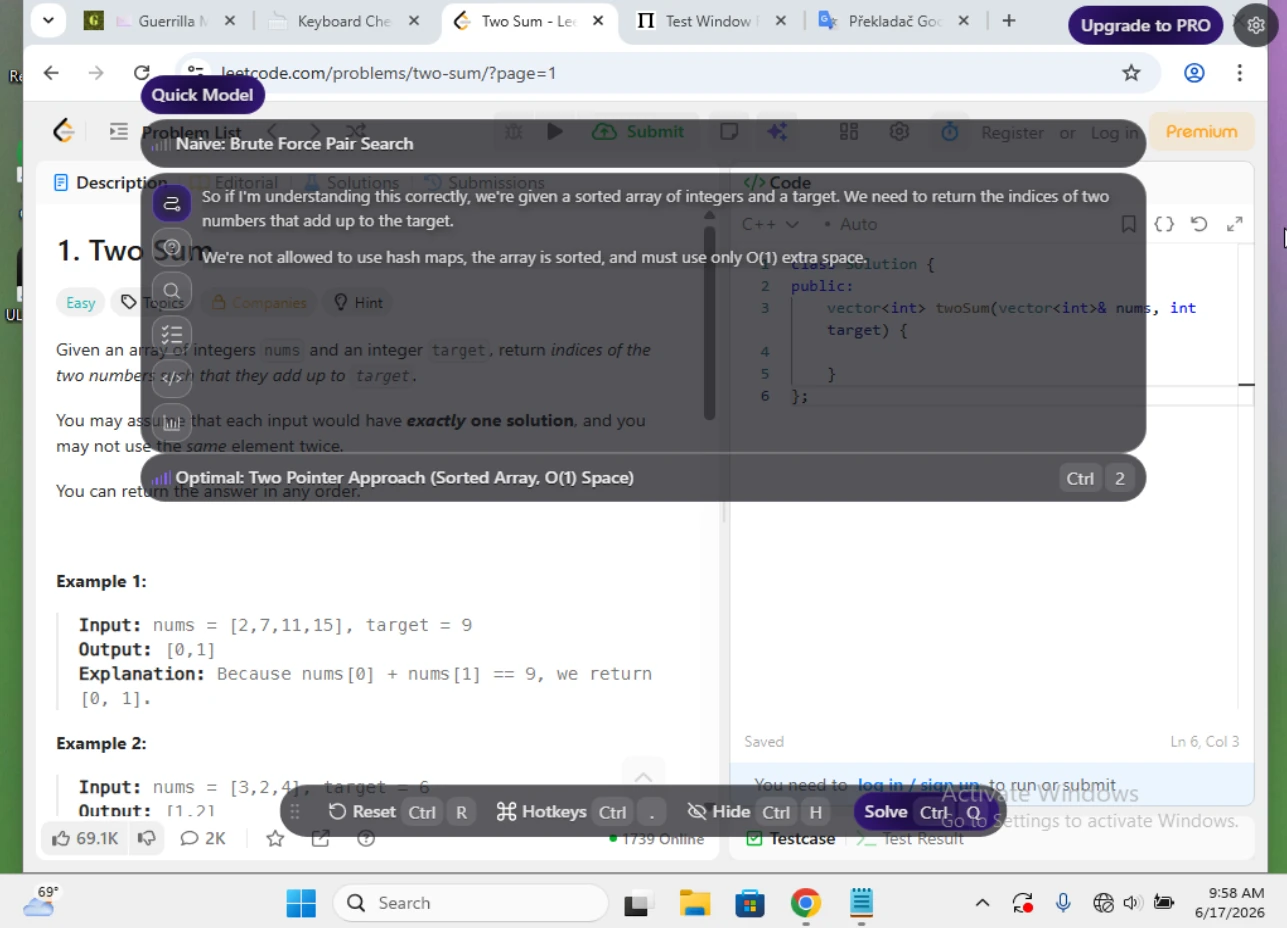
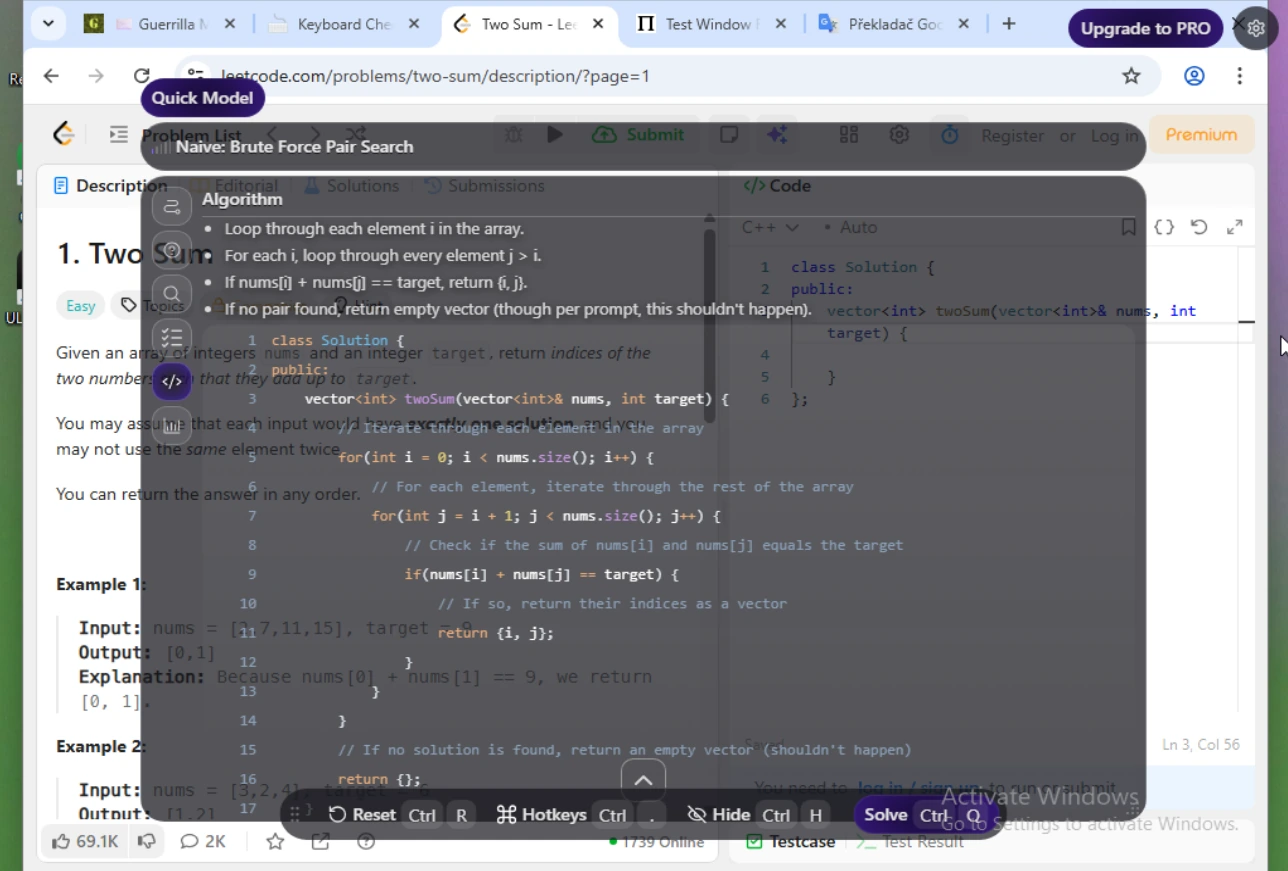
Same cluttered screen: ULTRACODE solved the wrong visible task
An old Two Sum page and the current top_k_frequent debugging task were visible together. The model should not read our mind; the product should let us target the exact context that matters.
The hard part was not solving Two Sum. It was controlling which visible context reached the AI.
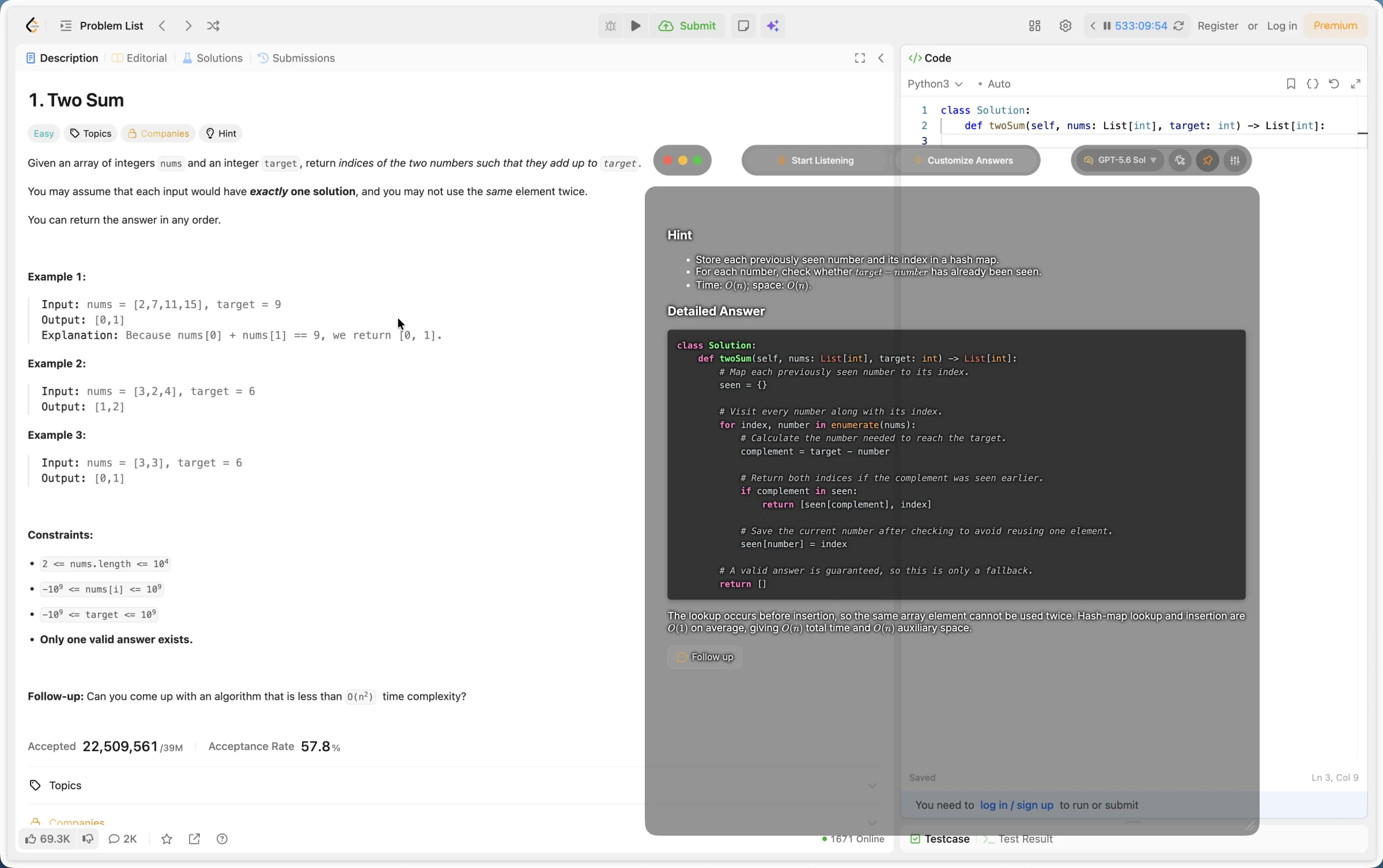
Same clean Two Sum prompt: ULTRACODE invented a different problem
We showed both products the standard unsorted Two Sum prompt. The correct answer should preserve the original constraints and return the original indices.
A plausible answer to an invented problem is still the wrong answer.
Pricing
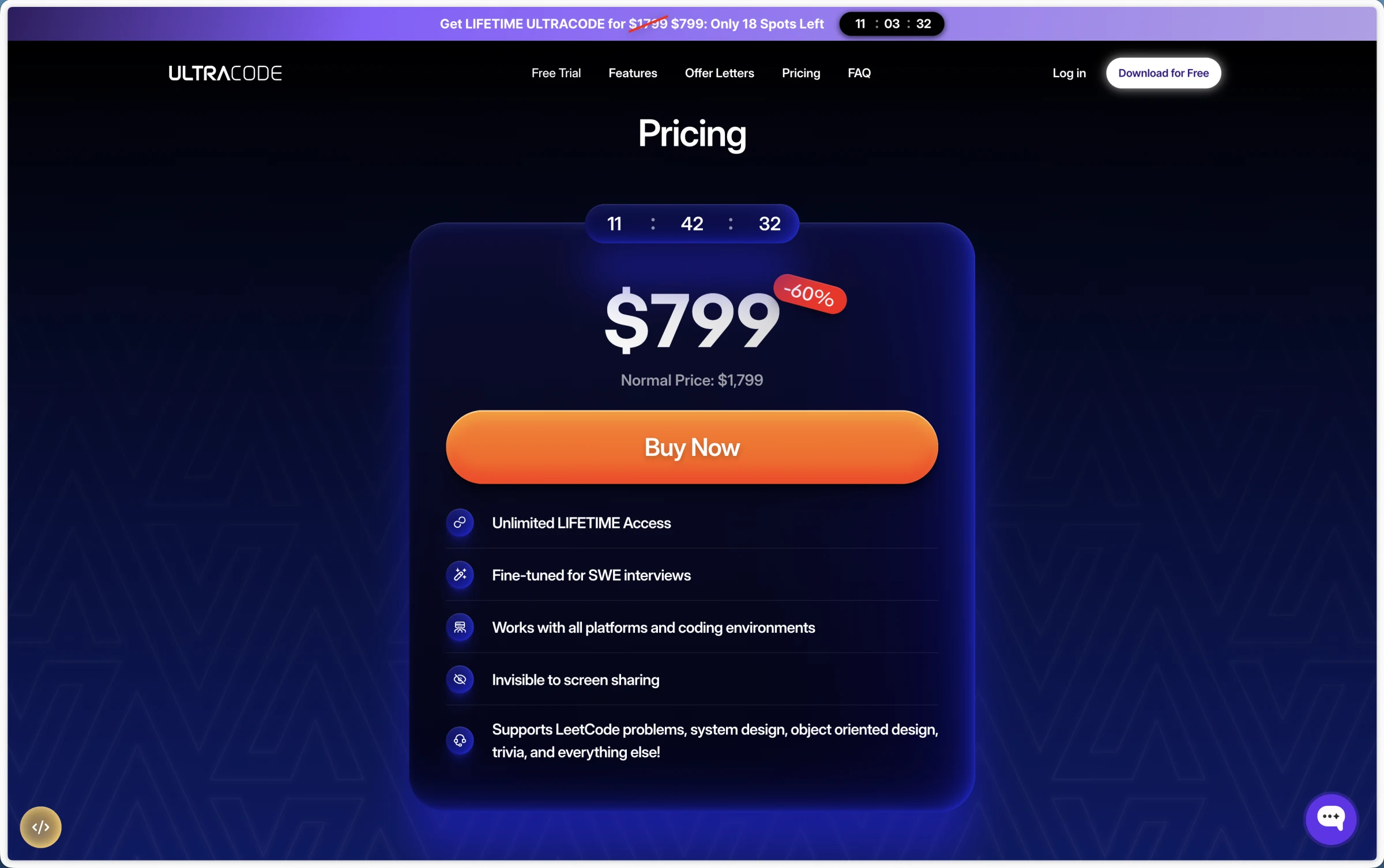
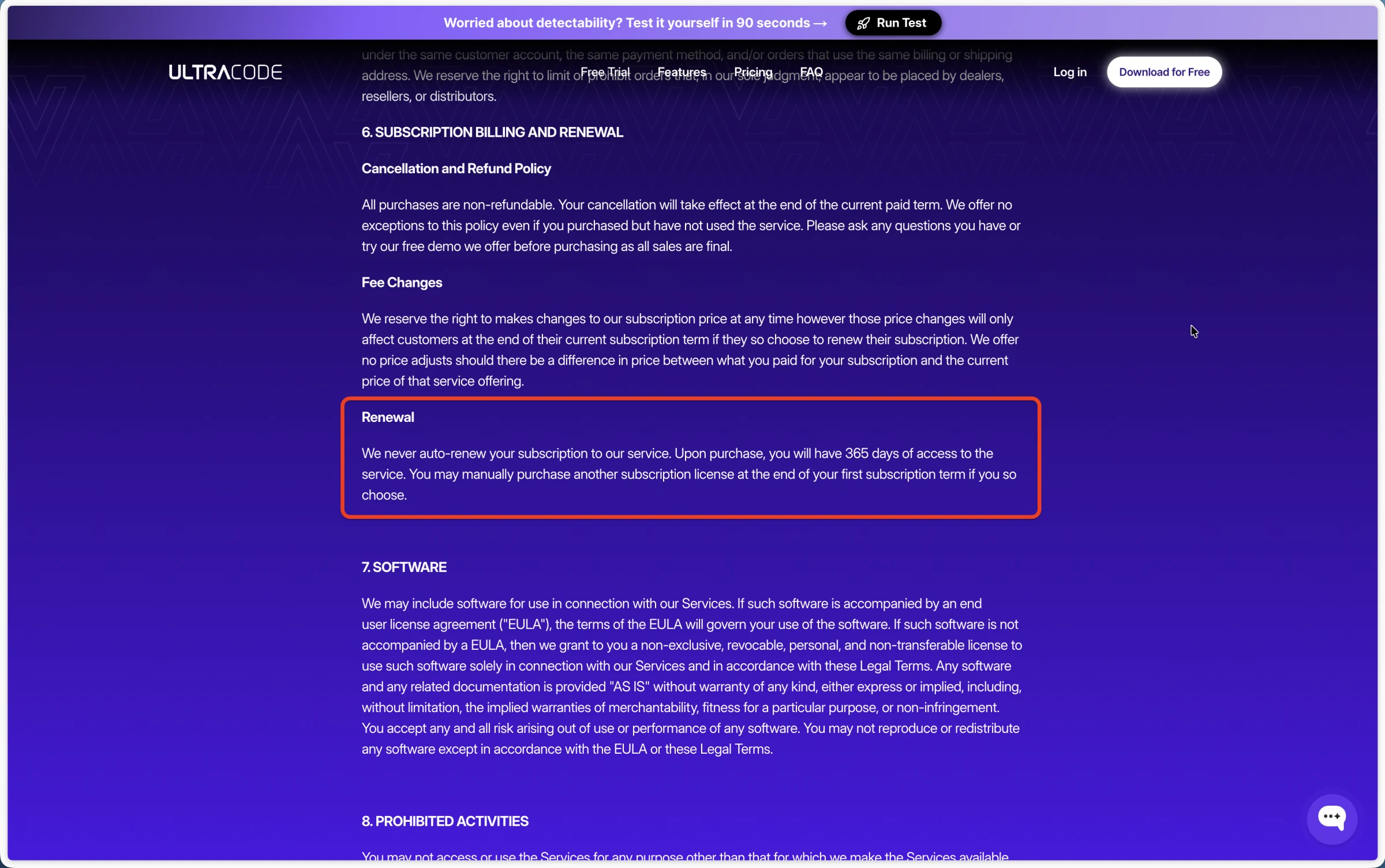
“Lifetime” on the sales page, 365 days in the linked terms
The same $799 offer is described as both "Lifetime" and "365 days"
ULTRACODE's sales page advertised “Unlimited LIFETIME Access” for
$799, anchored against a stated $1,799 normal price. Its linked terms
instead described 365 days of access and said all purchases were
non-refundable, even when unused. That conflict deserves written
clarification before anyone pays.
Source: ULTRACODE terms. The terms page was older than the current sales page, so we show
the conflict rather than guessing which description controls.
We tested the product layer, not just the AI model
Scenarios
Receiver-side Google Meet screen sharing, browser focus logging,
privileged shortcut monitoring, Activity Monitor and Task Manager
checks, cursor behavior, clean and cluttered coding screens, and
inspection of the signed macOS v8.9.0 app.
What counted
Whether ULTRACODE stayed hidden during screen sharing, kept the
interview page focused, prevented shortcut leakage and other desktop
tells, captured the right coding context, and matched the technical
claims published on its website.
Limitations
Desktop behavior was tested on the shown macOS and Windows setups;
the binary inspection covered only ULTRACODE v8.9.0 for macOS.
Future versions may differ. We did not inspect ULTRACODE's backend
or verify which models powered Quick and Reasoning. The main overlay
stayed hidden in screen share; the menu surface did not.
ULTRACODE correctly described a brute-force O(n²) solution for a clean Two Sum prompt. We are not claiming it cannot solve coding questions. The problems appeared once desktop workflow and context became realistic.
What worked
The main overlay itself stayed hidden
In our receiver-side test, the main transparent overlay stayed hidden. The failure was narrower but still decisive for a 100% claim: opening a language menu exposed UI on the shared screen.
Technical balance
The keyboard blocker works, but it is not unique
ULTRACODE's native keyboard blocker can suppress configured shortcut combinations before they reach the active app. That is legitimate engineering. The inspected app, however, used Apple's standard user-space event-tap API rather than the kernel-adjacent architecture described in its marketing.
CTRLpotato vs ULTRACODE AI
The practical difference
ULTRACODE is a shortcut-first full-screen overlay
Its interface is either click-through and difficult to control with
a mouse, or interactive and in the way of the desktop underneath.
Without area screenshot targeting or a visible context buffer,
cluttered screens also became context-selection problems.
CTRLpotato is built for interviews and assessments
CTRLpotato separates the main interview workflows instead of putting
everything behind one full-screen overlay. Area screenshots,
selected text, Follow Up, Live Coach, Mobile Mirror, and a visible
context buffer make it easier to control what the AI sees without
interrupting the interview.
Feature / workflow need
CTRLpotato
ULTRACODE AI in our test
Stealth & detection
Hidden during full-screen sharing
Pass Hidden from shared screen
Fail Menu visible to receiver
Active window focus
Pass Interview stays focused
Fail Focus loss in our test
Cursor does not reveal hidden assistant use
Pass Cursor stays normal
Fail Changed over UI and disappeared while typing
Keyboard shortcut isolation
Mixed Blocks active app; makes no absolute claim
Mixed Blocks active app; marketed as undetectable
Activity Monitor & system visibility
Pass Dynamic app/process identity
Fail Brand visible on macOS and Windows
Interview & assessment workflow
Area screenshots & precise capture
Pass Area screenshot + selected text
Fail No area capture found
Multiple screenshots in one AI request
Pass Up to 10 in context buffer
Fail No visible multi-shot buffer found
Follow-up questions & text prompts
Pass Follow Up + text Ask AI
Pass Chat / text prompt present
Mouse control without focus loss
Pass Clickable without becoming active
Fail Interactive overlay stole focus
AI model selection
Pass Named top-tier model picker
Fail Outdated lineup behind Quick / Reasoning
Phone as remote control & second screen
Pass Mobile Mirror
Fail Not found
Desktop control under pressure
Pass Focused interview workflow
Fail Full-screen overlay tradeoff
Pricing & access
Try real AI answers before paying
Pass 10 answers, no card
Mixed Free demo / trial available
Access duration clarity
Pass Clear plan duration
Fail Lifetime page vs 365-day terms
Want the workflow built for interviews and assessments?
AI answers are only half the product. The workflow determines whether
they're actually usable during a live interview: what context reaches
the AI, whether the interview keeps focus, what screen sharing and
monitoring can observe, and how easily you can control the assistant
under pressure.
What is the best ULTRACODE AI alternative for interviews and online assessments?
CTRLpotato is a strong ULTRACODE AI alternative when you need area screenshots, selected text, a visible multi-screenshot context buffer, named model selection, mouse interaction that does not steal focus, dynamic local identity, Mobile Mirror, and a lower-cost paid entry.
Is ULTRACODE AI actually undetectable?
Not according to our tests. An ULTRACODE menu appeared in a receiver-side screen share, the active page logged focus loss, a privileged session-level monitor detected shortcut keys before ULTRACODE blocked them, the cursor changed over hidden UI and disappeared during hidden typing, and branded processes remained visible on macOS and Windows.
Does ULTRACODE AI really run deeper in the operating system?
The inspected macOS build was an Electron 36.2.1 application with a small Swift helper using Apple's public CGEventTapCreate API at the user-session level.
Can proctoring software detect ULTRACODE keyboard shortcuts?
Yes. In our recording, ULTRACODE prevented the shortcut from reaching an ordinary browser keyboard listener, but a privileged session-level monitor still detected the physical keypresses. That does not prove every proctor would detect ULTRACODE, but it does contradict a 100% undetectable guarantee.
Does ULTRACODE AI steal focus?
Yes. Using ULTRACODE changed the active window in our focus logger test. Some interview platforms monitor focus changes, making this an important part of the workflow.
Does ULTRACODE AI show up in Activity Monitor?
Yes. Our macOS Activity Monitor capture showed multiple ULTRACODE processes and helpers by brand name. Windows Task Manager also showed an ULTRACODE process group with the recognizable icon.
Is ULTRACODE AI visible during screen sharing?
The main overlay stayed hidden in our receiver-side Google Meet test, but an ULTRACODE menu appeared on the shared screen when opened. That alone contradicts a 100% invisible screen-sharing claim.
Does ULTRACODE AI work with HackerRank?
It may work in some browser-only HackerRank sessions, but ULTRACODE's 100% guarantee is not credible. HackerRank's own Desktop App Mode documentation names Ultracode among invisible cheating tools it detects or closes, and our testing also found focus loss, system-visible processes, and shortcut monitoring risk.
Does ULTRACODE AI work with CoderPad?
It may work for some CoderPad interviews, but test the exact setup first. In our desktop testing, ULTRACODE changed focus, exposed cursor and process signals, and lacked area screenshot targeting. Those workflow issues matter on CoderPad and other monitored platforms.
Does ULTRACODE AI work with LeetCode?
Yes, ULTRACODE produced a valid brute-force answer on a clean LeetCode Two Sum screen. In separate runs it invented constraints and selected stale context on a cluttered desktop, so clean practice and a real multi-window interview are different tests.
How much does ULTRACODE AI cost?
ULTRACODE's current public sales page advertised a $799 lifetime offer. Its linked terms instead described 365 days of access and said purchases were non-refundable, including unused purchases. We recommend clarifying the access duration in writing before purchasing.
Is ULTRACODE AI good for real live interviews?
We would not rely on it for a real live interview. ULTRACODE solved a clean coding prompt, but its full-screen control model, focus loss, screen-share menu leak, cursor behavior, process visibility, missing context targeting, and non-specific model modes created too many avoidable risks.