Parakeet AI Review: The Product Didn't Live Up to the Claims
Parakeet AI markets automatic answers to every interview question, 100%
accurate responses, blazing-fast transcription, full coding support, and
100% private, undetectable use. Across repeated tests, we found those
claims didn't consistently hold up. The app lost interview context,
leaked desktop signals, stole focus, blocked the workspace underneath
it, and often produced answers that were difficult to use in a live
interview.
Should you use Parakeet AI in a live interview or online assessment?
Our read
Parakeet AI could answer a clean, isolated prompt, but repeated
testing showed a very different experience in realistic interview
scenarios. Its strongest claims around accuracy, coding assistance,
privacy, and live interviews did not consistently hold up.
Across repeated runs, questions went unanswered or were rewritten,
current company and coding context was lost, and live answers became
slow or difficult to read. Separate desktop checks exposed a
receiver-visible tooltip, focus loss, shortcut leakage, cursor
tells, identifiable local paths, and a visible window that blocked
the application underneath.
Parakeet AI may fit
Clean, single-question practice sessions
Prompts that explicitly demand a short answer
Low-pressure situations where you can verify every answer
Pick CTRLpotato if
You need reliable current-question and follow-up control
You want area screenshots, selected text, or context buffering
You care about screen-share, focus, cursor, and shortcut behavior
You want in-session model choice and answer customization
You want Mobile Mirror as a remote control and second screen
Test summary
The short version
Overall result
Several core claims failed our repeated tests
Question tracking, accuracy, screen-share invisibility, focus behavior, shortcut isolation, process hiding, and live answer usability all broke in documented tests.
Stealth result
The app wasn't as invisible as it claimed
A native tooltip and cursor behavior remained visible to the receiver, while focus, shortcuts, and local process inspection created separate observable signals.
Best fit
Clean, explicit prompts with room to supervise the output
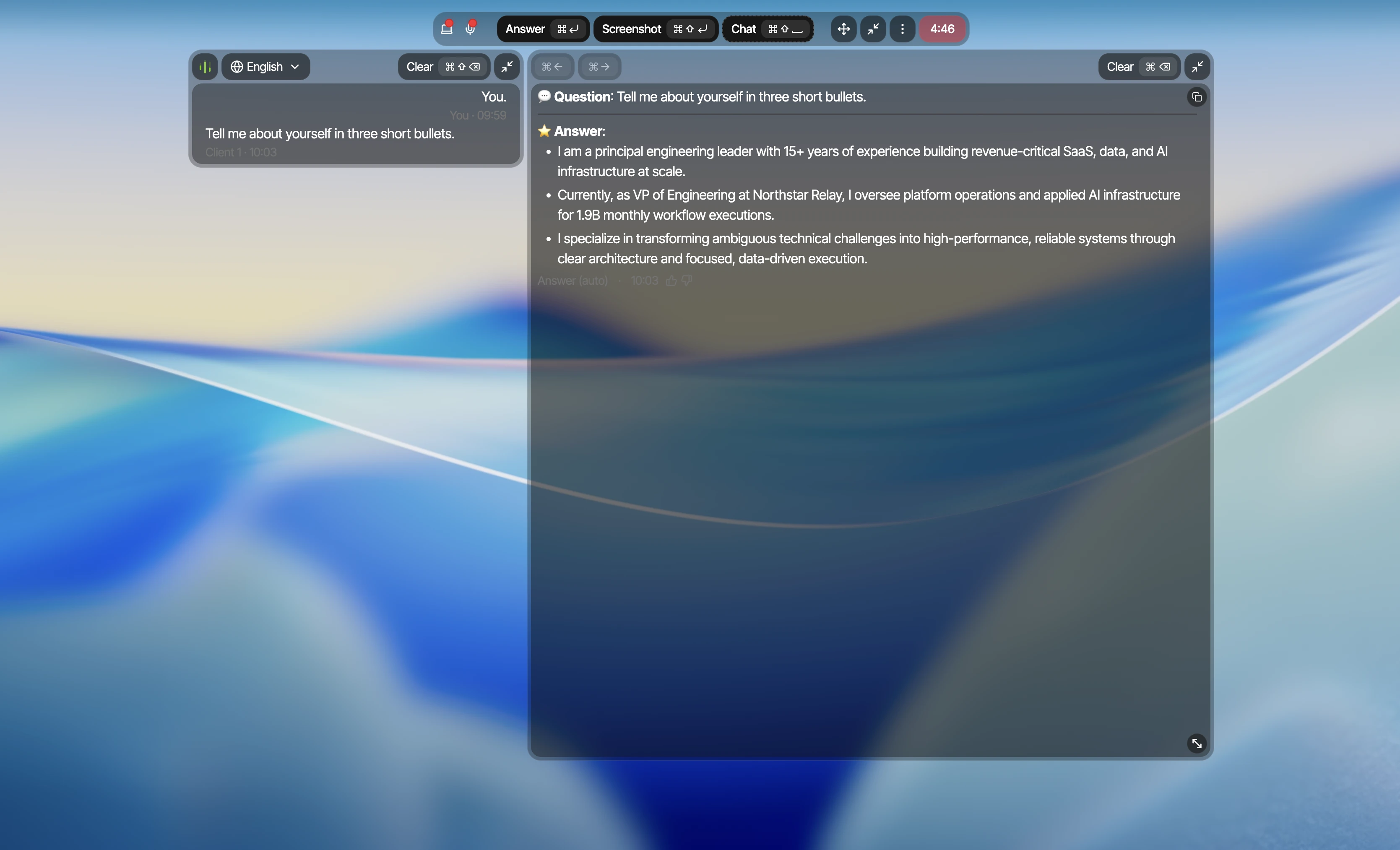
When we asked for exactly three short bullets, Parakeet AI produced a concise relevant response. Problems began once the interview moved beyond a single, explicit prompt.
Claim and risk audit
How Parakeet AI's biggest claims held up
Claim / check
Observed result
Why it matters
Proof
"Automatically get an answer to every interview question"
Fail Questions skipped or rewritten
Across repeated runs, Parakeet AI skipped complete questions, rewrote another into a different question, and answered with stale company context.
A native tooltip appeared to the screen-share receiver, focus changed, shortcut keys reached the active page, and local inspection exposed identifiable Parakeet AI paths.
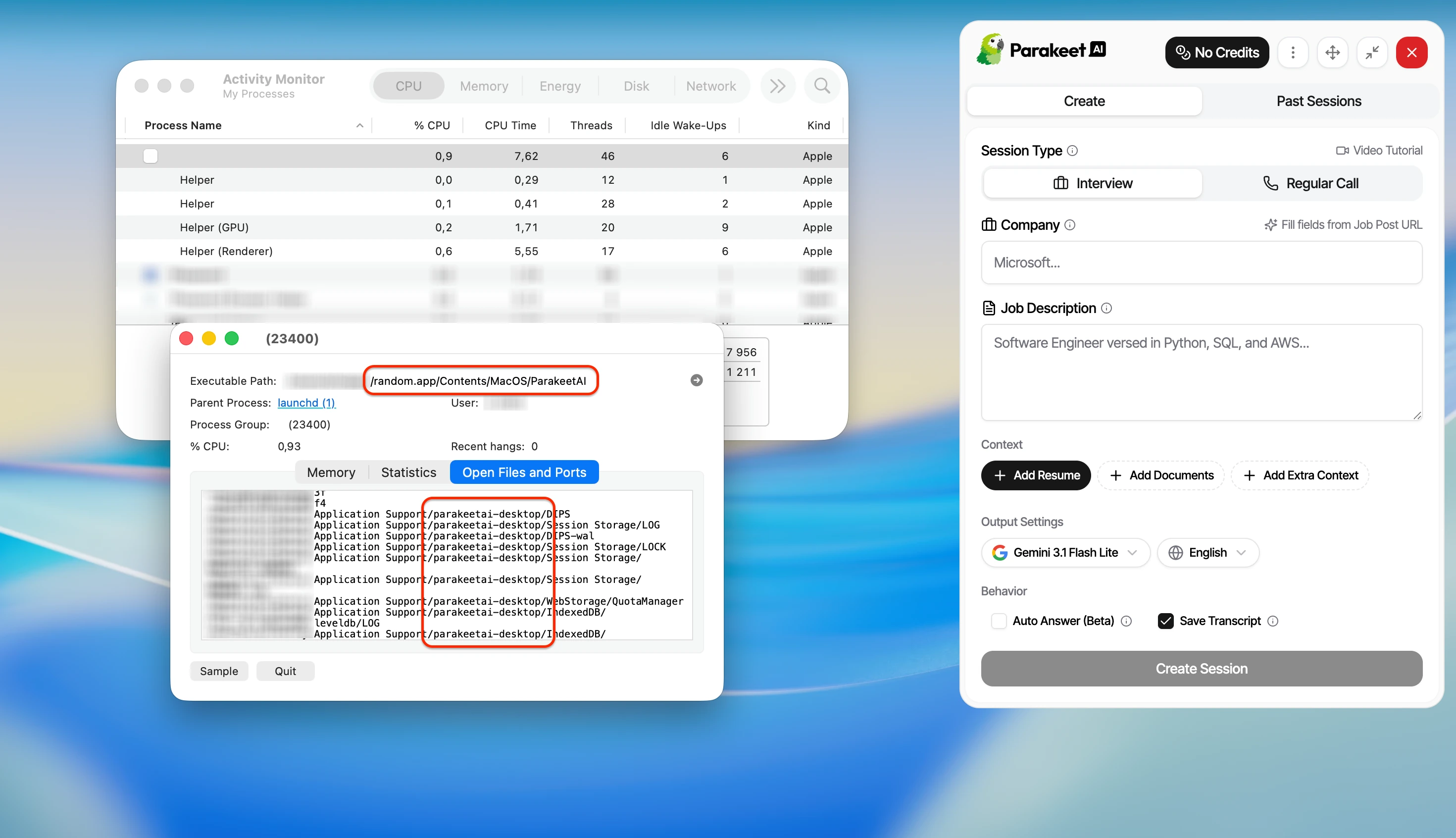
A blank or renamed top-level label did not hide the literal ParakeetAI executable path or parakeetai-desktop support directory during Activity Monitor inspection.
Public marketing claims were checked against
Parakeet AI's website. Findings describe the tested desktop build and repeated scenarios
documented on this page.
Key finding
The problems weren't limited to the AI answers.
Parakeet AI skipped or changed questions and used stale context across
repeated runs. Independent desktop checks also found screen-share
artifacts, focus loss, shortcut leakage, visible cursor behavior,
identifiable app and process paths, and a window that blocked the
workspace underneath it.
Context accuracy tests
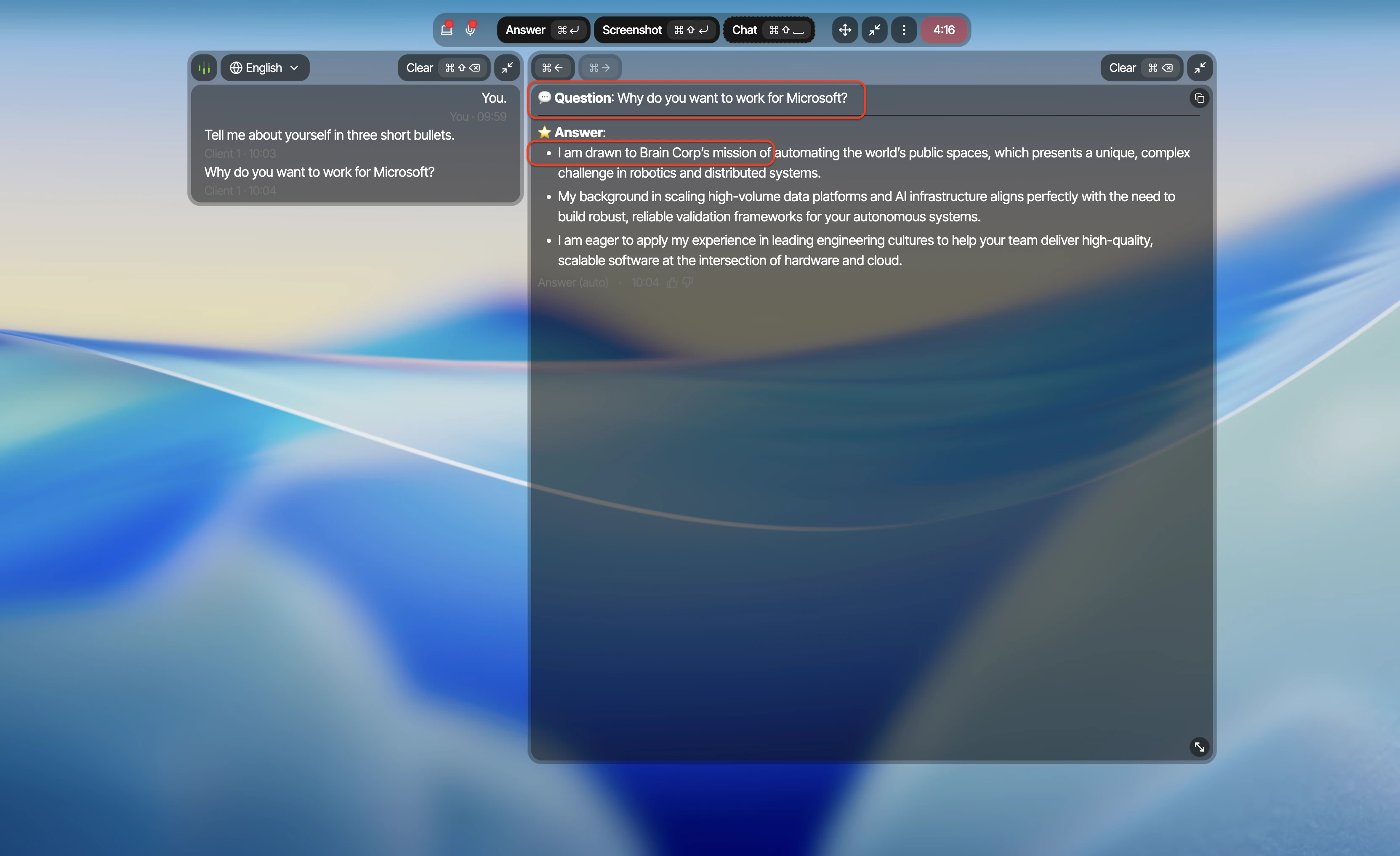
Separate runs showed skipped questions, rewritten prompts, and stale
context
Each example shows a different failure mode. The screenshots keep the
transcript, interpreted question, and generated answer visible together
so the mismatch can be verified directly.
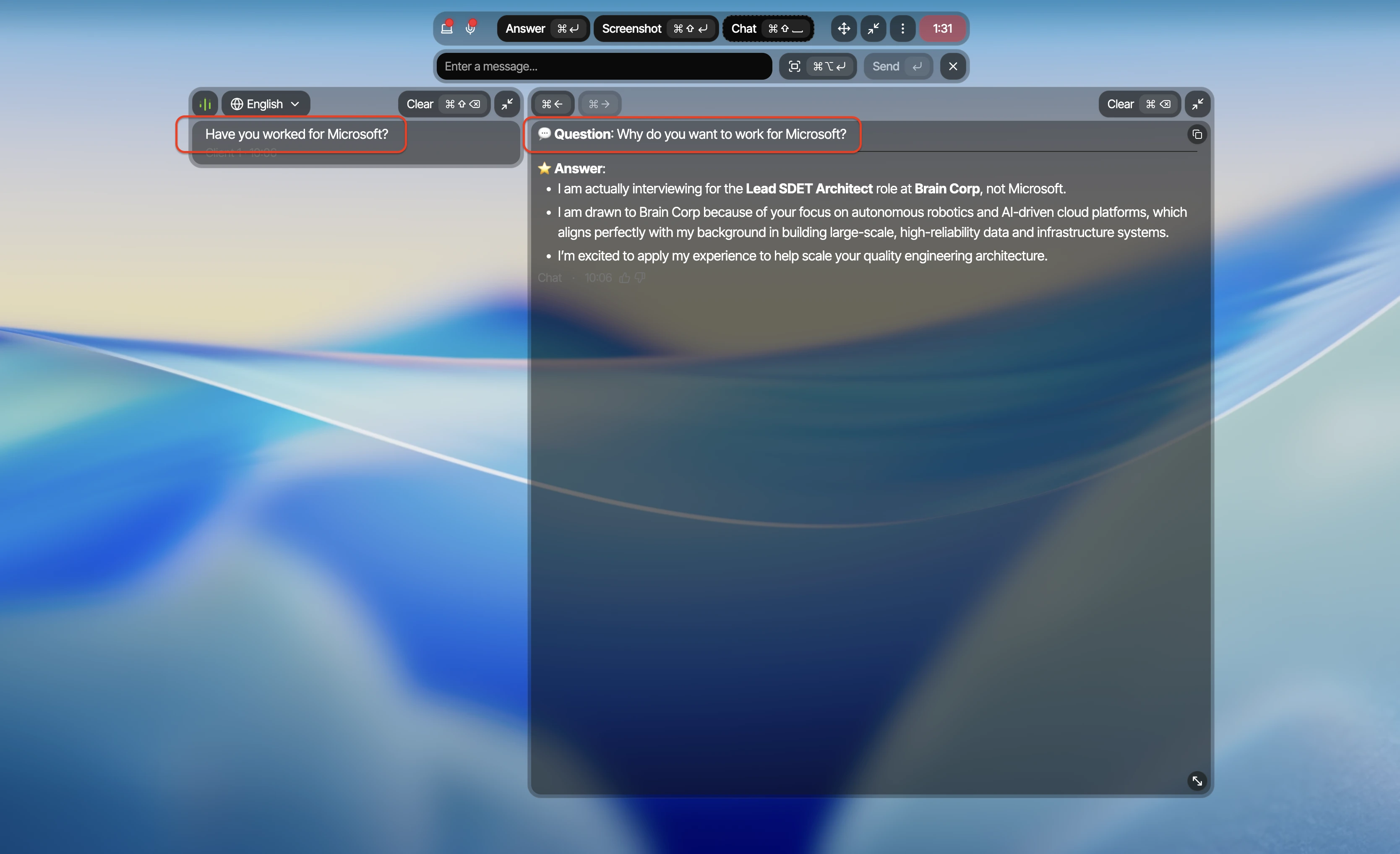
Question rewritten
It rewrote the question before answering
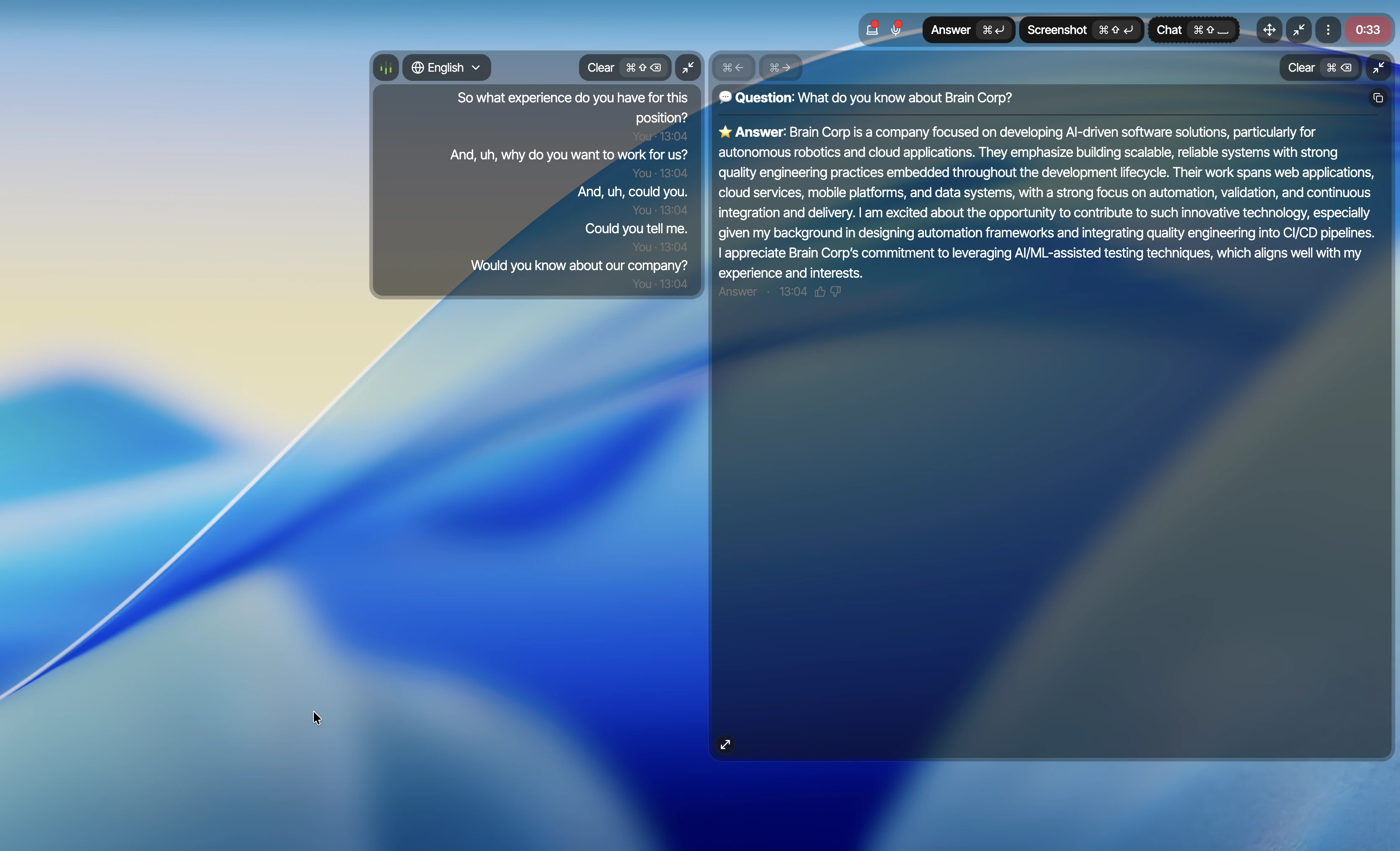
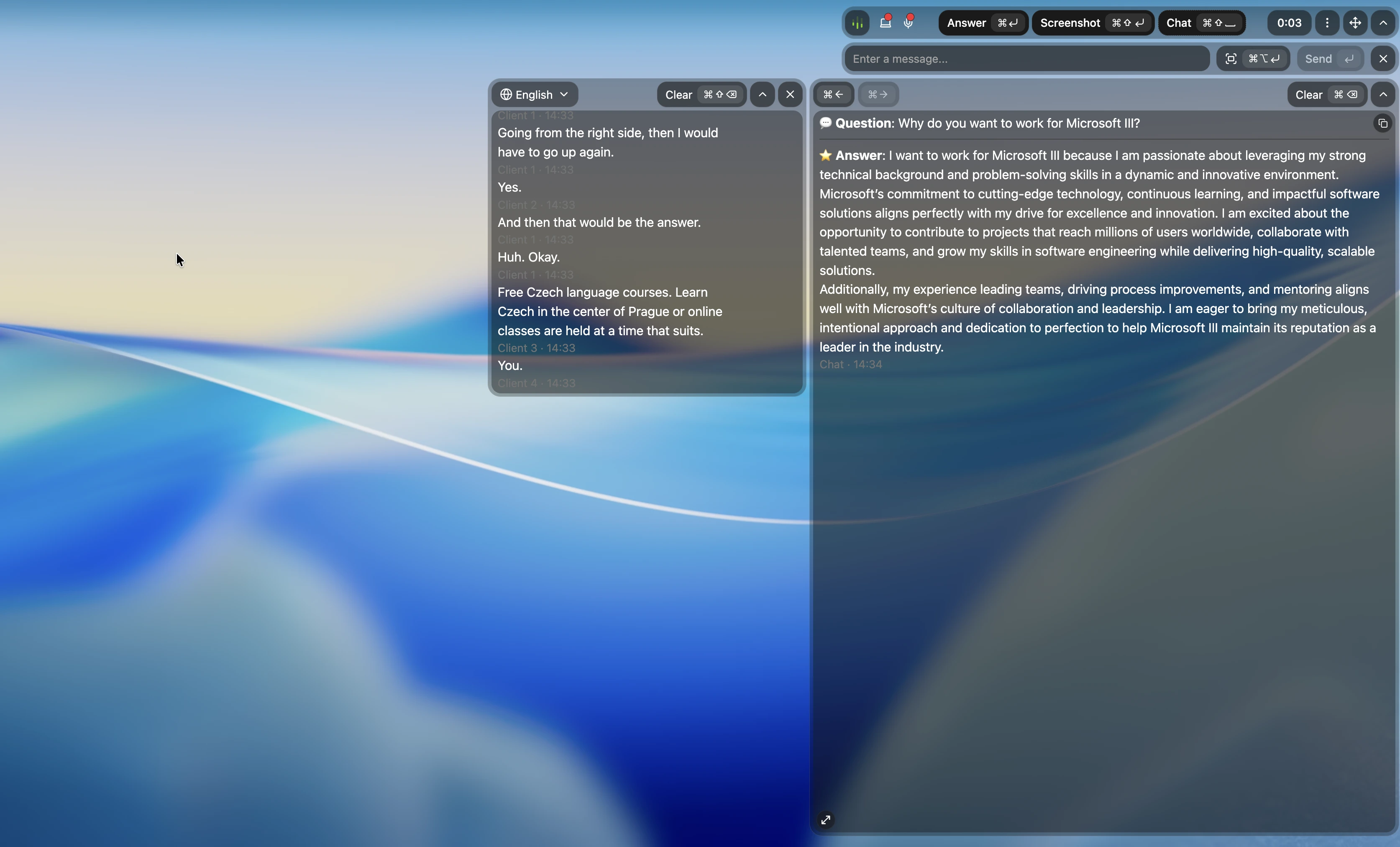
The interviewer asked whether the candidate had worked for Microsoft. Parakeet AI formed a different question about why the candidate wanted to work there, then answered with unrelated Brain Corp context.
Microsoft in the question, Brain Corp in the answer
The visible question was about Microsoft. The answer opened by discussing Brain Corp. This was not merely weak prose; it was the wrong company context.
A separate run again contained multiple clear questions while Auto Answer responded only to one. We therefore treat this as repeatable in our setup, not a one-off mistake.
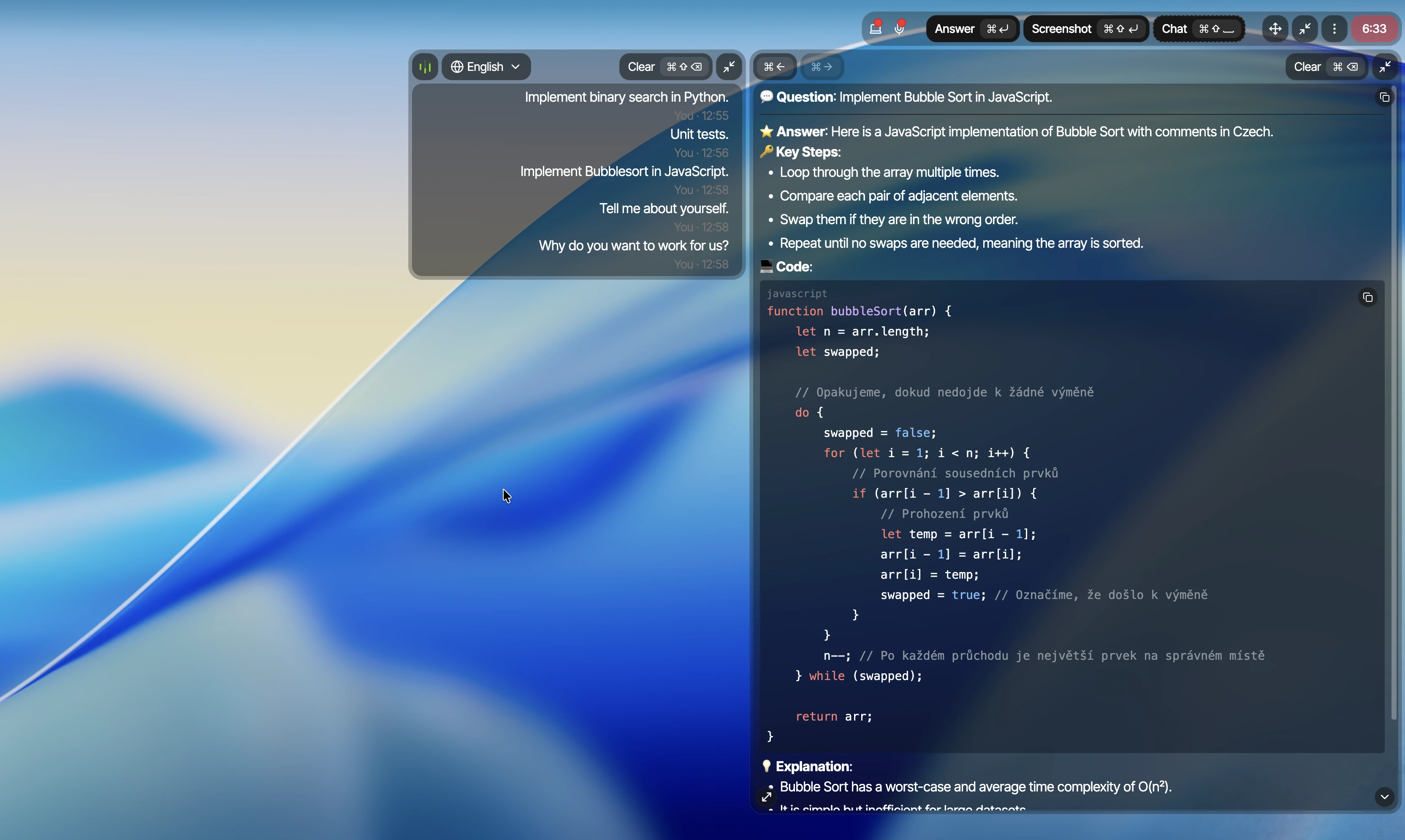
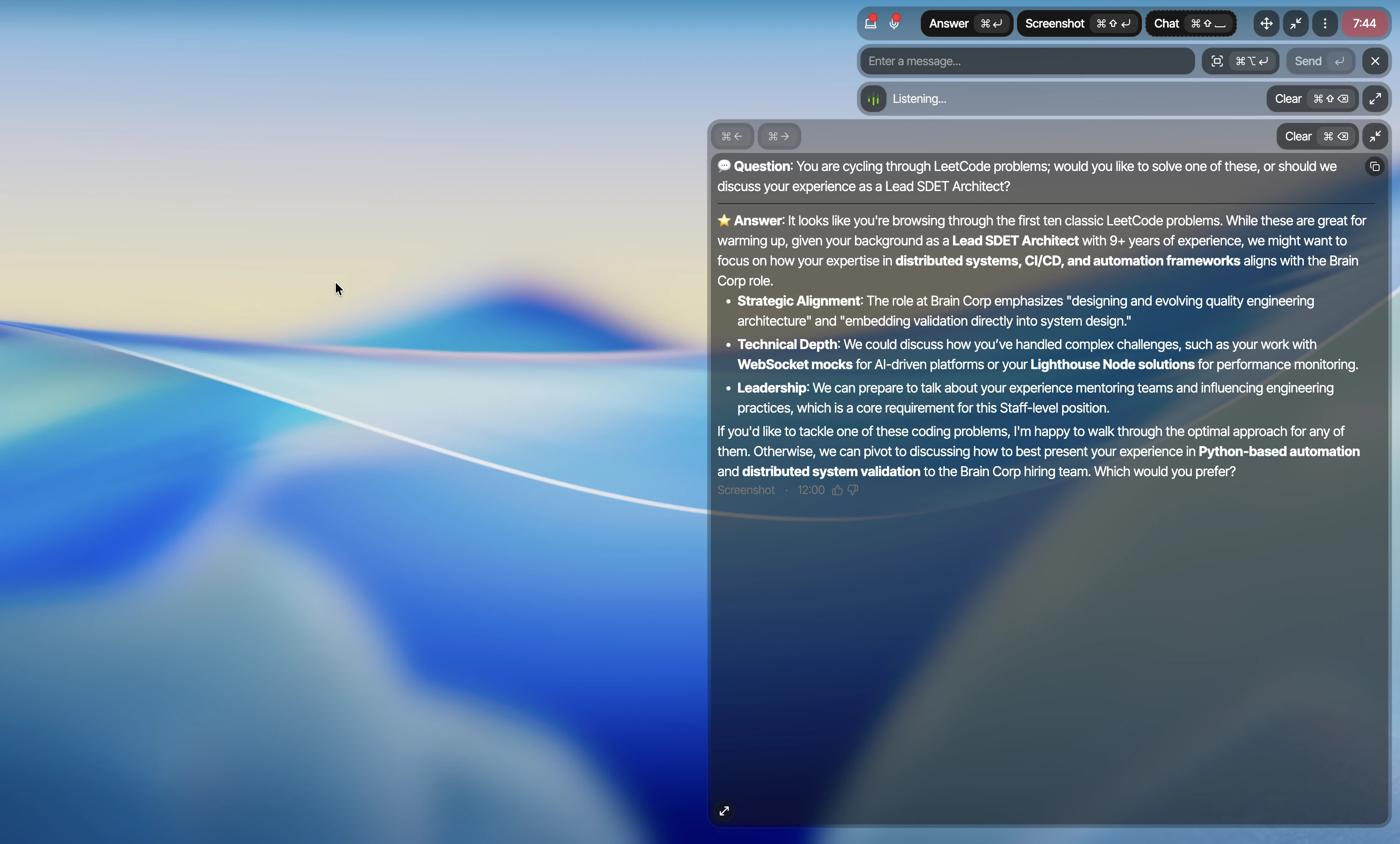
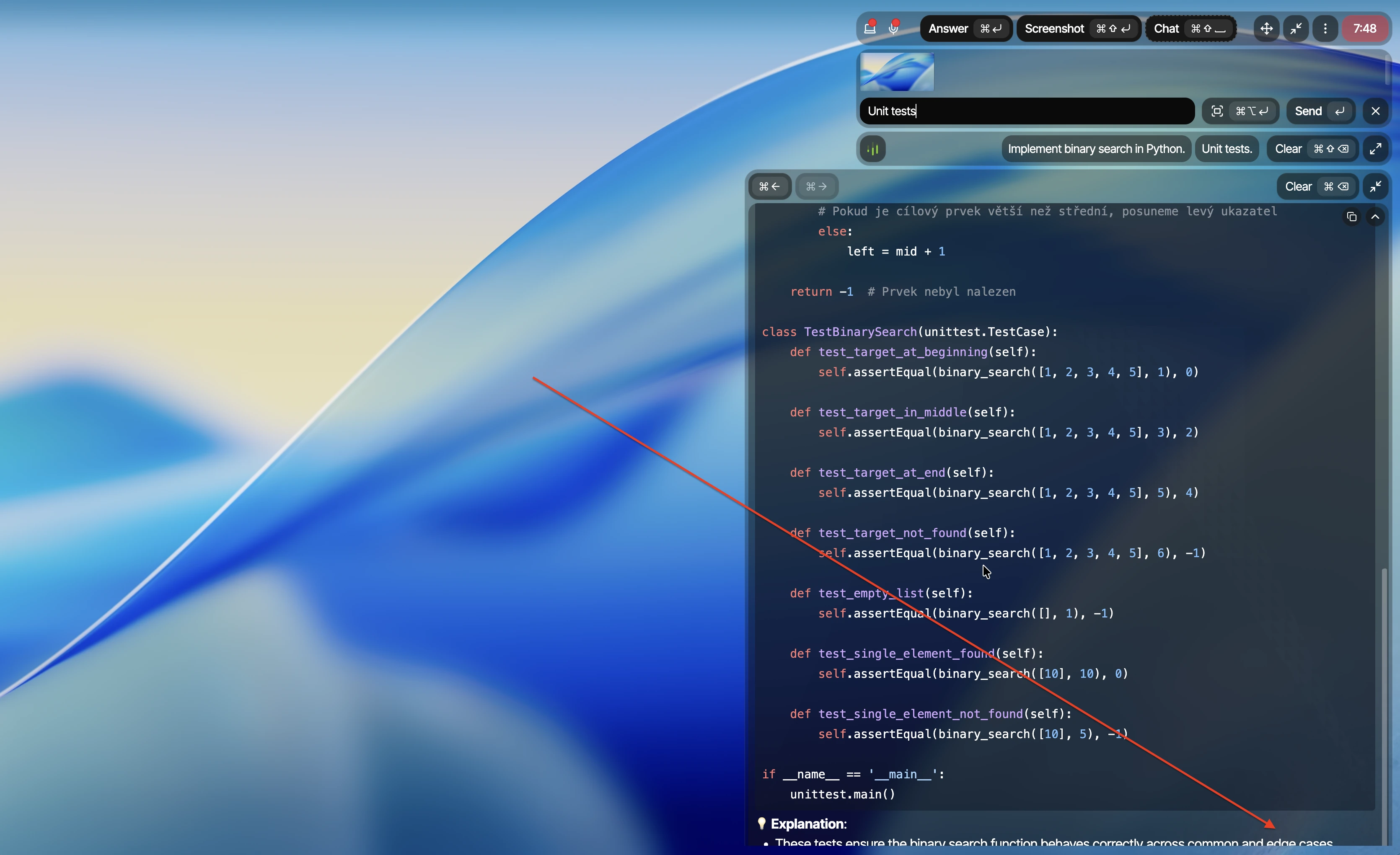
Parakeet AI formed the wrong question and returned meta-level observations instead of the requested coding solution. The answer looked substantial but did not complete the current task.
Hiding the main panel did not hide every observable signal
We tested receiver-side screen sharing, active-window focus, browser
shortcut events, cursor behavior, and normal Activity Monitor
inspection. These are separate checks, not different names for the same
issue.
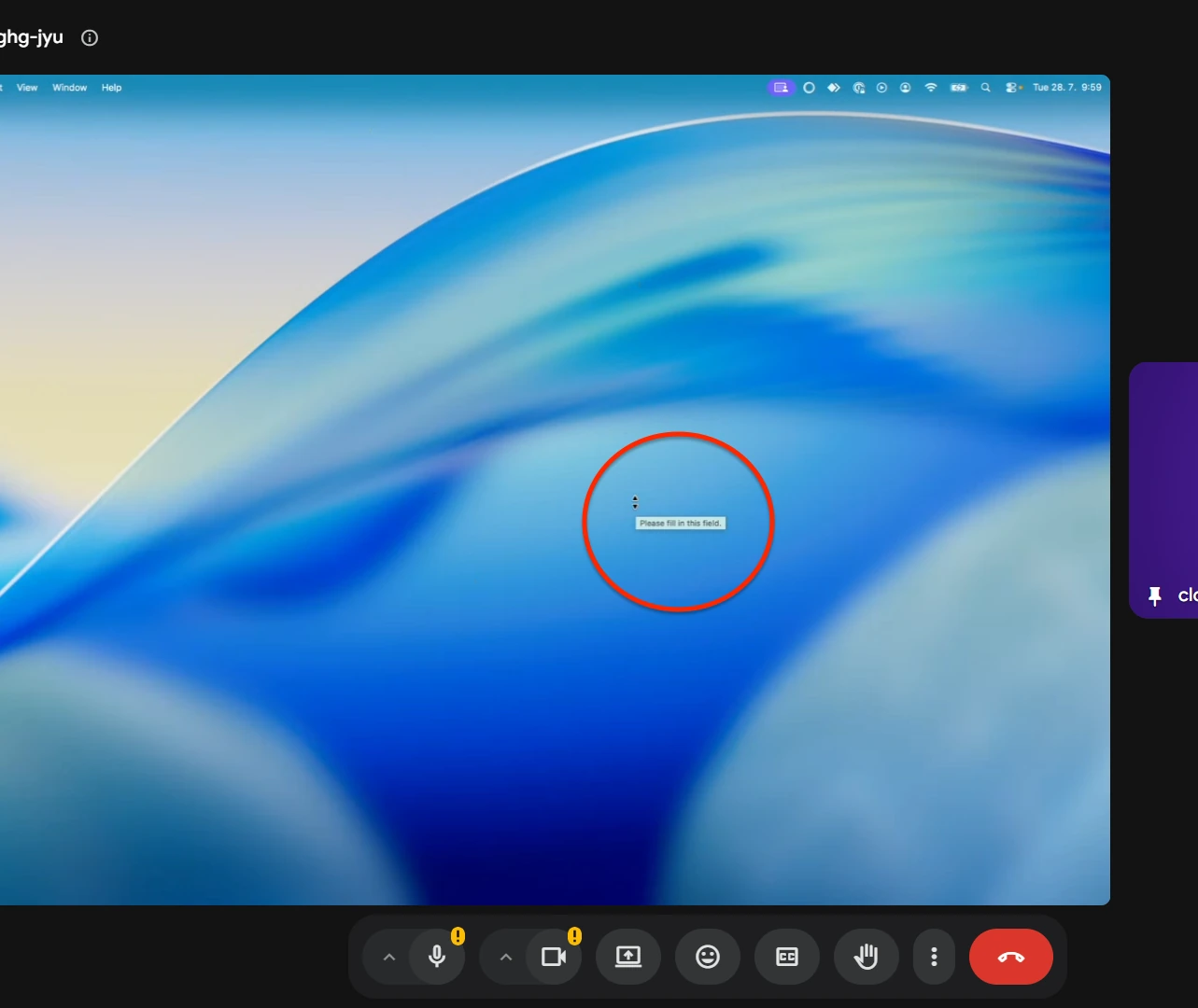
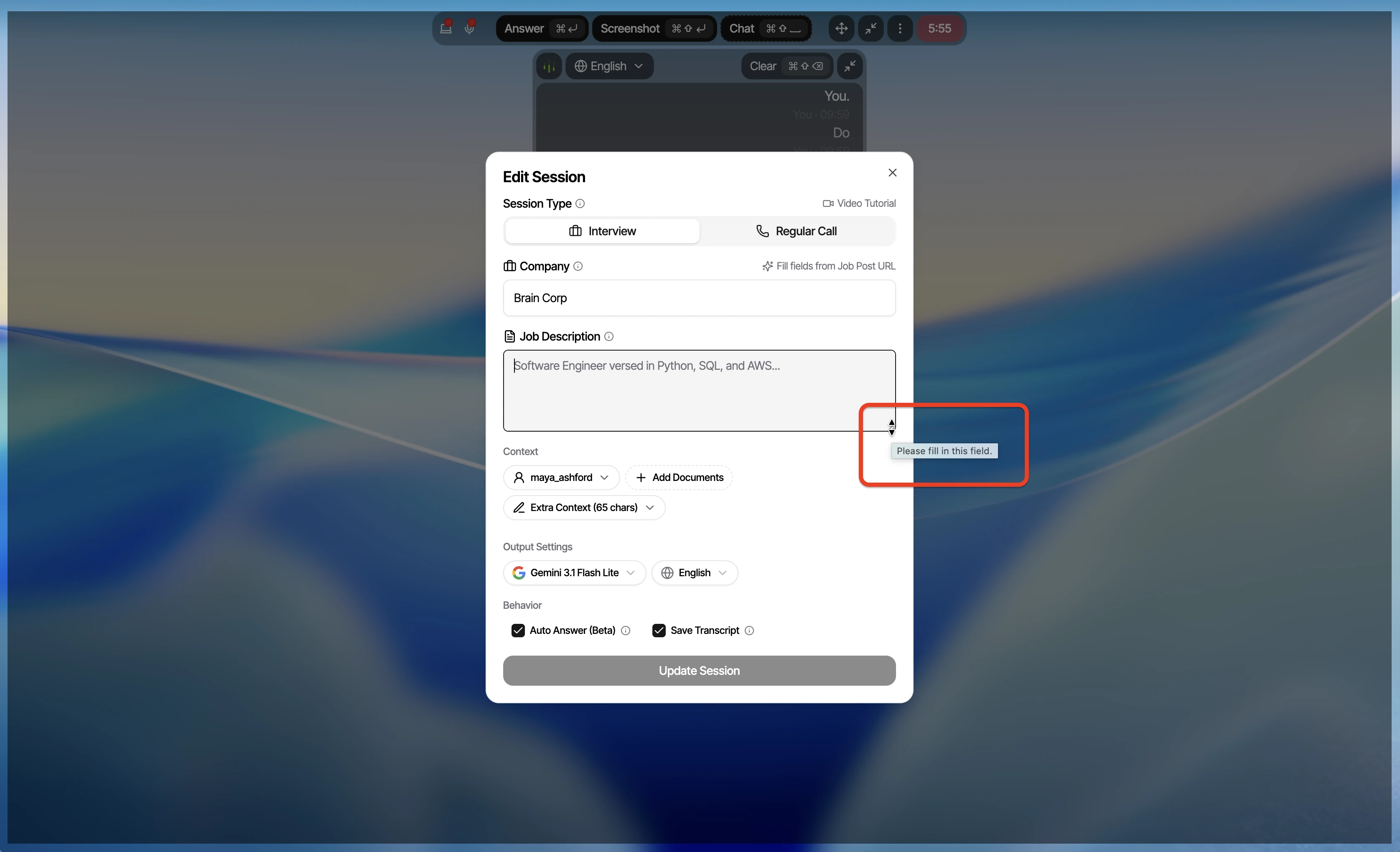
The main Parakeet AI panel stayed hidden, but its native validation tooltip appeared in the receiver-side Google Meet view. A screen-share guarantee has to include child and native surfaces, not only the main window.
From the user's side, the tooltip came from Parakeet AI's form and the pointer changed over resize surfaces. During screen share, those changes can reveal interaction where the receiver sees no assistant window.
Active page lost focus
Moving Parakeet AI stole focus
Moving the Parakeet AI window changed the active application and produced a BLUR event on the interview page. Monitored interview and assessment pages can observe that transition.
Repeated focus change
The focus loss was repeatable
A second recording reproduced the same active-window change during normal Parakeet AI interaction. This was not a one-off event.
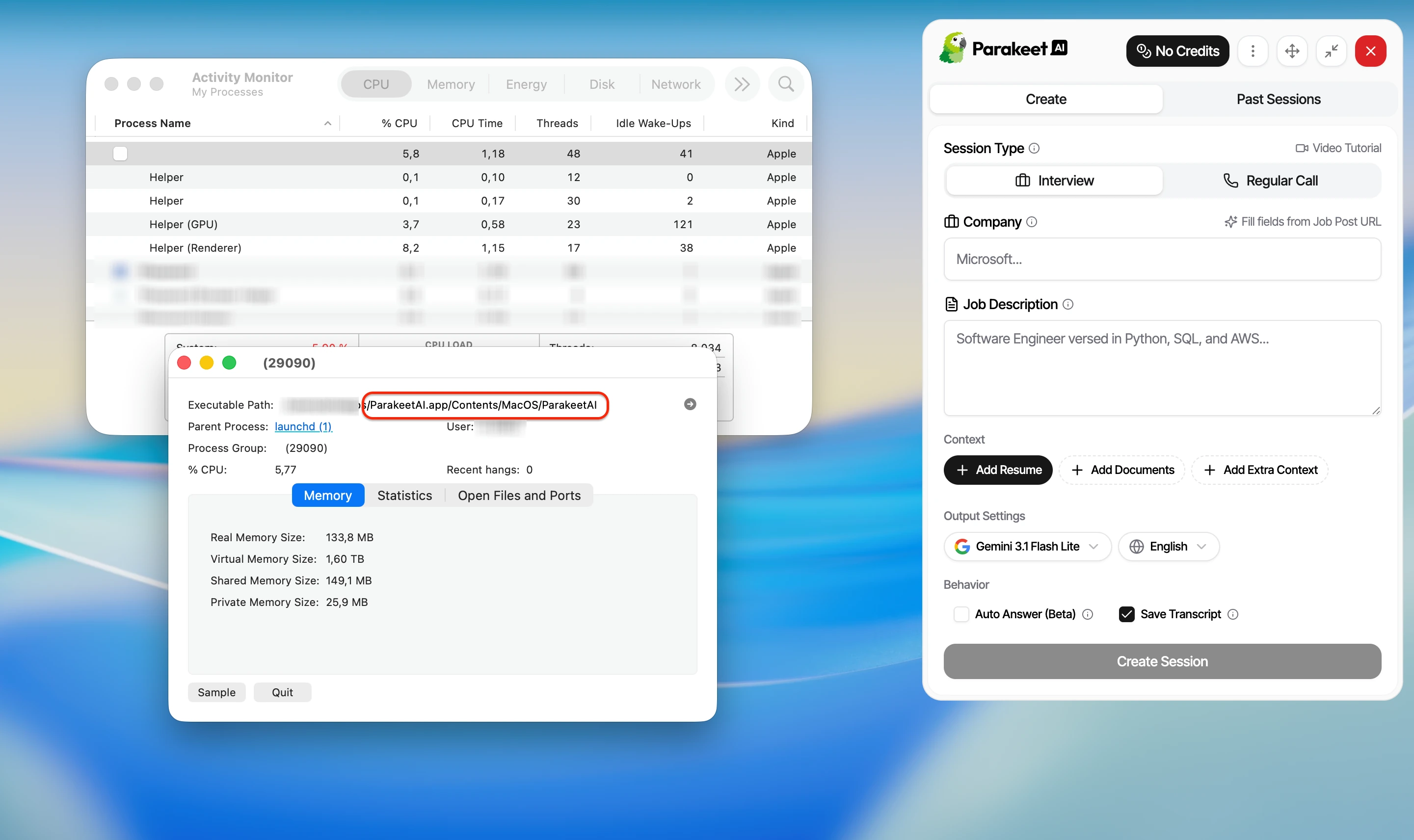
The top-level process label was visually blank, but Activity Monitor inspection still exposed the ParakeetAI executable path. That is easy to identify if a proctor asks for a process check.
After renaming the bundle, inspection still showed the ParakeetAI executable and parakeetai-desktop support path. Removing the visible window title did not remove the product identity.
Same scenario reruns
We reran the same scenarios in CTRLpotato
These comparisons isolate two specific behaviors: whether shortcut
events reach the active page, and how a cluttered full-screen capture is
handled when multiple tasks are visible.
Same active page: Parakeet AI leaked shortcut events
We triggered each product while a browser event logger was active. This test asks a narrow question: do the assistant shortcut events still reach the interview or assessment page?
Parakeet AI resultThe active browser page received Parakeet AI's shortcut events.CTRLpotato resultThe active browser page did not receive CTRLpotato's bound shortcut events.
A monitored assessment can inspect the active page's input stream, making leaked shortcut events observable.
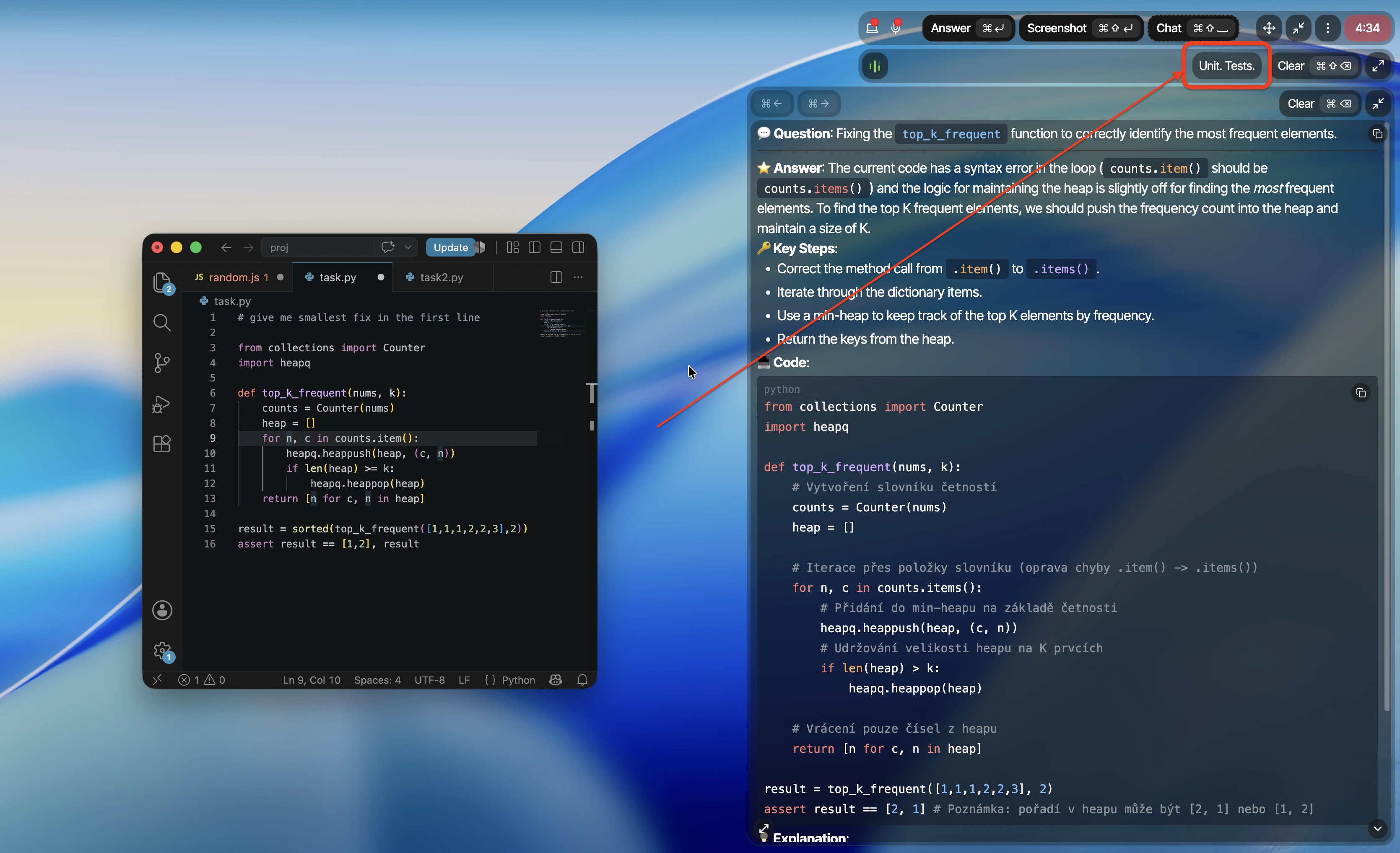
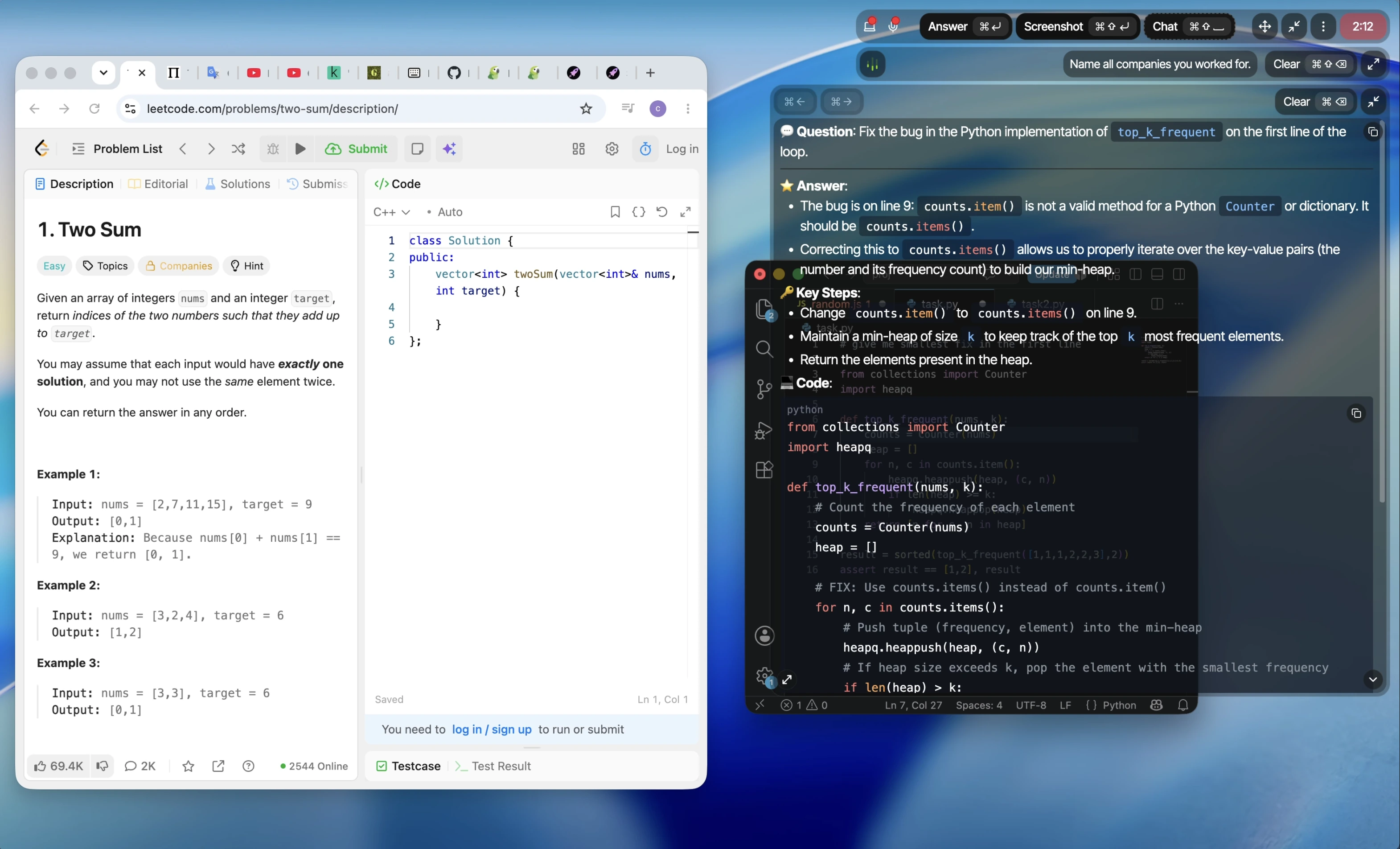
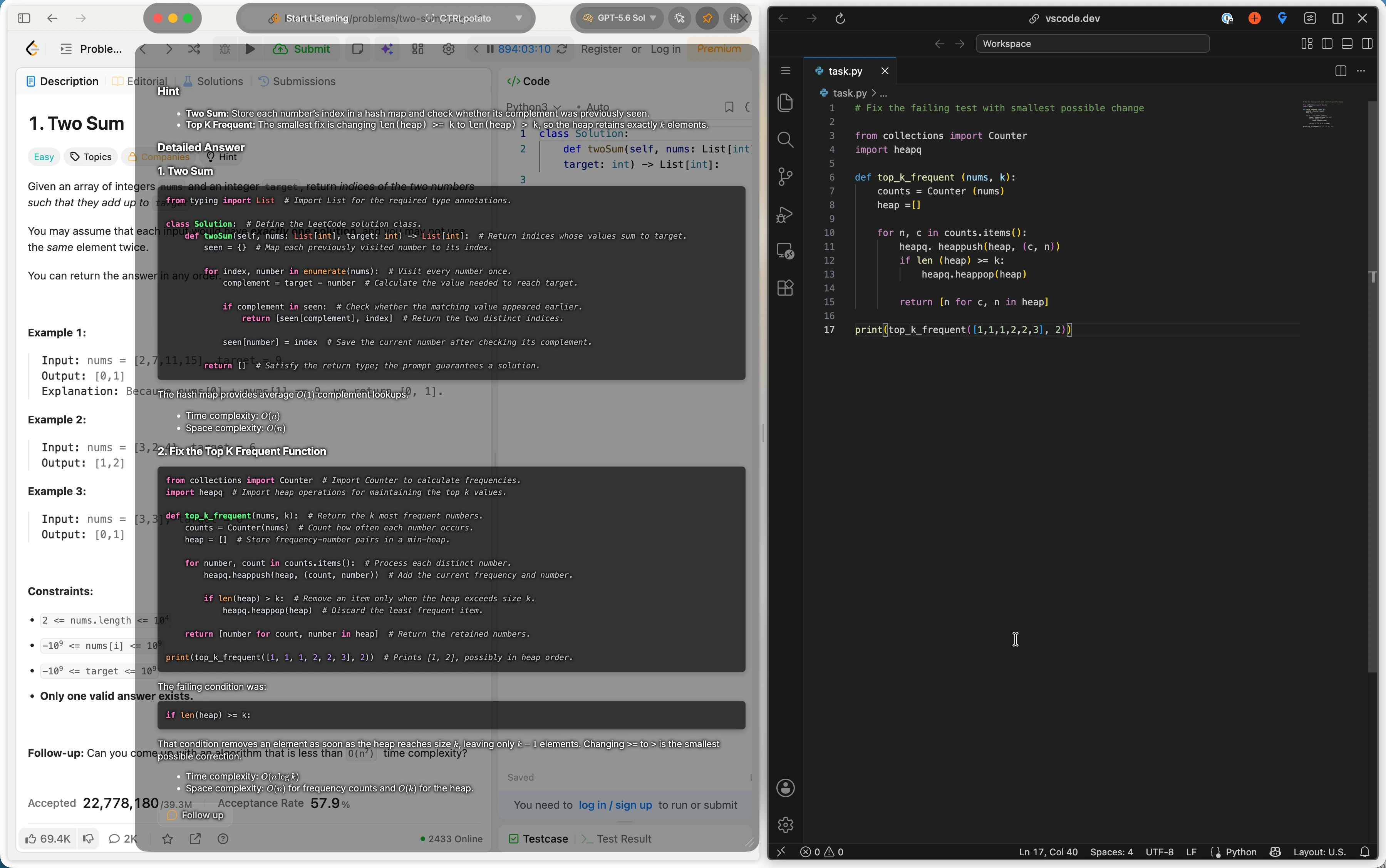
Same cluttered screen: Parakeet AI answered the wrong task
A LeetCode task and a separate top_k_frequent debugging task were visible together. Parakeet AI chose one visible task without a way to specify which one mattered. CTRLpotato can target one task with Area Screenshot; in this full-screen rerun, it correctly answered both.
The same full-screen capture contained two tasks. CTRLpotato answered both.
CTRLpotato can answer everything captured or use Area Screenshot to target one task.
Live workflow
The interface made context mistakes harder to correct
A live interview assistant needs to make the current context obvious,
preserve setup, reveal enough of long answers, and stay out of the
interviewer's way. These issues repeated across our sessions.
Answer trapped in a small window
Long code did not fit the fixed answer area
The generated code extended beyond the visible answer area, and the tested window could not expose the rest cleanly. That is a serious live-use problem even when the underlying code is relevant.
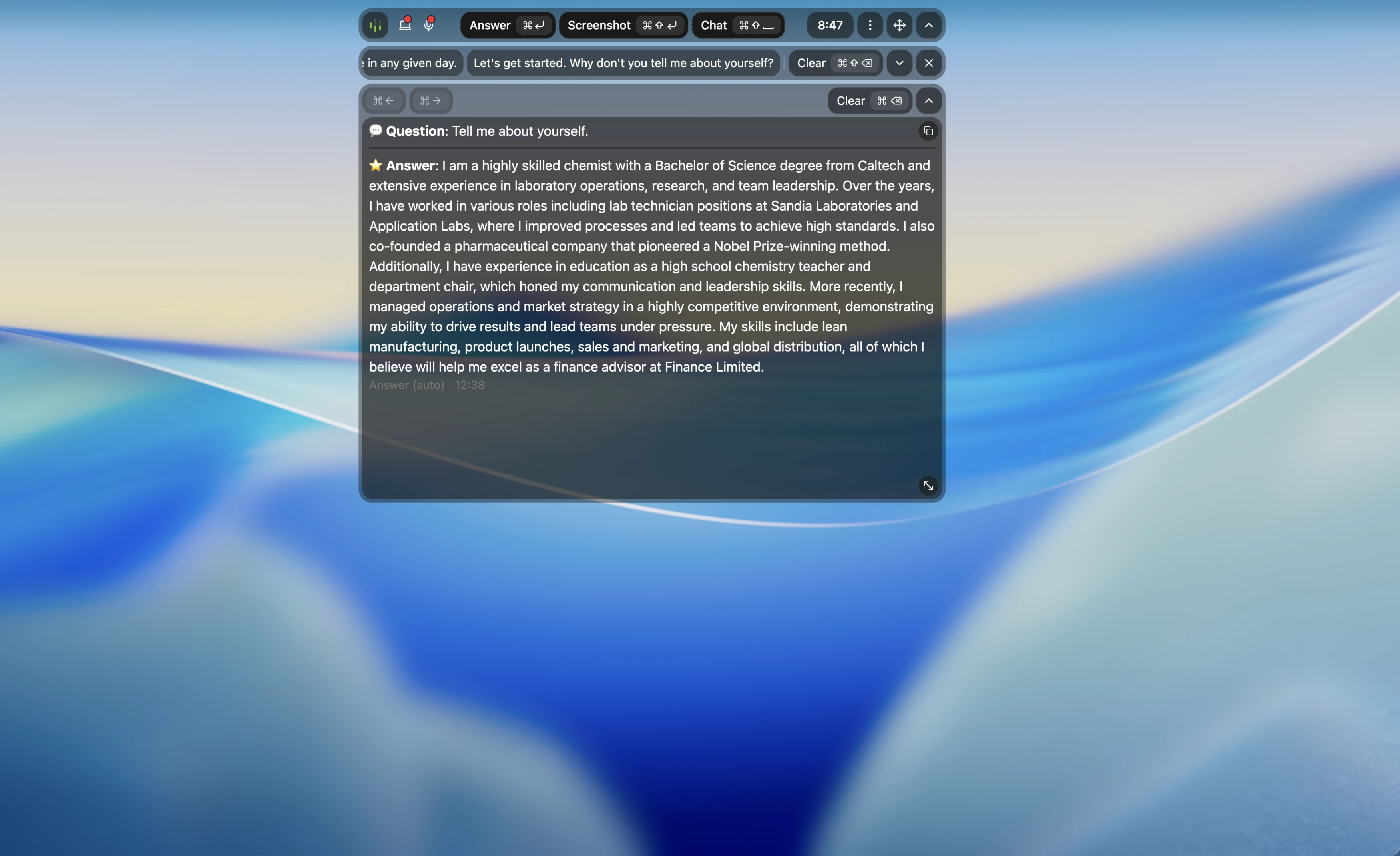
The default response shape was dense prose rather than a few spoken points. It may be readable after the call, but it is difficult to use while an interviewer waits.
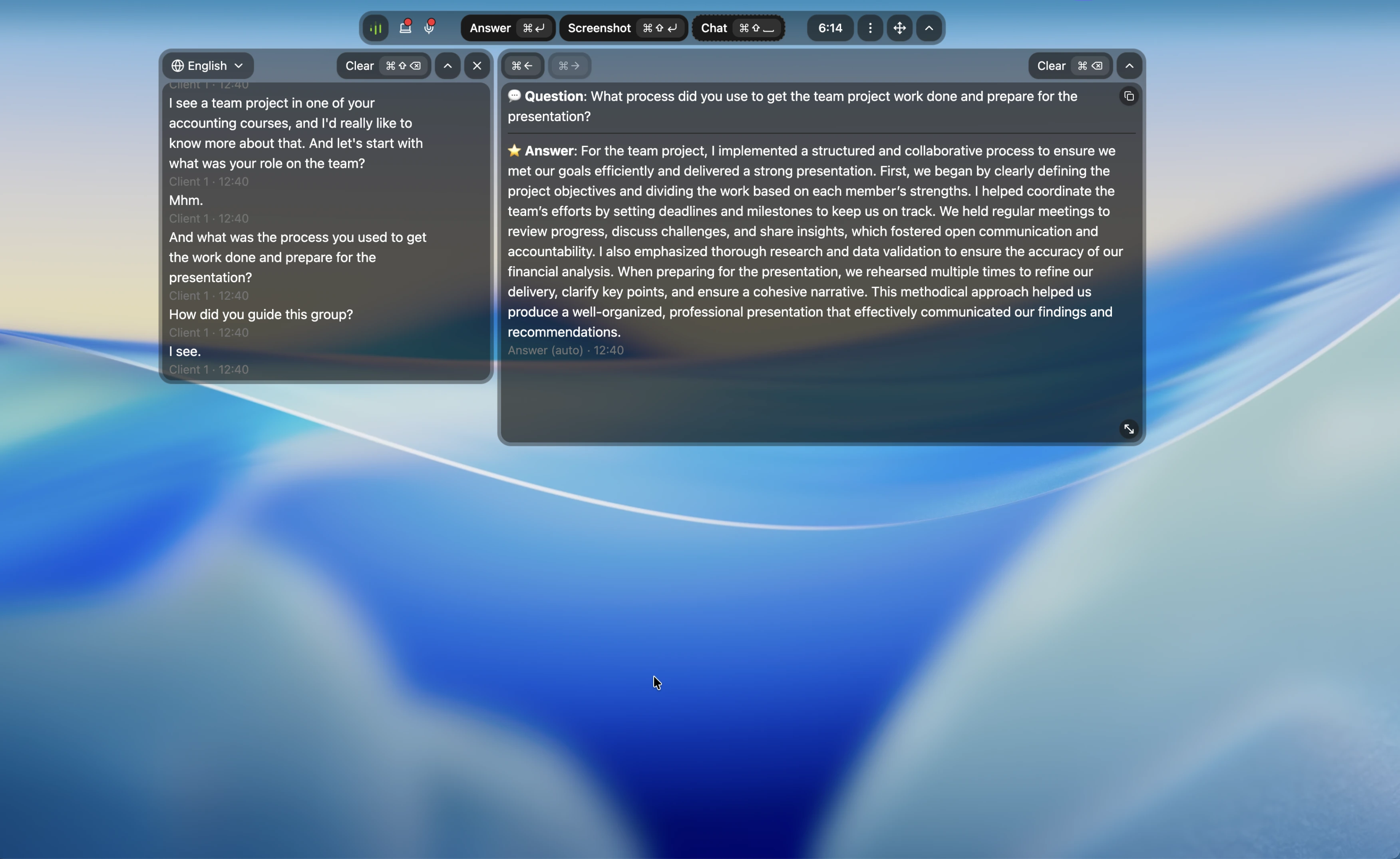
The transcript included filler-like turns such as short acknowledgements, while the answer still expanded into polished prose. Noisy context makes Auto Answer harder to trust.
The transcript introduced words that were never spoken
Another run contained malformed language and fabricated-looking wording in the transcript. The generated answer then treated that context as if it were reliable.
The desktop around Parakeet AI could remain clickable, but the visible Parakeet AI window itself blocked the application underneath. To reach covered browser tabs or controls, we had to move or minimize it, which also risked focus changes.
Repeated setup friction
Session setup did not stay dependable
Across repeated setup attempts, saved company, job, context, resume, and model choices disappeared; pasting into fields often failed; and disabling system audio ended a session mid-interview. Those are workflow failures before answer quality is even judged.
Slow answer delivery
Answers streamed too slowly for a live interruption
Parakeet AI often built long responses token by token at a pace that made the first useful point slow to reach. In a live interview, first-visible usefulness matters more than eventual paragraph completeness.
Security hygiene
Parakeet AI wrote the authentication deep link to disk before redacting
it
The desktop application's persistent log recorded the full
authentication deep link and its Base64 payload. Decoding that
payload produced a structure containing an
authToken field. A later log line hid the token, but the
earlier raw deep-link entry had already written it to disk.
This creates a credential-exposure risk if the log is shared and
represents a clear security-hygiene failure. We are not publishing
the token or raw payload, and we are not claiming to have
demonstrated account takeover.
The free trial is generous, but paid access gets expensive
You can test Parakeet AI before paying
Parakeet AI advertised 10 free sessions of up to 10 minutes. That is
enough to run your own question, audio, focus, and screen-share
checks before making a purchase.
Paid access starts at $38 for a single interview credit
Public pricing data listed one credit at $38, unlimited monthly
access at $149.90, and yearly and lifetime options at $899.90.
Parakeet AI's terms limit the initial refund window to purchases
that remain entirely unused.
Pricing point
CTRLpotato
Parakeet AI public offer
Try before paying
Pass 10 AI answers, no card
Pass 10 sessions up to 10 minutes
Lowest paid entry
Pass $29 Lite / $39 Sprint Pass
Mixed $38 for 1 credit
Unlimited monthly option
Pass $69 monthly Pro
Mixed $149.90 monthly
Annual / lifetime commitment
Mixed Quarterly Pro available
Mixed $899.90 yearly or lifetime
First-purchase refund
Mixed 7 days with light-use limit
Mixed 7 days only if entirely unused
Pricing reflects Parakeet AI's public offers available during this
review. Refund terms were checked against
Parakeet AI's terms. Verify the current checkout before purchasing.
Try the same scenarios yourself - 10 free AI answers, no card.
We tested the product layer, not just the AI model
Scenarios
Repeated Auto Answer interviews, spoken follow-ups, clean and
cluttered coding screens, Google Meet receiver-side sharing, browser
focus logging, shortcut event logging, cursor checks, Activity
Monitor inspection, setup persistence, and local log inspection.
What counted
We looked at whether Parakeet AI answered the current question, kept
the correct company and coding context, produced a usable first
response, stayed hidden from the receiver, preserved focus, isolated
shortcut events, and remained identifiable during normal system
inspection.
Limitations
This review used the free-trial desktop flow. Future versions, paid
limits, other operating systems, and different audio routes may
behave differently. Mobile operation was documented publicly but not
tested by us.
For balance
What Parakeet AI did well
Balance
A tightly constrained short answer worked
When the prompt explicitly requested three short bullets, Parakeet AI produced a relevant, compact response. We are not claiming every answer was poor.
Parakeet AI exposes manual in-session messages and pre-session context fields. In our tests, the issue was that automatic context selection and saved setup did not reliably preserve the current context.
Companion option
A mobile browser companion is available
Parakeet AI documents a mobile-optimized browser view that can run with the desktop session. We did not test how it works in practice or whether it offers the same remote-control capabilities, so we marked that workflow as not tested.
CTRLpotato vs Parakeet AI
The practical difference
Parakeet AI made the current context harder to verify
Parakeet AI combines transcription, automatic answers, manual
messages, screenshots, and pre-session context. The problem wasn't
Auto Answer itself. It was that the product often decided which
question or screen context mattered without giving us enough control
to verify or correct that input quickly when it was wrong.
CTRLpotato makes the current context explicit
CTRLpotato separates Live Coach, Ask AI, Follow Up, selected text,
area screenshots, and a visible context buffer. The user can choose
what the model sees, how the answer is shaped, and whether the
answer appears on the desktop or Mobile Mirror.
Feature / workflow need
CTRLpotato
Parakeet AI in our test
Current question & context control
Auto-detect the current question
Pass Live Coach question detection
Fail Skipped and rewrote questions
Use current company and interview context
Pass Current context stays visible
Fail Stale company context observed
Area screenshots & selected text
Pass Precise visual/text targeting
Not found Area capture not found
Visible multi-screenshot context buffer
Pass Visible context buffer (up to 10 screenshots)
Not found Visible buffer not found
Follow-up questions & text prompts
Pass Follow Up + text Ask AI
Pass Manual messages present
Model selection during the session
Pass Named top-tier model picker
Mixed Pre-session selection only
Programming language control
Pass Auto-detect or choose language
Not found Code-language control not found
Answer instructions & custom prompts
Pass Customize Answers
Mixed Pre-session context with persistence issues
Live answer readability
Pass Customize answer shape
Mixed Short only with explicit prompt
Stealth & desktop control
Receiver-side screen sharing
Pass Assistant UI stays hidden
Fail Native tooltip visible
Active interview window focus
Pass Controls do not take focus
Fail Repeated BLUR events
Cursor behavior over assistant UI
Pass Cursor stays normal
Fail Resize and tooltip tells
Bound shortcut isolation from active page
Pass Shortcut events blocked from the page
Fail Shortcut events reached page
Activity Monitor identity
Pass Dynamic app and process identity
Fail Parakeet AI paths remained identifiable
Click through the visible assistant window
Pass Click-through control
Fail Visible panel blocked apps below
Companion workflow & access
Phone / second-screen option
Pass Mobile Mirror remote + display
Mixed Mobile browser companion available
Try real AI output before paying
Pass 10 answers, no card
Pass 10 short free sessions
Want more control over your interview assistant?
Choose what the AI sees, how it answers, where it appears, and how it
behaves during a live interview. Start with 10 free AI answers, no card
required.
What is the best Parakeet AI alternative for interviews and online assessments?
CTRLpotato is a strong Parakeet AI alternative when current-question control matters. It adds area screenshots, selected text, a visible multi-screenshot context buffer, in-session top-tier model selection, answer customization, non-focus-stealing controls, dynamic local identity, and Mobile Mirror.
Does Parakeet AI answer every interview question?
Not in our tests. Across repeated runs, Parakeet AI skipped several complete questions, rewrote one question into a different one, answered with stale company context, and ignored a spoken coding follow-up.
Is Parakeet AI actually undetectable?
Not based on our tests. A native tooltip appeared in our receiver-side Google Meet share, normal interaction caused focus loss, shortcut keys reached the active page, cursor behavior changed over assistant surfaces, and Activity Monitor inspection exposed identifiable Parakeet AI paths.
Is Parakeet AI visible during screen sharing?
The main Parakeet AI panel stayed hidden in our receiver-side test, but a native validation tooltip appeared on the shared screen. Cursor behavior also changed around the hidden assistant surface. That does not support a 100% invisible claim.
Does Parakeet AI steal focus?
Yes in our tests. Moving and interacting with the Parakeet AI desktop window repeatedly caused the active interview page to log BLUR events.
Does Parakeet AI show up in Activity Monitor?
The obvious top-level label can be blank or cosmetically renamed, but normal Activity Monitor inspection exposed the ParakeetAI executable path and parakeetai-desktop support directory in our test.
Does Parakeet AI work with HackerRank?
It may work in some HackerRank sessions, but we would test the exact setup before relying on it. Our desktop testing found focus changes, shortcut leakage, identifiable local paths, and no area screenshot targeting. Those behaviors can matter on monitored coding platforms.
Does Parakeet AI work with LeetCode?
Parakeet AI can answer a clean LeetCode-style prompt. On a cluttered screen with two visible tasks, it guessed which one mattered and answered the wrong task. We found no area-capture step to target only the relevant assignment. Practice and a real multi-window interview are different tests.
Is Parakeet AI secure?
Our bundle and local-log review found a security-hygiene issue. Parakeet AI wrote the full authentication deep link and its Base64 payload to a persistent local log before later log entries hid the token. Decoding the payload revealed a structure containing an authToken field. We publish only a sanitized description and are not claiming account takeover or that the token was reusable.
How much does Parakeet AI cost?
At the time of this review, Parakeet AI's public pricing data listed one credit at $38, larger credit packs, unlimited monthly access at $149.90, and yearly and lifetime options at $899.90. It also advertised 10 free sessions of up to 10 minutes. Prices can change, so verify the checkout before purchasing.
Is Parakeet AI good for live interviews?
It can produce a useful response when the prompt is clean and explicitly constrained. We would not rely on the tested desktop workflow for a high-stakes live interview because current-question tracking, setup persistence, answer readability, focus, screen-share artifacts, shortcuts, and local identity all failed in ways that were repeatable in our setup.