Final Round AI alternative - live Copilot and coding test
Final Round AI Review: The Live Copilot Was Hard to Trust
Final Round AI promises instant, focused, résumé-aware answers, live
coding help, and an invisible desktop Copilot. In our macOS and Windows
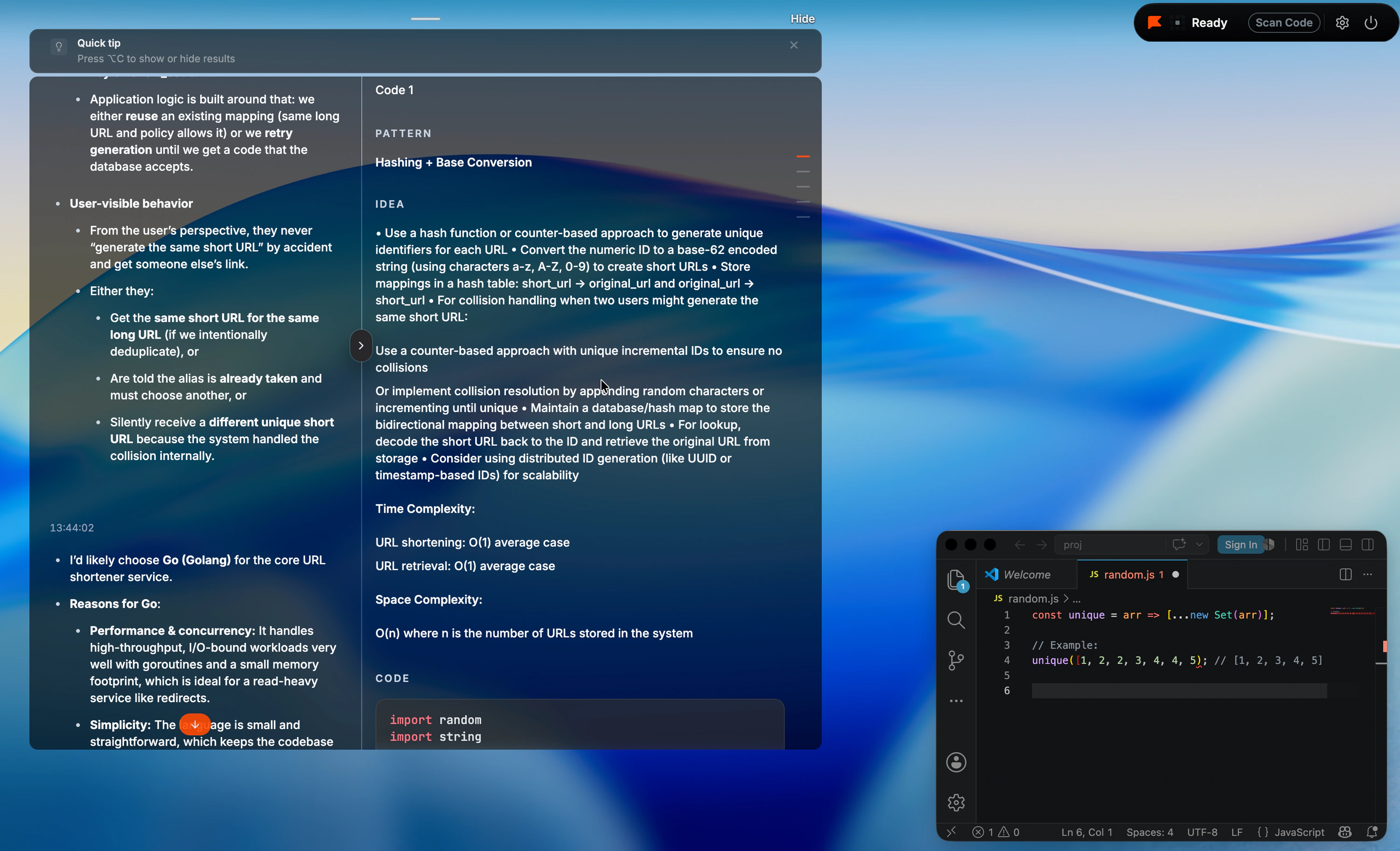
desktop tests, Scan Code continued the previous URL-shortener discussion
instead of analyzing the JavaScript visible in VS Code. The Copilot also
responded to setup conversation, filled the answer stream with long
competing responses, changed the active window's focus, and remained
identifiable in Windows Task Manager. Its cursor behavior also exposed
assistant interaction, while native tooltips could remain visible
during screen sharing.
Tested: July 2026Platform: macOS and Windows 11 desktop appsVersion: 2.5.0Evidence: desktop observations, screenshots, focus video, Task
Manager inspection
Should you use Final Round AI in a live interview or online assessment?
Our read
Final Round AI offers useful preparation features and setup
controls, but we found the live Copilot difficult to trust once the
interview became dynamic.
The strongest finding was that Scan Code continued the previous
URL-shortener discussion instead of analyzing the JavaScript visible
in VS Code. We also saw replies to setup conversation, long
overlapping answers, active-window focus changes during setup, and
clearly identifiable Final Round processes in Task Manager. The
cursor also changed over assistant UI, and native tooltips could
remain visible during screen sharing.
Final Round AI may fit
Mock interviews and broader interview preparation
Users who want model and answer-style choices before a call
Sessions where every answer can be reviewed before using it
Pick CTRLpotato if
You need area screenshots or selected-text targeting
You want the current context visible before asking AI
You need controls that do not take focus from the interview
You want explicit Ask AI, Follow Up, and Live Coach modes
You want Mobile Mirror as a remote control and second screen
Test summary
The short version
Biggest failure
Scan Code answered the previous problem instead
VS Code showed a JavaScript task, but Scan Code continued the earlier URL-shortener discussion and generated code for that previous context instead.
Desktop result
The desktop behavior exposed multiple tells
The setup window changed focus, the cursor changed over assistant UI, native tooltips could remain visible during screen sharing, and Windows Task Manager listed Final Round AI by name.
What worked
Useful setup controls and résumé context
The app exposed model, language, answer-style, coding, and system-design controls, and a later behavioral answer used the candidate's background.
Claim and risk audit
How Final Round AI's biggest claims held up
Claim / check
Observed result
Why it matters
Proof
"Keeps answers focused and relevant"
Fail Scan Code used the previous context
With unrelated JavaScript visible in VS Code, Scan Code continued the previous URL-shortener problem instead of analyzing the code on screen.
Instead of analyzing the JavaScript visible in VS Code, the recorded result continued discussing hashing, Base62, collisions, and URL lookup from the previous task.
The cursor changed over assistant UI, native tooltips could remain visible during screen sharing, and Windows Task Manager showed Final Round and Final Round AI by name.
Public marketing claims were checked against
Final Round AI's website. Findings describe only the documented desktop tests on this page.
Untested criteria remain marked Not tested.
Key finding
A correct answer to stale context is still the wrong answer.
The biggest issue we found was current-context control. With JavaScript
visible in VS Code, Scan Code continued the previous URL-shortener
discussion instead of analyzing the code on screen. The answer itself
was detailed, but it solved the wrong problem. Separate desktop checks
also found focus changes and clearly identifiable Final Round processes
in Task Manager.
Current-context evidence
Scan Code lost the current task, while the live stream became harder to
supervise
The first screenshot shows the key coding result. The next two show why
supervising the live Copilot became difficult, even when it eventually
used the candidate's résumé context.
Current-context failure
Scan Code answered the previous problem, not the code on screen
Scan Code was triggered while an unrelated JavaScript function was visible in VS Code. Instead of analyzing that code, Final Round AI continued the earlier URL-shortener discussion, covering hashing, Base62, collisions, and URL lookup before generating code for the previous problem.
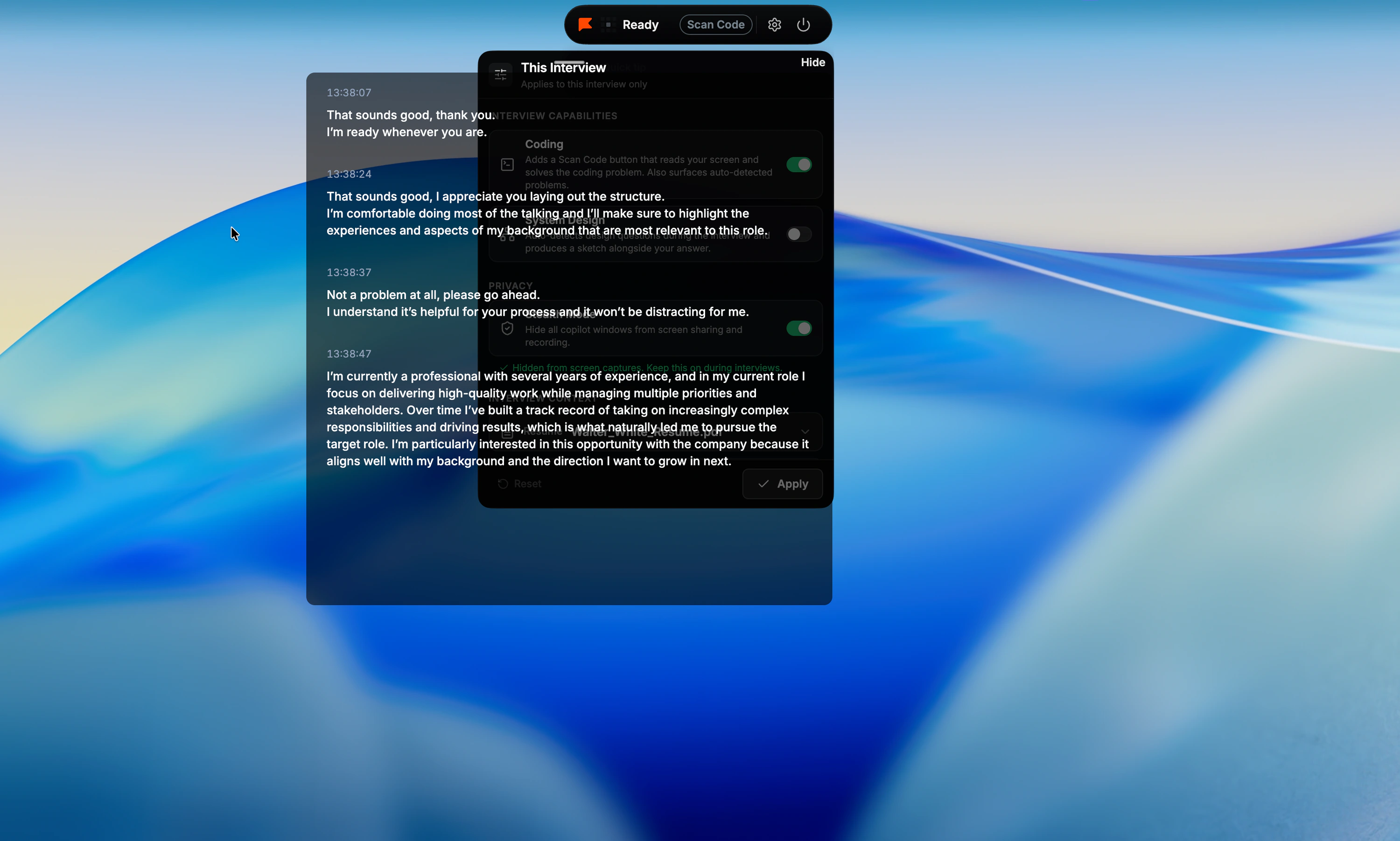
The answer stream suggested replies to ordinary setup remarks before the substantive interview answer appeared. The same screenshot also shows the settings panel covering much of the live answer stream.
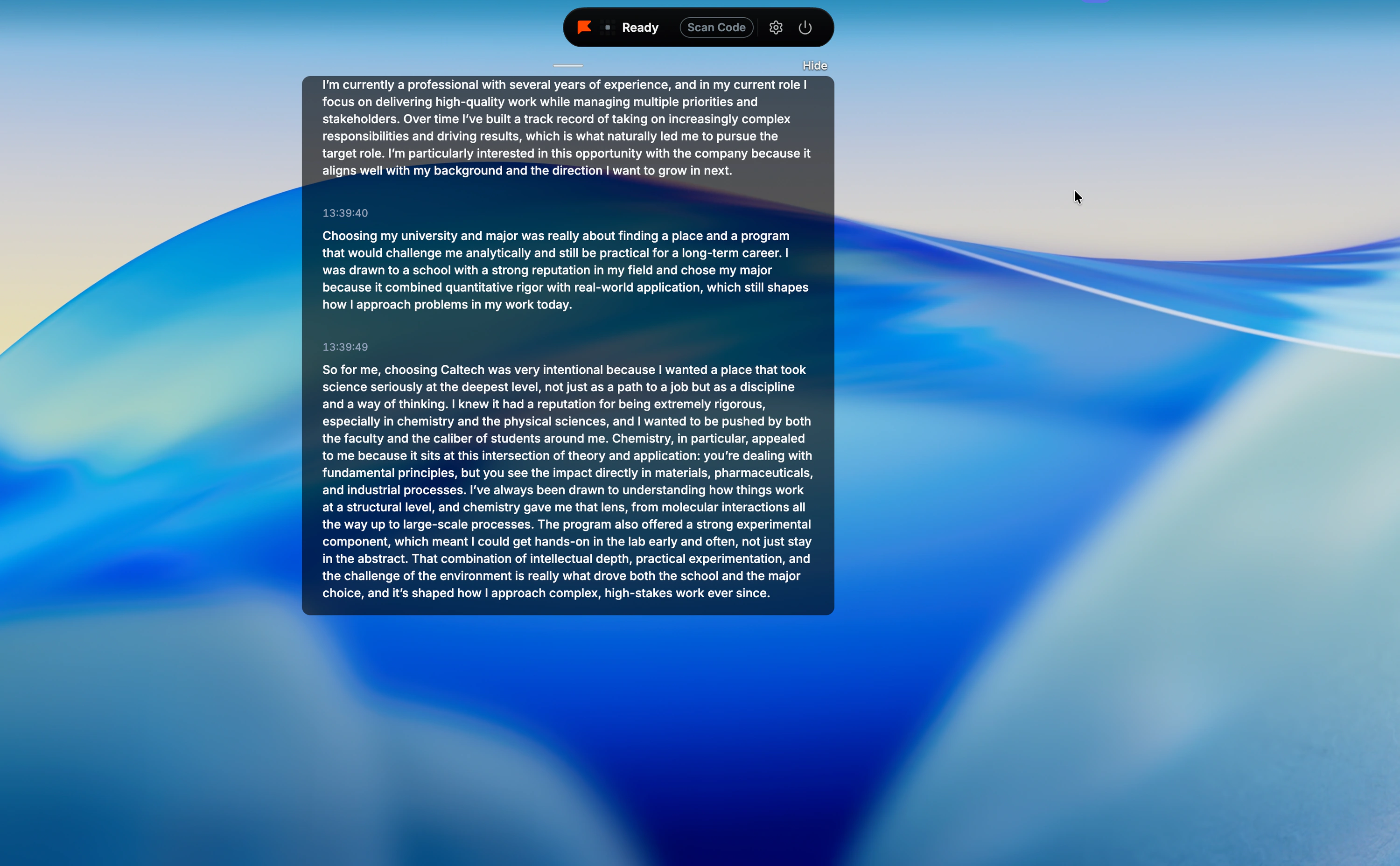
Two different answers appeared around the same topic
The Copilot first produced a generic university-and-major response, then surfaced a much longer Caltech-and-chemistry answer nine seconds later. The later answer used résumé context, but both remained in the stream and competed for attention.
Focus changed, the cursor exposed the UI, and tooltips could leak
These are separate desktop findings. The active interview page recorded
focus changes, the cursor changed over assistant UI, native tooltips
could remain visible during screen sharing, and a normal Task Manager
inspection exposed Final Round AI by name. Shortcut isolation was not
tested.
Active page lost focus
Opening the setup window changed the active application
Our browser logger recorded BLUR and FOCUS events while the Final Round AI setup window was opened and adjusted. Interview and assessment pages can observe that active-window change.
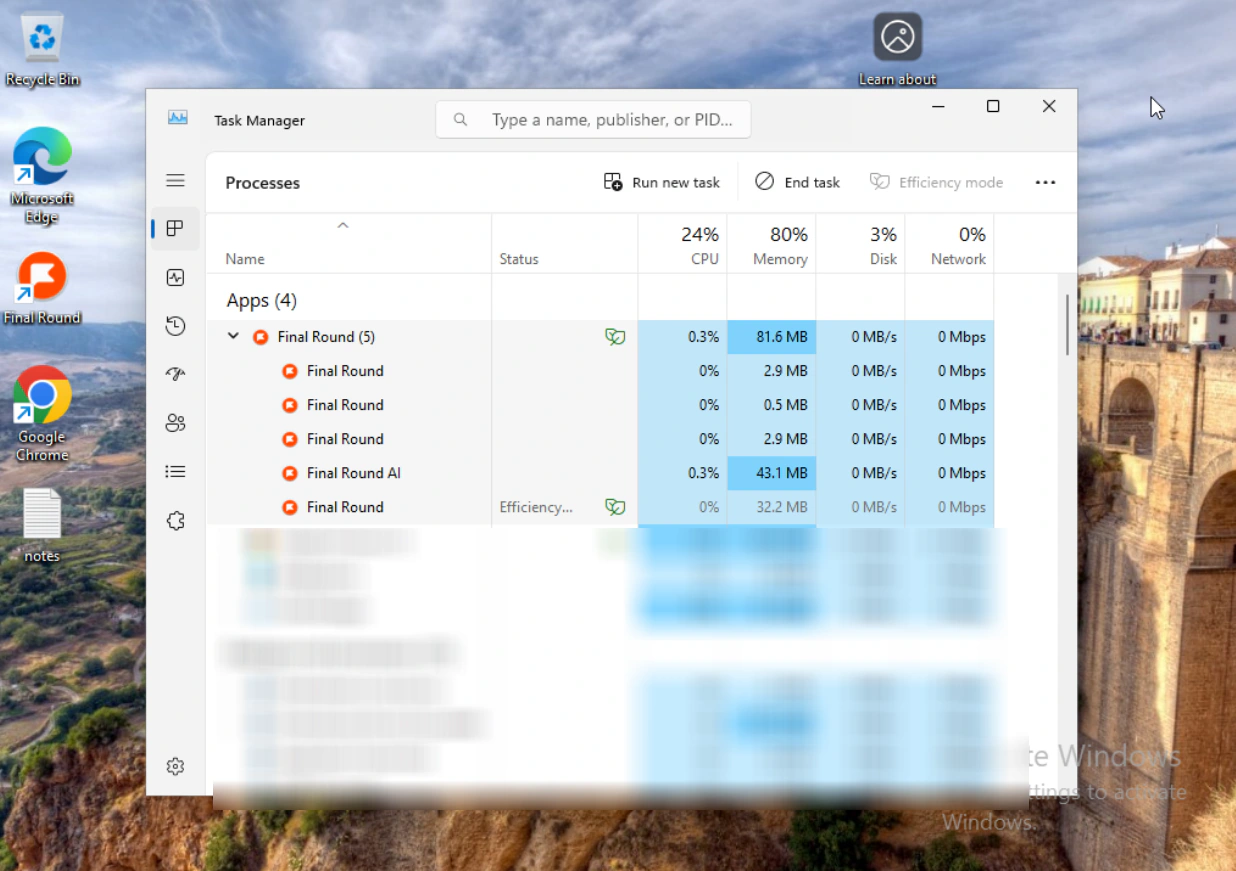
Final Round AI remained identifiable in Task Manager
Windows Task Manager displayed multiple Final Round and Final Round AI processes with the product icon. This is evidence from normal local system inspection, not a receiver-side screen-sharing test.
Live workflow
The live interface made a context mistake harder to recover from
Final Round AI offered useful setup controls. Once the session was
active, however, there was no precise targeting step for the current
editor, settings covered the answer, and long responses remained in the
stream.
No precise capture step found
Scan Code did not offer an area selector in the tested flow
We found a full-screen Scan Code action, but no area screenshot or selected-text step for targeting the current editor. When multiple tasks were visible, there was no way to specify exactly what the AI should analyze.
Current answer obscured
Settings covered the live answer
Opening This Interview placed a large settings panel over the current answer. Adjusting coding, system-design, or answer settings therefore obscured the response you were trying to follow.
Default mode
Default mode produced long answers
Default mode produced long responses, and multiple versions remained visible in the stream.
Public review context
Other Final Round AI reviews describe similar live-use problems
Public reviews are self-selected and do not determine our benchmark
outcomes. We include them only where the reported issue categories
overlap with our own direct testing.
User reports
Long answers, confusing controls, and incorrect context
Recent public reviews describe long or generic answers, confusing
desktop workflows, missed responses, and incorrect role or
interview context. Other reviewers also reported useful
low-latency answers, so the public record is mixed rather than
uniformly negative.
Final Round AI's own caveat
Final Round AI says coding support has limits
Final Round AI's own published review says expert-level coding
support may be less precise and recommends using the Copilot as a
thinking aid rather than a script during interviews.
$90 month-to-month, or a larger upfront commitment
The monthly plan costs the most
Final Round AI's published pricing lists its month-to-month plan at
$90. The effective monthly price drops to $60 with quarterly billing
($180 upfront) or $25 with annual billing ($300 upfront).
The shortest published refund window is 72 hours
Final Round AI's dedicated refund policy describes a 72-hour
money-back window with usage conditions. Its FAQ also mentions a
separate 7-day support instruction, so check the current refund
policy and checkout terms before purchasing.
Pricing point
CTRLpotato
Final Round AI public offer
Lowest monthly entry
Pass Lite at $29/mo
Mixed Monthly at $90/mo
Short interview-week option
Pass $39 Sprint Pass, no renewal
Not found One-time pass not found
Quarterly billing
Pass $59/mo, billed every 3 months
Mixed $60/mo, billed $180
Annual billing
Mixed Monthly, quarterly, or pass
Mixed $25/mo, billed $300
Published refund window
Mixed 7 days with light-use limit
Mixed 72 hours with usage limits
Pricing reflects Final Round AI's published offers available during
this review. Prices were checked against its
official product guide, and refund terms against its
dedicated refund policy. Verify the current checkout before purchasing.
Try precise context control yourself - 10 free AI answers, no card
required.
We tested the product layer, not just the AI model
Scenarios
On macOS, we tested behavioral interview audio, the live answer
stream, and Scan Code with current JavaScript and previous
system-design context. On Windows 11, we tested browser focus
behavior and Task Manager visibility. The desktop checks also
covered cursor behavior over assistant UI and native tooltip
surfaces relevant to screen sharing.
What counted
We looked at whether Final Round AI used the current screen context,
produced an answer that could be used during a live interview, kept
the interview page focused, kept the cursor normal over assistant
UI, prevented native tooltip leakage during screen sharing, and
matched its local invisibility claims during a normal Task Manager
inspection.
Limitations
We tested Final Round AI 2.5.0 on macOS and Windows 11. Scan Code and
live-answer evidence came from macOS; focus and Task Manager checks
came from Windows 11. Cursor behavior failed because the pointer
changed over assistant UI. Receiver-side screen sharing was mixed:
the main UI could remain hidden, but cursor changes and native
tooltips could still expose assistant interaction. Shortcut
isolation, explicit follow-up controls, and phone operation remain
marked Not tested.
For balance
What Final Round AI did well
What worked
The later answer used résumé context
The later Caltech-and-chemistry answer was specific to the candidate's background. We are not claiming the Copilot could not personalize an answer.
The tested setup included résumé and role context, coding and system-design toggles, model and language selection, coding-language choice, and Bullet, Paragraph, and Short answer styles.
Broader product
Final Round AI includes more than the live Copilot
The public product also includes mock interviews, résumé tools, job-search features, and post-interview analytics. This review evaluates only the live desktop Copilot workflow, not the broader preparation platform.
CTRLpotato vs Final Round AI
The practical difference
Final Round AI combines preparation with a live Copilot
Final Round AI combines interview preparation with a live Copilot.
In our desktop tests, the live workflow made the current context
harder to verify. When Scan Code selected the previous problem,
there was no visible context buffer or area-selection step to
correct it before the answer arrived.
CTRLpotato keeps the current context explicit
CTRLpotato separates Live Coach, Ask AI, Follow Up, selected text,
area screenshots, and a visible context buffer. You can choose what
the model sees, how it answers, and whether the response appears on
the desktop or Mobile Mirror.
Feature / workflow need
CTRLpotato
Final Round AI in our test
Current question & coding context
Analyze the code currently visible
Pass Target the current code or screen area
Fail Scan Code used the previous context
Area screenshot or selected-text targeting
Pass Precise visual/text capture
Not found Not found in tested flow
Visible multi-screenshot context buffer
Pass Visible context buffer (up to 10 screenshots)
Not found Visible buffer not found
Automatic question handling
Pass Live Coach detects current questions
Mixed Setup remarks also got replies
Explicit follow-up or text prompt
Pass Follow Up + text Ask AI
Not tested Not tested
Answer controls & readability
AI model selection
Pass Named top-tier model picker
Pass Model picker present
Answer length and format
Pass Customize Answers
Pass Bullet, Paragraph, and Short
Résumé and job context
Pass Resume + interview context
Pass Résumé and role context
Live answer readability
Pass Compact live formats available
Mixed Paragraph run was dense
Desktop behavior & detection
Keep the interview window focused
Pass Controls do not take focus
Fail BLUR / FOCUS events recorded
Local app and process identity
Pass Dynamic app/process identity
Fail Final Round processes visible
Receiver-side screen sharing
Pass Assistant UI stays hidden
Mixed Main UI hidden; cursor and tooltips can leak
Cursor behavior over assistant UI
Pass Cursor stays normal
Fail Cursor changed over assistant UI
Shortcut isolation from active page
Pass Shortcut events blocked from the active page
Not tested Not tested
Companion workflow & pricing
Phone as remote control and second screen
Pass Mobile Mirror
Not tested Phone workflow not tested
Interview preparation suite
Mixed Live tools + Session Debriefs
Pass Mocks, resume, prep, and analytics
Lowest paid commitment
Pass $29/mo or $39 once
Mixed $90 month-to-month
Want the AI to answer the code you're actually looking at?
Choose exactly what reaches the model with area screenshots, selected
text, or a visible context buffer. Keep the interview focused and move
the answer to Mobile Mirror when you need more screen space.
What is the best Final Round AI alternative for live interviews and online assessments?
CTRLpotato is a strong Final Round AI alternative when current-context control matters. It adds area screenshots, selected text, a visible multi-screenshot buffer, explicit Ask AI and Follow Up modes, focus-safe controls, dynamic local identity, and Mobile Mirror.
Is Final Round AI worth it?
Final Round AI offers substantial preparation and personalization features. In the live desktop workflow we tested, Scan Code continued the previous problem, the answer stream became difficult to supervise, the setup window changed focus, and Final Round processes remained visible in Task Manager. At $90 month-to-month, we would test the exact workflow you need before relying on it.
Does Final Round AI work during live interviews?
It generated behavioral answers and used résumé context in our test. We still found the live Copilot difficult to trust once the interview became dynamic: it replied to setup remarks, left competing answers in the stream, and Scan Code continued the previous problem instead of analyzing the code currently visible.
Is Final Round AI actually undetectable?
No desktop assistant should be treated as universally undetectable. In our tests, Final Round AI changed the active application, changed the cursor over assistant UI, could expose native tooltips during screen sharing, and remained visible by name in Windows Task Manager. Shortcut isolation was not tested.
Is Final Round AI visible during screen sharing?
The result was mixed. The main assistant UI could remain hidden, but cursor changes and native tooltips can still expose interaction with the assistant to the receiver. Hiding the primary window is not the same as making every desktop surface screen-share safe.
Does Final Round AI steal focus?
Its launch and configuration window changed focus in our test. A browser logger recorded BLUR and FOCUS events while that window was used. This finding is scoped to the recorded setup interaction, not every control in the product.
Does Final Round AI show up in Task Manager?
Yes in our Windows test. Task Manager listed multiple processes named Final Round and Final Round AI with the product icon. This proves local process visibility, not receiver-side screen-share visibility.
Does Final Round AI work with HackerRank?
Final Round AI publicly supports HackerRank, but we did not run a platform-wide HackerRank test. In our macOS Scan Code test, the app continued the previous system-design problem instead of analyzing the JavaScript visible on screen. We also observed cursor changes over assistant UI and screen-share leakage through native tooltips. Shortcut isolation was not tested, so test your exact workflow before relying on it.
Does Final Round AI work with LeetCode or CoderPad?
Final Round AI publicly lists LeetCode and CoderPad support. Our evidence does not establish a platform-wide pass or fail. It does show that precise context matters: when Scan Code was triggered on current JavaScript, the result continued the previous URL-shortener problem.
Can Final Round AI analyze the code currently on screen?
It is designed to analyze code through Scan Code, but our recorded test found a current-context failure. With an unrelated JavaScript function visible in VS Code, Scan Code continued the previous URL-shortener discussion instead of analyzing the code on screen.
How much does Final Round AI cost?
Final Round AI's official July 2026 pricing guide listed $90 month-to-month, $180 billed quarterly ($60 per month), and $300 billed annually ($25 per month). Its dedicated refund policy described a 72-hour guarantee with usage conditions. Prices and terms can change, so verify checkout before buying.
What is the practical difference between Final Round AI and CTRLpotato?
Final Round AI combines a broad preparation suite with a live Copilot. CTRLpotato is more explicit about live context: separate Ask AI, Follow Up, Live Coach, area screenshots, selected text, a visible context buffer, focus-safe controls, dynamic local identity, and Mobile Mirror.